
Intended audience: developers administrators
AO Platform: 5.0
Overview
This page explains, in detail, how to add a Large Language Model (LLM) through the UI.
Flow: LLM Models → LLM Configurations
Prerequisites
-
UI access to LLM Models and LLM Configurations.
-
A working API key for the models you want to add.
-
Provider base URL(s) and any required Additional Properties (e.g., region, deployment, api-version).
Navigation
-
Go to LLM Models and click Add New.
-
Then go to LLM Configurations and click Add New.
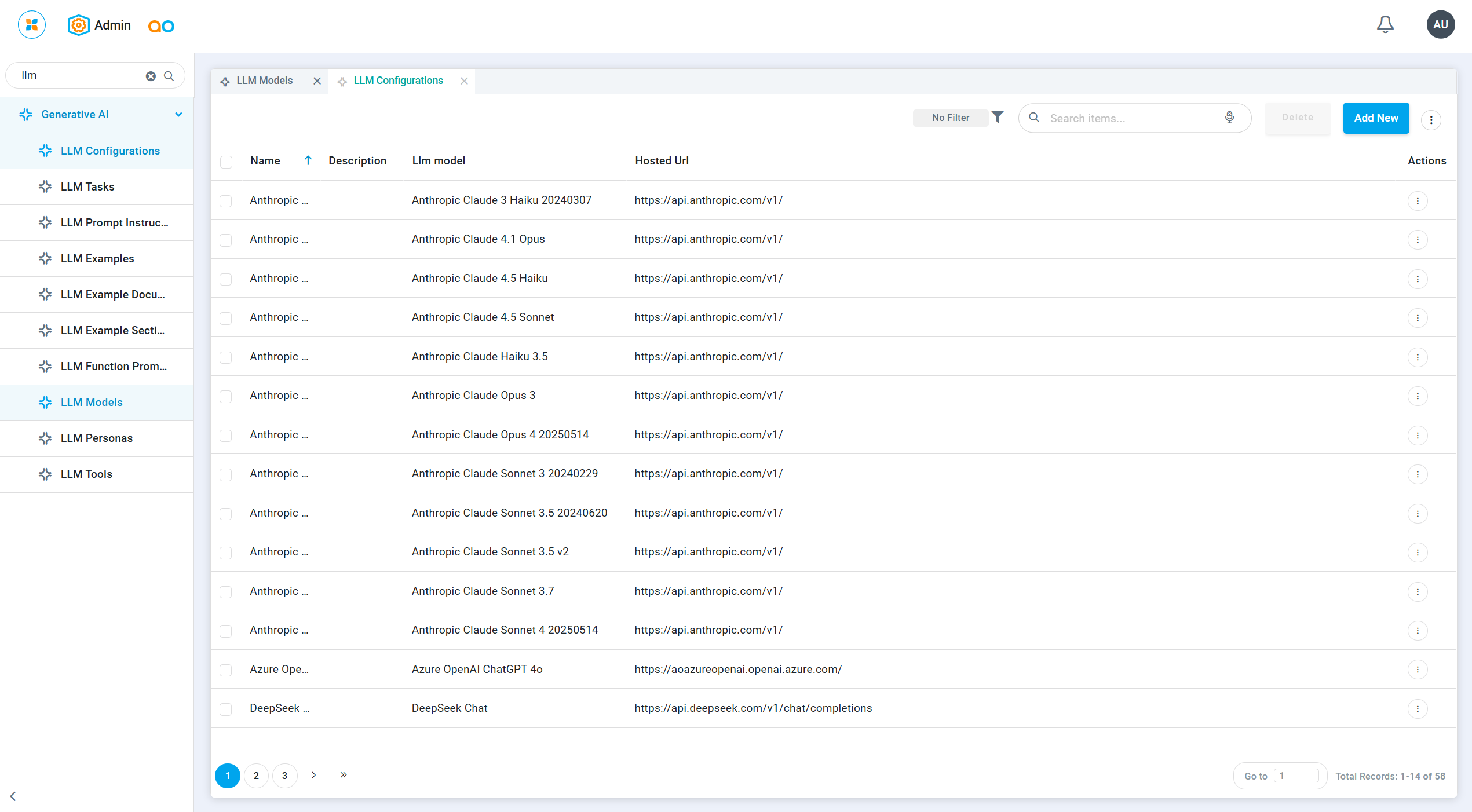
Field-by-Field Reference
LLM Models (define once)
-
Key — Unique identifier. Example:
anthropic-3-5-sonnet-latest.
Used internally and in dropdowns. -
Name — Human-friendly label.
-
Description / Long Description — Short and long notes on when/why to use this model.
-
LLM Model Family — Provider (Anthropic, Google, OpenAI).
-
Version — Exact provider model id (e.g.,
3-5-sonnet-latest,gemini-3.0-pro,gpt-4o-mini). -
Is Reasoning Model — Toggle only if the plan/model is a “reasoning” tier.
-
Encoding Name — How tokens are counted:
-
Most providers:
wordcount -
Many OpenAI models:
o200k_base
-
-
Max Token Limit — Max context size allowed by the model/contract.
-
Threshold Token — Soft cap to warn/trim inputs before hitting the max.
LLM Configurations (wire to endpoint)
-
Name — Label for this specific connection (often includes env).
-
LLM model — Select the model you created in LLM Models.
-
Hosted URL — Provider base URL (differs by provider/hosting).
-
Api Key — Secret used for authentication.
-
Additional Properties — Key/Value pairs for provider-specific needs:
-
Google Gemini:
maxRetries,timeout,topP,temperature -
OpenAI:
maxRetries,timeout,temperature -
Anthropic:
maxRetries,timeout
-
-
Is Default — Toggle if this should be the workspace default.
Step-by-Step: Create the Model → Create the Configuration
Create the LLM Model
-
LLM Models → Add New.
-
Fill the fields: Key, Name, LLM Model Family, Version, Encoding Name, Max Token Limit, Threshold Token (Descriptions optional).
-
Click Save.
Create the LLM Configuration
-
LLM Configurations → Add New.
-
Select LLM model, set Hosted URL, API Key, and any Additional Properties.
-
Optionally set Is Default.
-
Click Save.
Provider Cheat-Sheet
Anthropic (using Claude 3.5 Sonnet)
LLM Model
-
Key:
claude-3-5-sonnet-20240620 -
Name:
Anthropic Claude Sonnet 3.5 20240620 -
LLM Model Family:
Anthropic -
Version:
3-5-sonnet-20241022 -
Is Reasoning Model: Off
-
Encoding Name:
wordcount -
Max Token Limit:
200000 -
Threshold Token:
50000
LLM Configuration
-
Key:
claude-3-5-sonnet-20240620 -
Name:
Anthropic Claude Sonnet 3.5 20240620 -
LLM model:
Anthropic Claude Sonnet 3.5 20240620(select from the dropdown) -
Hosted URL:
https://api.anthropic.com/v1 -
Api Key: ANTHROPIC_API_KEY
-
Additional Properties:
-
maxRetries: 3— how many times a user will retry a failed request. -
timeout: 60— per-request timeout in seconds before the call is aborted.
-
-
Is Default: as needed
Google Gemini (using 2.5 Pro)
LLM Model
-
Key:
gemini-2.5-pro -
Name:
Google Gemini 2.5 Pro -
LLM Model Family:
Google -
Version:
2.5-pro -
Is Reasoning Model: Off
-
Encoding Name:
gemini -
Max Token Limit:
2097152 -
Threshold Token:
524288
LLM Configuration
-
Key:
gemini-2.5-pro -
Name:
Google Gemini 2.5 Pro -
LLM model:
Google Gemini 2.5 Pro(select from the dropdown) -
Hosted URL:
https://generativelanguage.googleapis.com/v1beta/models/gemini-2.5-pro:generateContent?key=GOOGLE_API_KEY -
Api Key: GOOGLE_API_KEY
-
Additional Properties:
-
maxRetries: 5 — number of user retries on transient failures. -
timeout: 120 — per-request timeout in seconds. -
temperature: 0.001 — randomness (lower = more deterministic outputs). -
topP: 0.6 — nucleus sampling cap; model chooses from top cumulative-probability tokens.
-
-
Is Default: as needed
OpenAI (using 4o-Omni)
LLM Model
-
Key:
gpt-4o-2024-08-06 -
Name:
OpenAI ChatGPT 4.0 Omni-2024-08-06 -
LLM Model Family:
OpenAI -
Version:
OpenAI ChatGPT 4.0 Omni-2024-08-06 -
Is Reasoning Model: Off
-
Encoding Name:
o200k_base -
Max Token Limit:
128000 -
Threshold Token:
32000
OpenAI – LLM Configuration
-
Key:
gpt-4o-2024-08-06 -
Name:
OpenAI ChatGPT 4.0 Omni-2024-08-06 -
LLM model:
OpenAI ChatGPT 4.0 Omni-2024-08-06(select from the dropdown) -
Hosted URL:
-
Api Key: OPENAI_API_KEY
-
Additional Properties (optional):
-
maxRetries: 3 — number of user retries on transient failures. -
timeout: 60 — per-request timeout in seconds. -
temperature: 0.01 — randomness (lower = more deterministic outputs).
-
-
Is Default: as needed
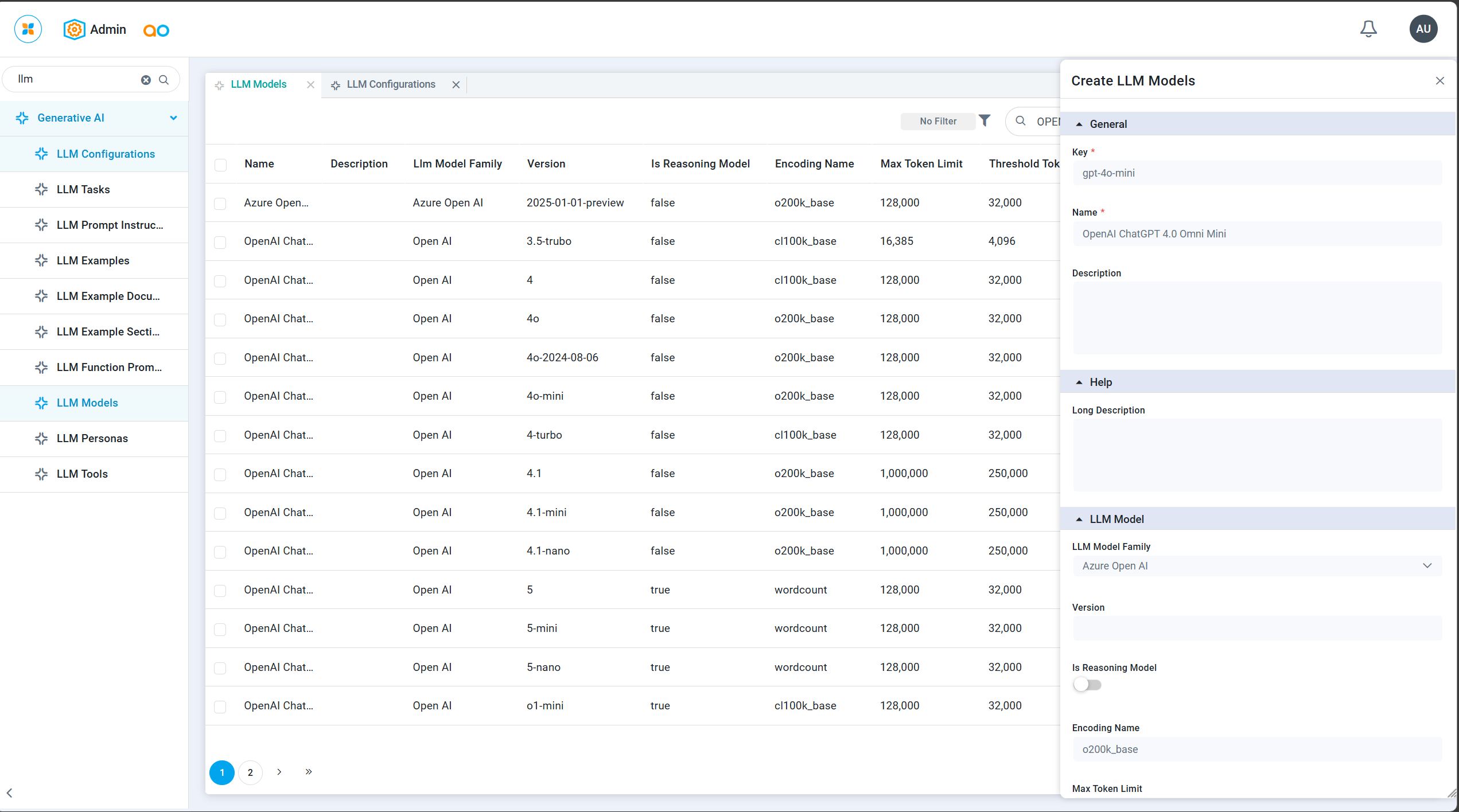
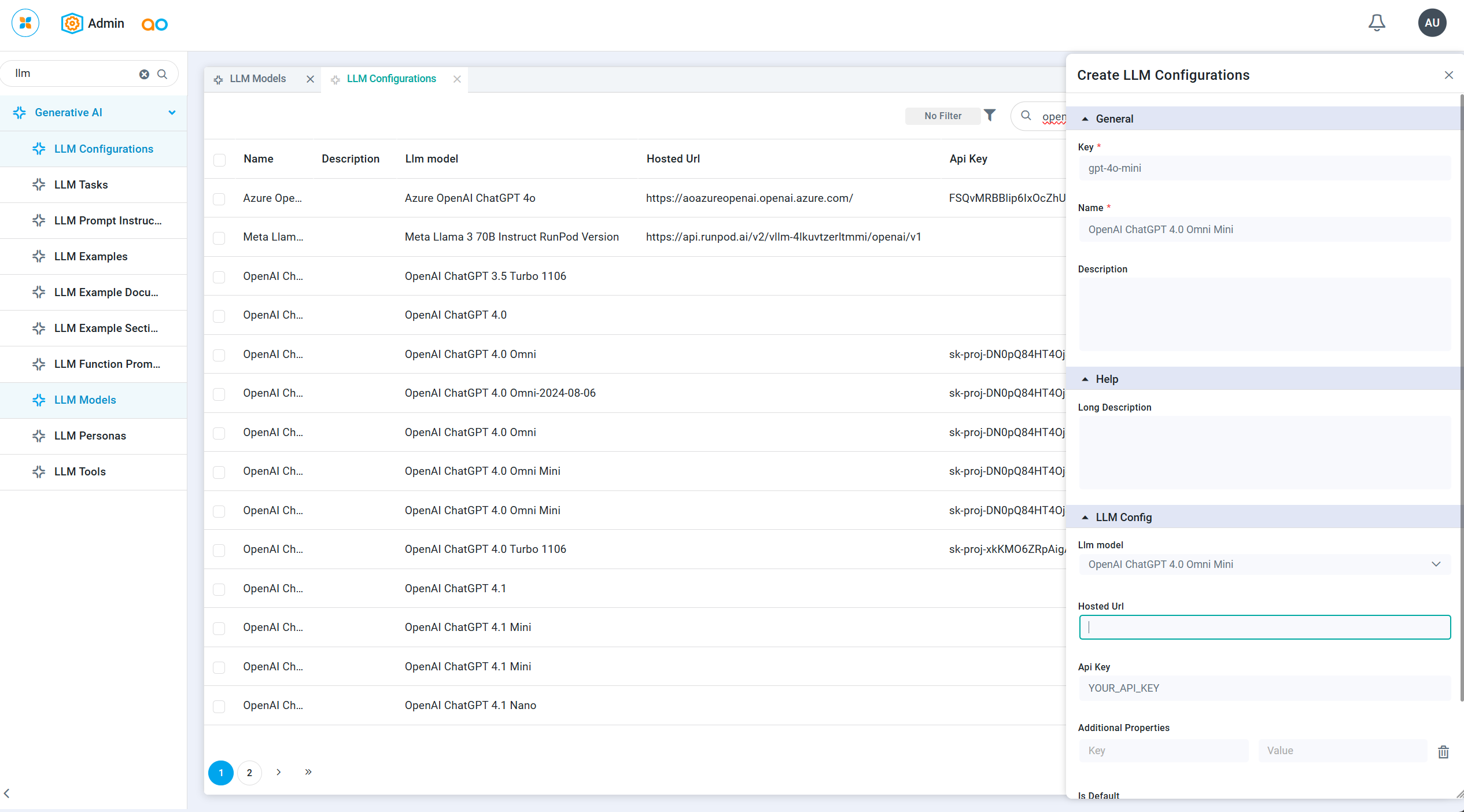
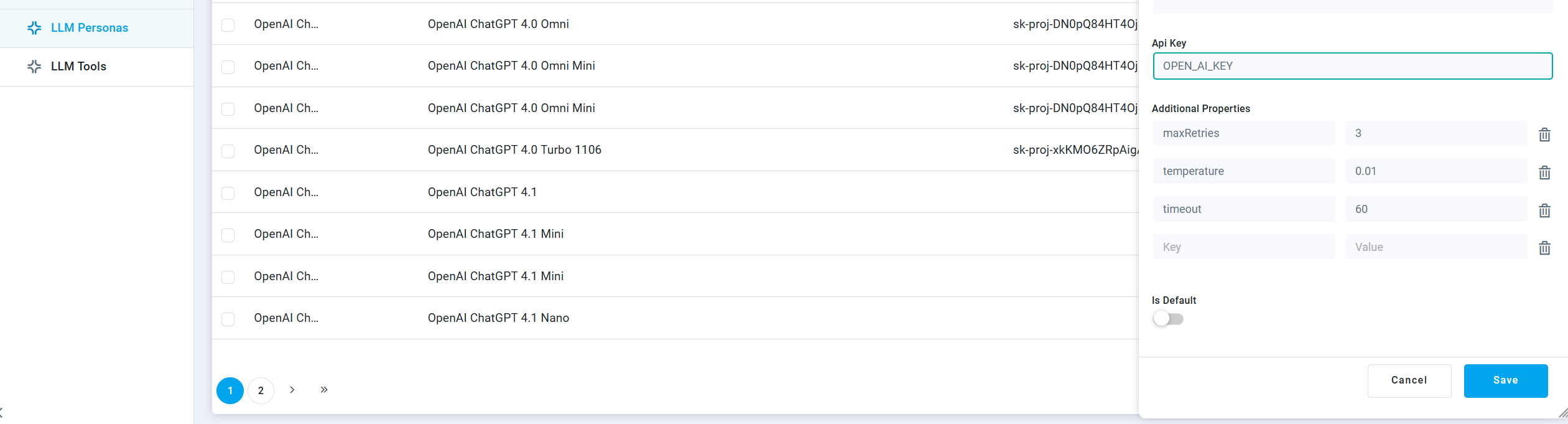
The above screenshots are the default additional properties to be configured for the OpenAI models.
The workflow is identical for all LLM Model Families—create the LLM Model first, then the LLM Configuration. Only the field values change per provider (e.g., Version, Hosted URL (mandatory in Gemini models)
-
Options by Provider
-
OpenAI -
-
reasoningEffort : Controls how many internal reasoning tokens the model uses before producing the final answer, trading off speed and cost against depth and quality
"reasoning": {
"effort": "none | minimal | low | medium | high | xhigh"
}
-
Claude - Controls how much extended thinking Claude is allowed to use on a request, trading off latency and cost against reasoning depth.
{
"thinkingConfig": {
"thinkingBudget": 0
}
}
Contact App Orchid | Disclaimer