
Intended audience: developers administrators
AO Platform: 5.0
Overview
The default mode the AO Platform connects to database environments is by using a shared service account. This means that all individual Users will only be known to the AO Platform and represented as a single connected service in the database environment. Users and their Roles have their permissions configured in the AO Platform.
This topic describes how to configure the AO Platform where an organization wants the database environment to manage Users and their Roles with permissions, and therefore the AO Platform needs to forward each end-user’s identity all the way to the database, so queries run as the real person — not as a shared service account (aka User-Principal Propagation).
Both approaches have pros and cons. See the rest of this topic for a Snowflake-specific overview, and this topic for a more in-depth technical overview > User-Principal Propagation for JDBC Data Sources - Developer Guide.
Why Does It Matter?
Until now, when Alice opened a page with Apps in AO Platform (e.g., Easy Answers) that pulls data from Snowflake, the platform connected to Snowflake using a single shared service account login (let's call it ao_platform_svc). Snowflake had no idea Alice was the one asking. Every query — Alice's, Bob's, the CEO's — looked identical on the warehouse side.
That created four challenges:
|
Problem |
Business Impact |
|---|---|
|
No per-user auditing at the warehouse |
Compliance can't answer "who ran that query?" — only "the platform did" |
|
Row-level security can't be enforced at the warehouse |
The DB sees one user, so masking and row-access policies are blunt instruments |
|
No per-user warehouse cost attribution |
Finance can't bill or chargeback by department; everything is one bucket |
|
Revoking one user's database access requires changing platform credentials |
Heavy-handed; risk of breaking everyone to disable one person |
Using the User-Principal Propagation configuration, Alice's query shows up in Snowflake as Alice. Her department's row-access policy applies to her. Her query consumes her warehouse quota. If she leaves the company, an admin revokes her Snowflake user, and nothing else breaks.
Architecture Diagram
The Big Picture
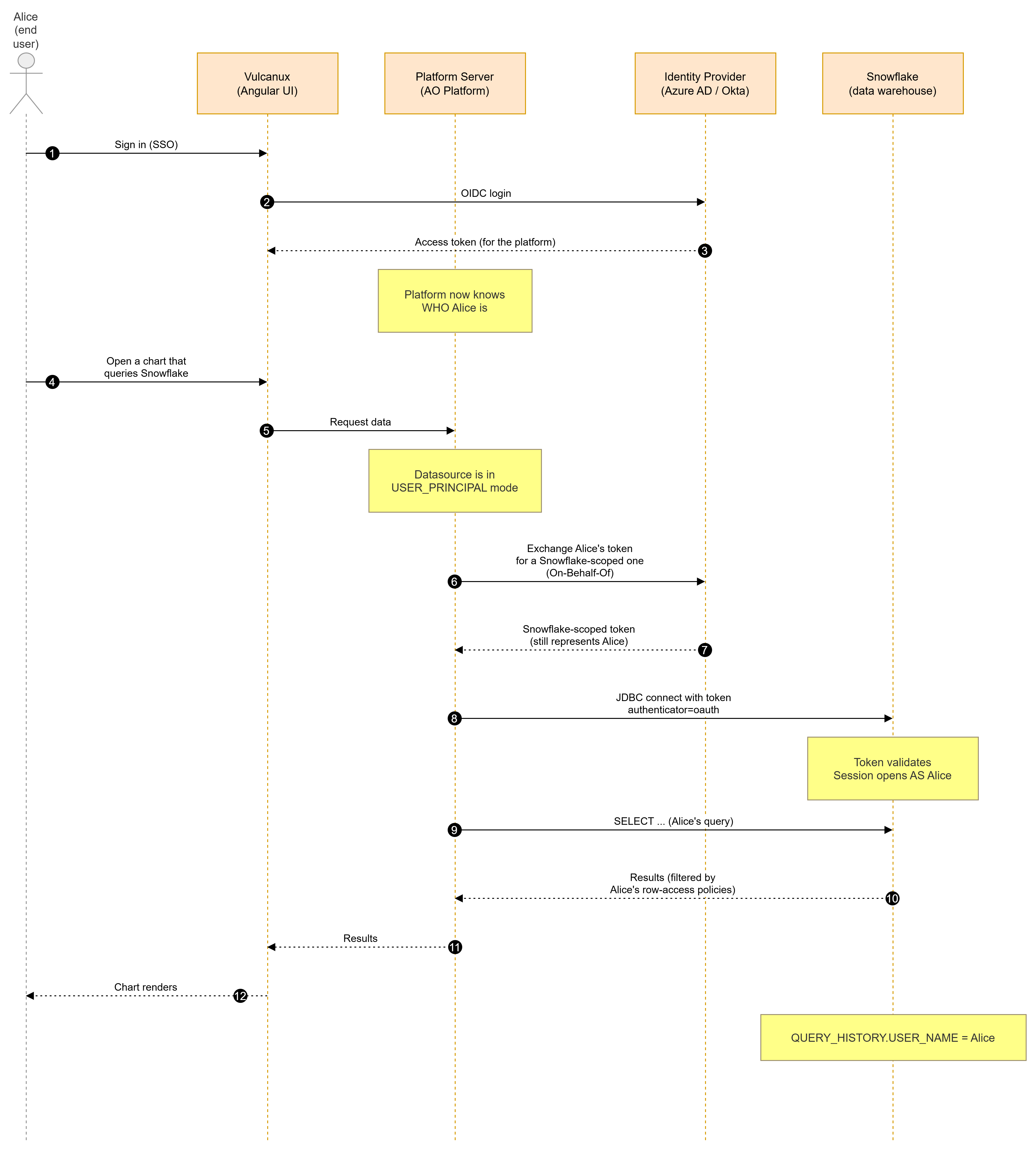
The Same Flow, Told as a Story
   Alice signs in            Alice opens                The Platform asks the IdP:
   to the Platform            a chart                   "give me a token for Alice
   via SSO                                              that Snowflake will accept"
        │                       │                                │
        ▼                       ▼                                ▼
   ┌─────────┐             ┌───────── ──┐                    ┌──────────────┐
   │  IdP  │   token A   │ Platform │                    │ Identity   │
   │       │─────────────▶ │ knows    │   token A (Alice's)│ Provider   │
   │       │             │ Alice    │───────────────────▶   │ (Azure AD) │
   └─────────┘             │ now      │                    │            │
                         └────────────┘                    └───────┬───────┘
                                                               │
                                                       token B for Snowflake
                                                       (still says "Alice")
                                                               ▼
                                                       ┌─────────────────┐
                                                       │  Snowflake   │
                                                       │  validates,  │
                                                       │  opens       │
                                                       │  session as  │
                                                       │  Alice       │
                                                       └─────────────────┘

   Result: Snowflake's audit log shows Alice ran the query.
           Row-access policies for Alice apply.
           Warehouse usage is billed to Alice.
Before vs. After (Visual Contrast)
                BEFORE                                    AFTER
                ───────                                    ──────

  Alice's query   ─┐                              Alice's query   ─┐
                   │                                               │
  Bob's query     ─┼─▶  ao_platform_svc  ─▶ DB    Bob's query     ─┼─▶  Bob       ─▶ DB
                   │       (shared)                                │
  Carol's query   ─┘                              Carol's query   ─┼─▶  Carol     ─▶ DB
                                                                   │
                                                  Alice's query   ─┼─▶  Alice     ─▶ DB

  Audit log says:   "ao_platform_svc"             Audit log says:  "Alice", "Bob", "Carol"
  RBAC enforces:    one identity                  RBAC enforces:   real user identity
  Cost reports:     one bucket                    Cost reports:    per-user attribution
What Changes for Whom?
End Users (Alice, Bob, the CEO) — Nothing Changes
They sign in the same way (SSO), they click the same buttons, they see the same charts. The plumbing under them is different; the experience isn't.
Data Governance / Compliance — Significant Upgrade
-
Audit trail is now per-user at the warehouse layer, not just at the platform layer.
-
Row-access and masking policies in Snowflake (or equivalent) now apply per-user as designed.
-
Off-boarding is cleaner — revoke the user in the IdP / Snowflake; no platform-side credential changes needed.
Finance / FinOps — New Capability
-
Per-user warehouse usage attribution is now possible. Snowflake's
WAREHOUSE_METERING_HISTORYjoined withQUERY_HISTORY.USER_NAMEgives you department-level chargeback.
Platform Admins / Ops — New Configuration Surface
-
One new column on the datasource row:
auth_mode. Set it toUSER_PRINCIPALto turn the feature on for a given datasource. -
A few config knobs in
application.yml(kept under asecurity.user-principalblock; feature flag default off). -
Snowflake-side one-time setup of an "External OAuth security integration" — see the engineer doc.
Developers — Minimal Surface Area
-
For data sources already configured, code call sites are unchanged.
factory.getDataSource(name).getConnection()works the same. -
Adding support for a new database vendor is one file (an "adapter"). Engineer doc has the cookbook.
QA — New Test Scenarios to Validate
See QA Test Matrix section below.
Use Cases
|
Use Case |
Before |
After |
|---|---|---|
|
HR analyst opens a salary dashboard |
Sees all rows (RBAC enforced in the app layer only) |
Snowflake's row-access policy hides rows for departments outside HR |
|
Finance month-end Snowflake cost report |
Single line: "AO Platform: $12,400" |
Per-department breakdown by warehouse usage |
|
Compliance audit "who ran query X?" |
Answer: "the platform did" |
Answer: "Alice did, at 14:32 UTC, from session 8a7c…" |
|
Off-boarded employee |
Must rotate platform service account |
Revoke their Snowflake user (or IdP account); platform automatically rejects their future queries |
|
Snowflake admin disables one user mid-session |
All users keep working (one credential) |
That specific user's next query fails cleanly; everyone else unaffected |
|
Auditor requests query lineage for a specific user over 90 days |
Cannot answer from warehouse logs |
Directly queryable from |
Compliance & Governance Benefits
Concrete wins for the Governance, Risk, and Compliance (GRC) team:
-
SOX: per-user query attribution at the warehouse satisfies "evidence of who accessed financial data" controls.
-
GDPR / HIPAA: row-level security is now meaningful — the DB can enforce "user X may only see records for region Y" because it knows who X is.
-
SOC 2 CC6.1 (Logical Access): access reviews can be conducted at the warehouse layer, not just at the platform.
-
Data lineage: end-to-end traceability is now possible across three audit streams — platform, IdP (sign-in logs), warehouse (query history) — joinable by user identity.
-
Least privilege: different platform users can have different Snowflake roles. The shared-service-account anti-pattern is gone.
Roles & Responsibilities
|
Role |
Their Job |
|---|---|
|
Platform admin |
Toggle the feature flag; configure |
|
Snowflake admin / DBA |
Create the External OAuth security integration; provision Snowflake users matching platform users; grant roles |
|
IdP admin (Azure AD / Okta / …) |
Register the platform as an OAuth client; grant the Snowflake-API permission; complete admin consent; ensure user-attribute mapping (UPN / email) is correct |
|
Identity / SCIM team |
Keep platform user identities in sync with Snowflake user identities (matching |
|
Compliance / GRC |
Define and validate row-access / masking policies that now have real meaning; conduct access reviews using warehouse logs |
|
Application developers |
Nothing — call sites are unchanged. Optionally configure |
|
QA |
Validate per the test matrix in section QA Test Matrix - see below. |
|
Support / Ops |
Monitor metrics (token mint rate, pool count, sweeper activity); respond to per-user authorization failures |
|
End users |
Nothing |
QA Test Matrix
These are the scenarios QA should validate. Each is mapped to the defense layer it exercises in the engineer doc.
Test Data Prerequisites
Before running any of the tests below:
-
A Snowflake account with an External OAuth security integration trusting the platform's IdP — set up by the Snowflake DBA per the engineer doc.
-
Two test users federated through that IdP, each with a corresponding Snowflake user:
-
alice@test.example— granted Snowflake roleTEST_ANALYST. -
bob@test.example— granted Snowflake roleTEST_FINANCE.
-
-
A test datasource in the platform, configured as
auth_mode = USER_PRINCIPAL,oauth_flow = EXTERNAL_SAME_IDP, pointing at the Snowflake account. -
A row-access policy on a test table in Snowflake that filters by
CURRENT_USER(). -
The feature flag
security.user-principal.enabledset totrue.
Happy-Path Tests
|
# |
Scenario |
Steps |
Expected Result |
|---|---|---|---|
|
HP-1 |
End-user query attribution |
Alice signs in. Opens a chart backed by the test datasource. |
Chart renders. In Snowflake |
|
HP-2 |
Per-user row-access enforcement |
Alice opens the chart (row-access policy lets her see 10 rows). Bob opens the same chart (policy lets him see 3 rows). |
Alice sees 10 rows; Bob sees 3. |
|
HP-3 |
Concurrent users isolated |
Alice and Bob simultaneously query the test datasource (~10 queries each in parallel). |
Both see their own row-filtered data; no errors; Snowflake query history shows two distinct |
|
HP-4 |
Query reuses same connection |
Alice fires 5 queries within ~1 minute. |
All 5 queries return successfully. Connection-pool metrics show pool size stays at the per-user max (default 4), not growing. |
|
HP-5 |
Service-account datasource still works |
A second datasource left at |
Returns data using the service account, exactly as before. No regression. |
Token-Refresh Tests
|
# |
Scenario |
Steps |
Expected Result |
|---|---|---|---|
|
TR-1 |
Background refresh (L1) |
Alice queries, idles for |
Both queries succeed. Logs show a proactive token mint by the sweeper between queries; the second query has no extra latency. |
|
TR-2 |
Refresh during active session |
Disable the proactive sweeper in config. Alice queries, idles for |
Second query succeeds. There is a small latency bump on the second query (single-flight refresh). |
|
TR-3 |
Mass concurrent refresh |
Disable sweeper. Have 50 simulated users with the same expired-soon token all query simultaneously. |
Exactly one token-exchange call hits the IdP; the other 49 reuse the result. (Verifies single-flight protection.) |
|
TR-4 |
Refresh on cold start |
Restart the platform server. Alice queries immediately. |
Query succeeds after a small mint latency. |
Strict-Fail Tests
|
# |
Scenario |
Steps |
Expected Result |
|---|---|---|---|
|
SF-1 |
Scheduled pipeline fails cleanly |
Configure a Quartz job to query the test datasource. Let it fire. |
Job status = |
|
SF-2 |
OData with Basic auth |
Use a Power BI / curl client to query the OData endpoint backed by the test datasource using Basic auth. |
HTTP |
|
SF-3 |
OData with Organizational Account |
Same as SF-2 but using Organizational Account (Azure AD / OIDC) auth. |
Success. Snowflake query history shows the user's identity. |
|
SF-4 |
Non-OIDC platform user |
A user who authenticated via LDAP (not OIDC) queries the test datasource. |
|
Revocation Tests
|
# |
Scenario |
Steps |
Expected Result |
|---|---|---|---|
|
RV-1 |
Snowflake role revoked |
Alice queries successfully. Snowflake admin revokes Alice's |
Second query fails with a Snowflake "access denied" error message (the platform faithfully surfaces it). |
|
RV-2 |
Token revoked at IdP |
Alice queries. The IdP admin revokes her session. Alice queries again. |
Second query succeeds on the first retry (L5 reactive retry kicks in); metric |
|
RV-3 |
Logout invalidates pool |
Alice queries. Alice signs out of the platform. Alice's stale browser tab sends a request. |
Request fails with |
|
RV-4 |
User disabled in IdP |
The IdP admin disables Alice's account. Alice's existing OIDC session token is still technically valid (hasn't expired). Alice queries. |
Either (a) the token is still accepted until expiry (token-bearer behavior), or (b) if the IdP supports revocation lookups, the next refresh fails with a clear error. (Document which behavior your IdP exhibits.) |
Configuration / Negative Tests
|
# |
Scenario |
Steps |
Expected Result |
|---|---|---|---|
|
CF-1 |
Feature flag off |
Set |
Clear configuration error surfaces; no half-broken behavior. Datasource cannot be used until either the flag is on or the datasource is switched back to SERVICE_ACCOUNT. |
|
CF-2 |
Missing oauth_flow |
Set |
Save fails with a clear validation error: "oauth_flow must be set when auth_mode is USER_PRINCIPAL". |
|
CF-3 |
Missing oauth_config_json |
Set the row's |
Save fails with a clear validation error. |
|
CF-4 |
Bad client secret |
Set |
Query fails with |
|
CF-5 |
Bad scope / audience |
Mis-configure the Snowflake audience in |
Query fails with a clear error from the IdP (e.g., "audience not allowed"). |
|
CF-6 |
Unsupported DB type |
Configure a non-Snowflake (and non-adapter-supported) datasource with |
Fails with: "Database type X does not support user-principal mode on datasource Y. Register a UserPrincipalAuthAdapter or switch the datasource back to SERVICE_ACCOUNT." |
Performance / Capacity Tests
|
# |
Scenario |
Steps |
Expected Result |
|---|---|---|---|
|
PC-1 |
Per-user pool memory |
Simulate 100 active concurrent users each querying. |
Server memory usage stays bounded; metrics show |
|
PC-2 |
LRU cap enforcement |
Simulate 5 100 distinct users (above the default |
LRU pool eviction kicks in; metric |
|
PC-3 |
Token-mint latency |
Measure end-to-end latency of a first query (cold start) vs. a warm query (cached token + pool). |
First query: extra ~200-500 ms (token exchange + connection handshake). Warm: same as service-account baseline. |
|
PC-4 |
Sweeper overhead |
Run a 30-minute baseline of mixed workload. |
Sweeper runs every 30 s with negligible CPU; total mint count matches active-user-pool count, not query count. |
Acceptance Criteria (The Headline)
A Phase 1 release is acceptable when:
-
✅ HP-1 passes — query attribution works.
-
✅ HP-2 passes — row-access policy enforcement is per-user.
-
✅ HP-5 passes — service-account datasources are unaffected (no regression).
-
✅ SF-1, SF-2 pass — strict-fail behavior is correct.
-
✅ RV-2 passes — L5 reactive retry actually fires on revocation.
-
✅ CF-1 passes — the feature flag can disable the feature cleanly.
The other tests are graded but not blockers for Phase 1.
FAQ for Non-Technical Readers
Q: What's a "service account"? A: A shared technical login that an application uses to connect to a database. The application uses the same login regardless of which human is interacting with the app. Convenient, but it hides who's really making each request.
Q: What's "OAuth"? A: A standardized way for apps to access resources on a user's behalf without sharing the user's password. When you sign into a website with "Sign in with Google", that's OAuth.
Q: What's a "token"? A: A short-lived digital pass (typically ~1 hour) that proves you've successfully signed in. Apps include the token in their requests instead of re-asking for your password every time.
Q: Does this mean my password goes to Snowflake? A: No. Passwords never leave the IdP. The platform forwards a token (issued by the IdP) that proves "Alice has logged in"; Snowflake validates the token's signature against the IdP's public keys. Your password is never seen by the platform or by Snowflake.
Q: I'm not on Snowflake — does this benefit me? A: Phase 1 supports Snowflake only. Phases 2–4 add Redshift, BigQuery, Azure SQL, Databricks, Trino, Postgres-AAD, and Oracle ADB. The framework is reusable; the rollout is phased.
Q: What if our IdP goes down? A: Existing in-flight queries continue (their tokens are already issued). New queries that need a fresh token will wait briefly and then fail clearly if the IdP doesn't recover in time. No queries silently fall back to the old shared service account — that would defeat the audit trail this feature is designed to create.
Q: Will scheduled / overnight reports stop working? A: For datasources configured for user-principal mode, yes — they need a real user identity. The recommended pattern is to leave the datasource on SERVICE_ACCOUNT for batch use cases and create a parallel USER_PRINCIPAL datasource for interactive use. Phase 4 may introduce persisted refresh tokens to let scheduled jobs run on behalf of a specific user, but that's not in scope today.
Q: How is this different from RBAC inside the platform? A: Platform RBAC controls what features and screens users can access. User-principal propagation pushes the user identity all the way to the database so the database itself can enforce its own access controls. They complement each other — platform RBAC for app-level concerns, warehouse RBAC for data-level concerns.
Q: Is this turned on for everyone today? A: No. The feature flag defaults to off. Each datasource explicitly opts in by setting auth_mode = USER_PRINCIPAL. Existing data sources continue unchanged unless explicitly migrated.
Q: How do we measure the value of this in production? A: A few suggested KPIs:
-
% of warehouse queries with a real user identity (target: 100% of interactive queries)
-
Time-to-revoke after off-boarding (target: minutes, not hours)
-
Number of row-access policies actively in use (target: grows from ~0)
-
Per-department warehouse cost reports published (target: monthly)
Glossary
|
Term |
Plain-English Meaning |
|---|---|
|
AO Platform |
The codename for this product. |
|
AOContext |
The platform's internal "who is currently making this request" context. |
|
Audit trail |
The chronological record of who did what, when. |
|
Datasource |
A configured connection to a database (Snowflake, Redshift, etc.). |
|
End user |
A real human using the platform (Alice, Bob, …). |
|
External OAuth |
Snowflake's name for "I trust an outside identity provider to vouch for users". |
|
Feature flag |
A configuration switch that turns a feature on or off without redeploying code. |
|
IdP |
Identity Provider. The system where users sign in (Azure AD, Okta, Ping, …). |
|
JDBC |
The standard way Java apps talk to relational databases. |
|
OAuth |
A standard for letting apps act on a user's behalf without seeing their password. |
|
OBO |
On-Behalf-Of. Microsoft's specific OAuth flow for "I have token A for user X; give me token B for user X but valid against a different service." |
|
OIDC |
OpenID Connect. An identity layer on top of OAuth for "who is this user?" questions. |
|
Pool |
A reusable set of pre-opened database connections (faster than opening one per query). |
|
Refresh token |
A long-lived credential used to mint new short-lived access tokens without re-prompting the user. |
|
RFC 8693 |
The internet standard for OAuth token exchange (the vendor-neutral version of OBO). |
|
Row-access policy |
A Snowflake feature that automatically filters rows based on who's asking. |
|
Service account |
A shared technical login that an app uses to access a database. |
|
SSO |
Single Sign-On. Sign in once at the IdP, get access to many apps. |
|
Strict-fail |
Design choice: when something's wrong, fail clearly rather than silently doing the wrong thing. |
|
Token |
A short-lived digital pass proving a user has authenticated. |
|
USER_PRINCIPAL mode |
The new mode where the platform forwards the user's identity to the database. |
|
Warehouse |
A cloud database optimized for analytics (Snowflake, Redshift, BigQuery, …). |
Contact App Orchid | Disclaimer