
Intended audience: developers administrators
AO Platform: 5.0
Overview
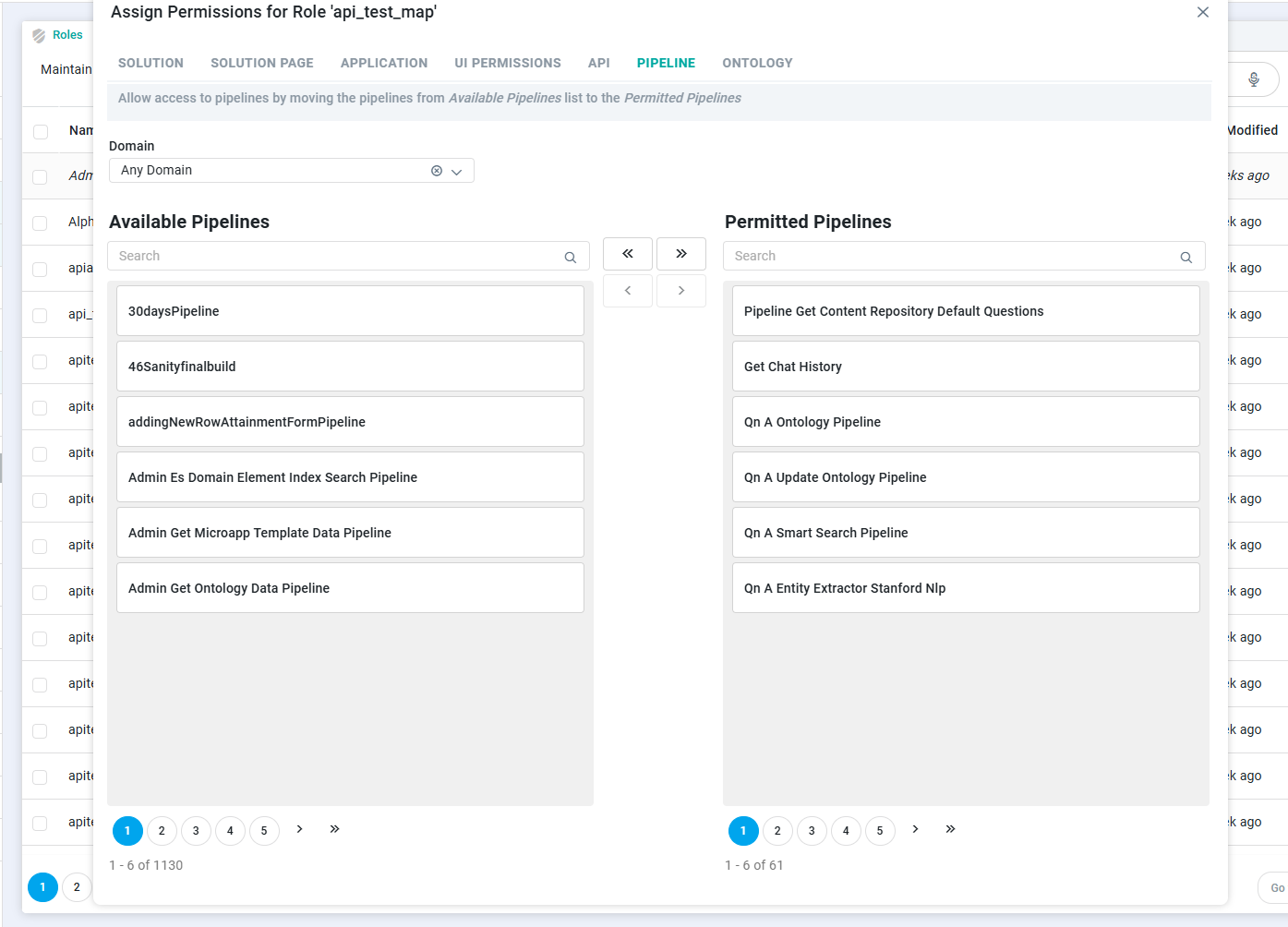
The PIPELINE tab controls which pipelines a Role can run. Unlike the API tab, access here is granted rather than restricted: you move the pipelines a Role should be able to use from the Available Pipelines list to the Permitted Pipelines list. Pipelines tied to an application the Role can already reach, or added under Access Control > System Pipelines, are permitted by default, so this tab is mainly for granting access to pipelines used on their own, such as through an API or a Scheduler Task or Job.
Assigning Pipeline Permissions
-
From the Domain dropdown, select the domain whose pipelines you want to work with. It defaults to Any Domain, which lists pipelines across all domains, or you can pick a specific domain to narrow the list.
-
The left panel lists the Available Pipelines and the right panel lists the Permitted Pipelines. In Available Pipelines, find a pipeline using the search box or the page controls, then select it.
-
Move it to Permitted Pipelines with the arrow buttons. The single right arrow (›) moves the pipeline you've selected, and the double right arrow (») moves all of them. The change takes effect as soon as you move it.
-
To remove access, select a pipeline under Permitted Pipelines and use the left arrows (‹ or «) to move it back.
Contact App Orchid | Disclaimer