
Intended audience: developers administrators
AO Platform: 5.0
Overview
The ONTOLOGY tab controls which ontologies a Role can work with, and whether the Role can only use an ontology or also edit it. An ontology includes a set of related data objects, called MSOs, such as Customer, Premise, and Meter.
For each ontology you add to a Role, you set one of two access levels, and it applies to all of that ontology's MSOs:
-
Allow Use: Users of the selected Role can use the ontology within an Easy Answers solution and view ontology configurations in the Ontology Composer, but cannot edit any ontology configurations. Use this when a Role needs the ontology's data in a solution but has no reason to change its configurations.
-
Allow Edit: Users of the selected Role can use the ontology within an Easy Answers solution and can also edit the ontology configurations in the Ontology Composer.
These levels work alongside the Role's other access. Using an ontology in a solution still depends on the Role having access to that solution, and editing it depends on the Role having access to the Ontology Composer.
To disallow access (and hide) an Ontology from users of a given Role, simply do not add the Ontology to the Ontology tab in the Assign Permissions dialog.
Assigning Ontology Permissions
-
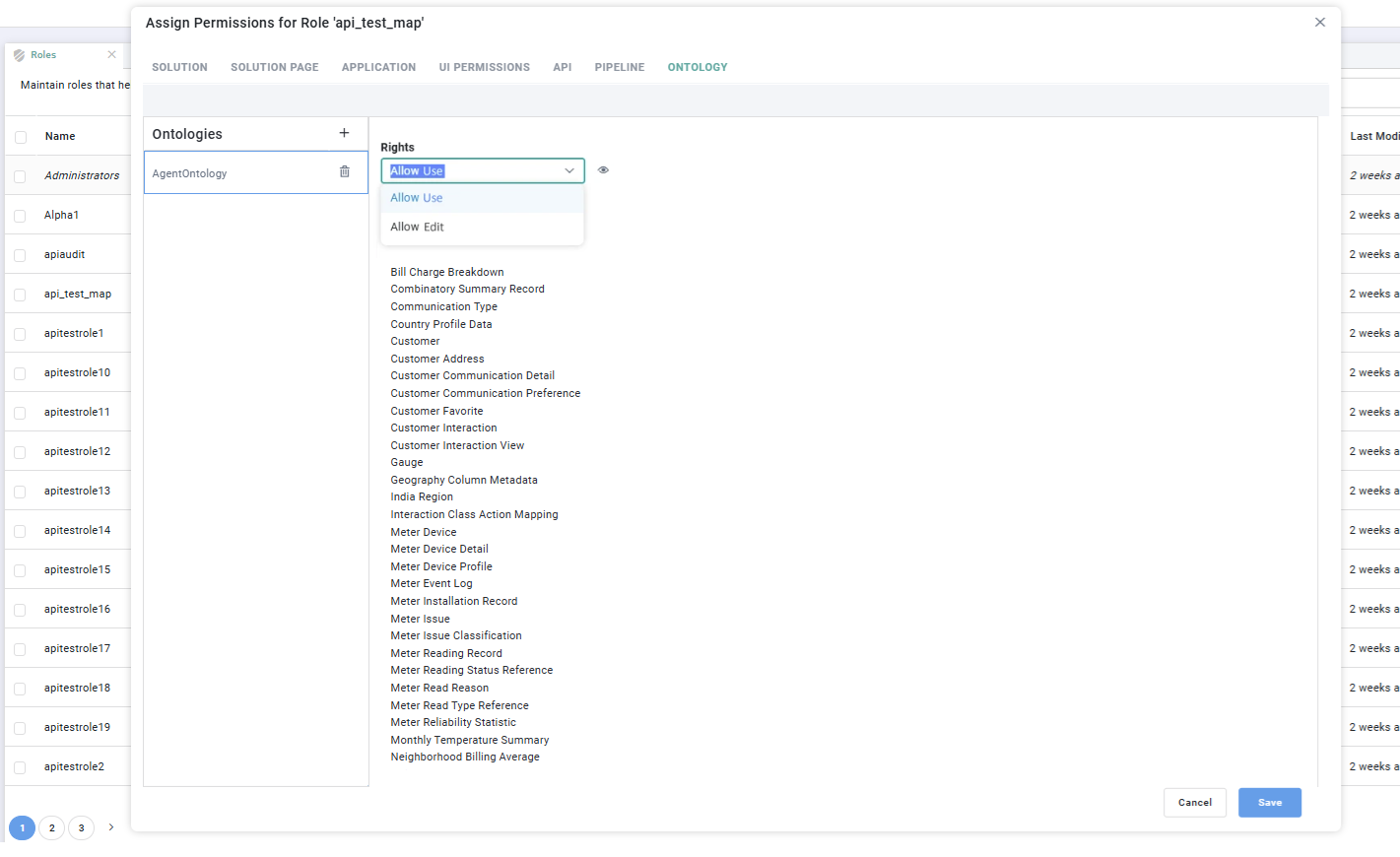
In the Ontologies list on the left, select the add icon (+) to add an ontology to the Role. To remove one, select the delete icon next to its name.
-
With an ontology selected, choose its access level from the Rights dropdown, either Allow Use or Allow Edit. The level applies to every MSO in the ontology.
-
The list below the Rights dropdown shows the MSOs that belong to the selected ontology, so you can see what the access level covers.
For any enabled Easy Answers solution, add the AO Common Ontology and set it to at least Allow Use. If it isn't added and granted access, some Easy Answers features stop working and return a "User doesn't have access to Ontology" error.
When you have finished, select Save to apply your changes, or Cancel to discard them.
Contact App Orchid | Disclaimer