
Intended audience: Developers administrators
AO Platform: 5.0
Architecture
What This Service Does
|
Capability |
Detail |
|---|---|
|
MCP tool host |
13 tools and 5 prompts via JSON-RPC 2.0 over Streamable HTTP at |
|
Auth forwarding |
Passes Bearer token or API key from the inbound MCP request to every AO Platform call |
|
OAuth metadata |
Serves |
|
Platform 401 propagation |
Converts AO Platform |
|
Retry & timeout |
Retries platform 5xx with exponential backoff; per-tool configurable timeout |
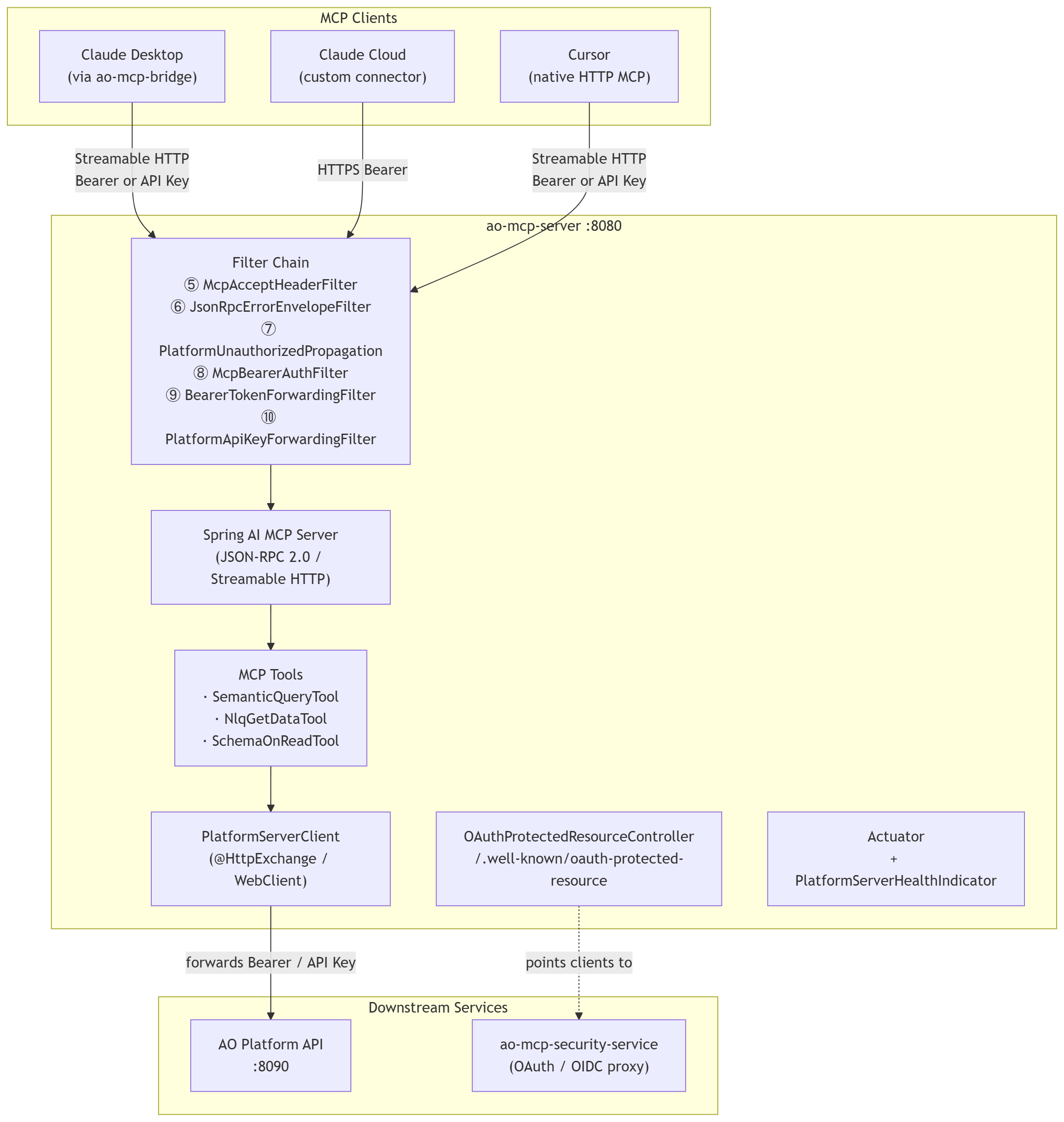
Component Diagram
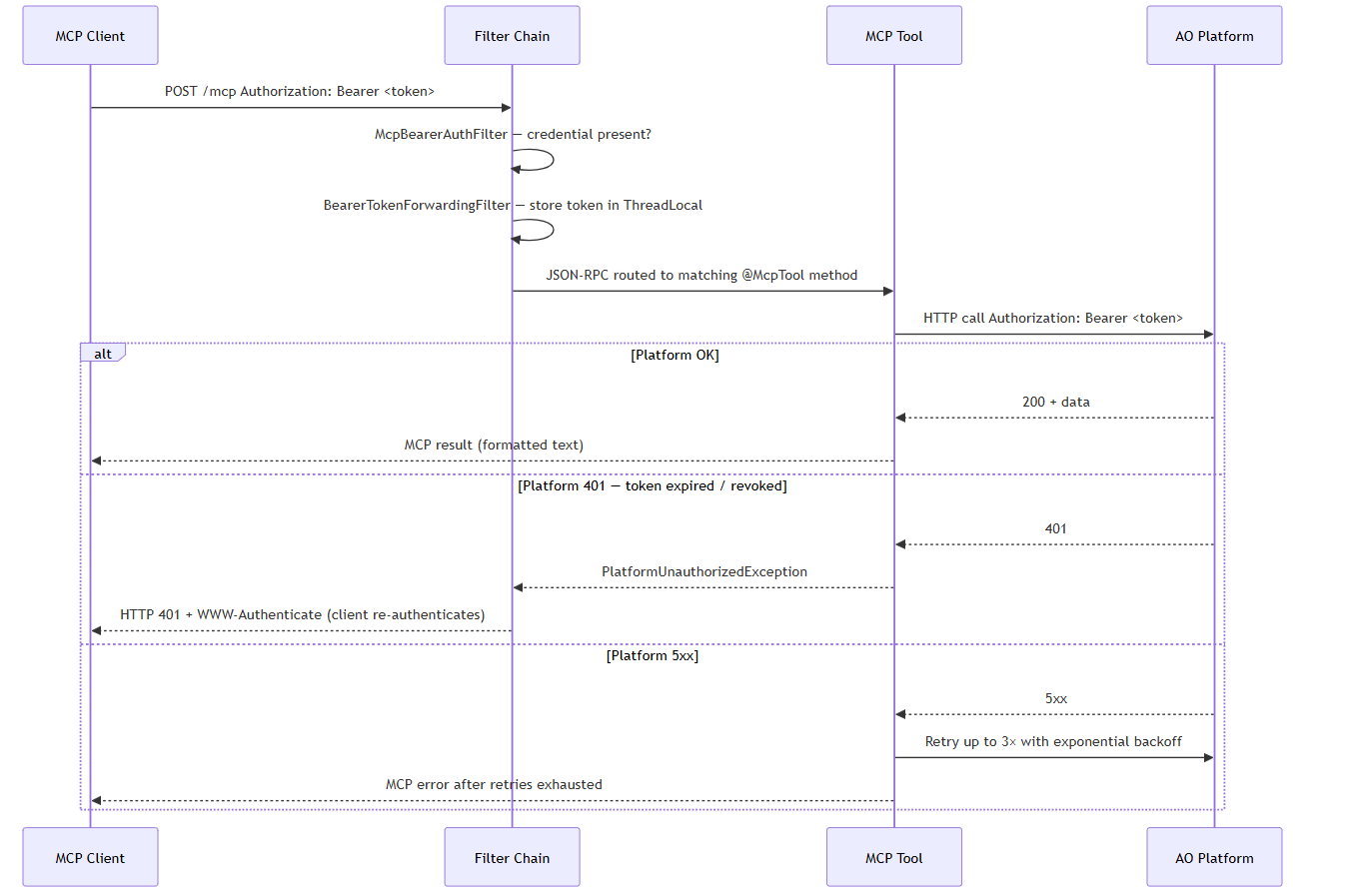
Request Flow
MCP Tools & Prompts
All tools are invoked through the MCP protocol at /mcp. Parameters are passed as MCP arguments; return values are formatted text.
Semantic SQL Tools
|
Tool |
Platform Endpoint |
Required Params |
Optional Params |
|---|---|---|---|
|
execute-semantic-sql |
POST |
|
|
|
nlq-to-semantic-sql |
POST |
|
|
|
validate-semantic-sql |
POST |
|
— |
Recommended two-step workflow:
-
nlq-to-semantic-sql— converts the question to SQL; returnssemanticSQL, ambiguity info, and session IDs (conversationId,workflowId) -
Review / optionally
validate-semantic-sql -
execute-semantic-sql— only call this whensemanticSQLis present in step 1's response
If step 1 returns ambiguity only (no SQL), do not call execute-semantic-sql — disambiguate with the user or recall NLQ with feedback or structured ambiguity params.
Reuse conversationId and workflowId on follow-up turns. When contextChanged is true, use the IDs from that response on the next call.
NLQ Tools
|
Tool |
Platform Endpoint |
Required Params |
Optional Params |
|---|---|---|---|
|
nlq-get-data |
POST |
|
|
Use nlq-get-data when the client needs a one-shot answer, and SQL visibility is not required. Use nlq-to-semantic-sql + execute-semantic-sql when the client needs to inspect or refine the SQL before running it.
Schema Discovery Tools
|
Tool |
Platform Endpoint |
Required Params |
Optional Params |
|---|---|---|---|
|
list-ontologies |
GET |
— |
— |
|
list-msos |
GET |
|
|
|
describe-mso |
GET |
|
— |
|
search-schema |
GET |
|
|
|
list-relationships |
GET |
|
|
|
get-mso-sample-data |
GET |
|
|
|
get-mso-column-details |
GET |
|
— |
|
get-mso-statistics |
GET |
|
|
|
export-ontology-schema |
GET |
|
— |
Note: All SOR tools use
ontologyUid. Onlyexport-ontology-schemausesontologyName.export-ontology-schemareturns the full schema JSON and can be tens of thousands of tokens — use incremental SOR tools first.
Typical Flows
|
Goal |
Tool Sequence |
|---|---|
|
Unknown ontology, answer a question |
|
|
Known ontology, run raw SQL |
|
|
One-shot answer, no SQL review needed |
|
|
Full schema dump (last resort) |
|
MCP Prompts
|
Prompt |
Purpose |
|---|---|
|
schema-on-read-intro |
Discovery workflow: list ontologies → SOR tools → validate → execute; when to use export |
|
schema-on-read-params |
Parameter reference for SOR tools ( |
|
semantic-sql-intro |
NLQ-to-SQL workflow, ambiguity handling, session ID reuse, when to call execute |
|
semantic-sql-params |
Full parameter reference for |
|
when-to-use-natural-language-vs-semantic-sql |
Decision guide: NLQ one-shot vs two-step SQL vs raw SQL vs schema tools |
Query Workflow
The skill follows a five-step workflow for each data question:
Step 1 — Identify the Ontology. If only one ontology exists, use it. If multiple exist, call `list-ontologies` and let the user choose.
Step 2 — Generate Semantic SQL. Call `nlq-to-semantic-sql` with the user's question. The tool supports three query modes: Controlled (strict matching), Balanced (default — moderate flexibility), and Freeform (liberal interpretation). If ambiguity is returned instead of SQL, the skill presents options to the user and re-calls with their selection. If the tool errors out, the skill explains the failure and offers to attempt manual SQL construction — only with user confirmation.
Step 3 — Execute the Query. Run the generated SQL via `execute-semantic-sql`. On failure or empty results, the skill explains what happened and asks the user how to proceed.
Step 4 — Schema Lookup (only if needed). If SQL or results are unclear, use incremental schema tools to verify column names, sample values, or relationships.
Step 5 — Offer Visualization. After presenting results as a plain English summary, the skill offers to generate a Chart.js visualization. Chart type is selected based on data shape (e.g., pie for small category counts, line for time series, bar for comparisons).
Ambiguity Resolution
When `nlq-to-semantic-sql` detects ambiguity, the skill handles two types:
-
MSO ambiguity: The question matches multiple entities (e.g., "financial entities" could mean Bills, Payments, or Contract Account). The skill presents options and recalls with the user's choice.
-
MSO_PROPERTY ambiguity: The question matches multiple properties within an entity (e.g., "$50" could refer to Final Balance, Balance Forward, or Original Balance). Same resolution pattern.
The skill loops up to 3 times. If ambiguity persists, it suggests rephrasing the question or switching query modes.
Error Handling
On any failure, the skill follows a strict protocol: state what failed, explain in plain English, offer 1–2 specific next steps, and wait for user confirmation. It never silently retries or modifies a query without the user's go-ahead.
API Reference
MCP Endpoint
|
Path |
Method |
Auth Required |
Description |
|---|---|---|---|
|
|
POST |
Yes |
MCP JSON-RPC 2.0 tool calls (Streamable HTTP) |
|
|
GET |
Yes |
MCP server-sent events stream |
Authentication: Authorization: Bearer <token> or X-Platform-Api-Key / X-API-Key header. Both missing → 401 with WWW-Authenticate pointing to /.well-known/oauth-protected-resource/mcp.
Disable auth for local dev: MCP_REQUIRE_AUTH=false.
Example tool call:
{
  "jsonrpc": "2.0",
  "method": "tools/call",
  "params": {
    "name": "nlq-to-semantic-sql",
    "arguments": {
      "question": "How many invoices are overdue?",
      "ontologyUid": "ont-abc123",
      "checkForContextChange": true,
      "conversationId": "",
      "workflowId": ""
    }
  },
  "id": 1
}
Example success response:
{
  "jsonrpc": "2.0",
  "result": {
    "content": [{ "type": "text", "text": "Semantic SQL: SELECT COUNT(*) FROM Invoices WHERE dueDate < NOW()\nconversationId: conv-xyz\nworkflowId: wf-abc" }]
  },
  "id": 1
}
OAuth Protected Resource Metadata
Served per RFC 9728. Both paths return identical JSON.
|
Path |
Method |
Auth |
|---|---|---|
|
|
GET |
None |
|
|
GET |
None |
Response 200 OK:
{
  "resource": "https://your-mcp-host.example.com",
  "authorization_servers": ["https://your-auth-host.example.com"]
}
MCP clients fetch this on receiving a 401 to discover the OAuth authorization server (ao-mcp-security-service). Configured via MCP_RESOURCE_URL and AUTH_SERVER_URL.
Health & Info
|
Path |
Description |
|---|---|
|
|
Liveness probe; includes |
|
|
Application metadata |
Health response:
{
  "status": "UP",
  "components": {
    "platform": { "status": "UP" }
  }
}
Authentication
Bearer Token (SSO / OIDC)
Inbound (MCP client → ao-mcp-server):
-
Client sends
Authorization: Bearer <JWT>on each/mcprequest. -
McpBearerAuthFilterenforces presence; returns401if neither Bearer nor API key is present. -
BearerTokenForwardingFilterextracts the token and stores it inBearerTokenContext(ThreadLocal).
Outbound (ao-mcp-server → AO Platform):
-
WebClient outbound filter resolves credentials in this order:
-
BearerTokenContext— set from the inbound MCP request -
Authorizationheader from the current servlet request (fallback) -
Static
PLATFORM_BEARER_TOKENenv var (last resort — automated testing only)
-
AO Platform validates the JWT: signature (JWKS), issuer (iss), audience (aud), expiry. ao-mcp-server does not validate tokens.
API Key
Inbound:
-
Client sends
X-Platform-Api-KeyorX-API-Keyheader. -
PlatformApiKeyForwardingFilterextracts and stores it inPlatformApiKeyContext(ThreadLocal). -
McpBearerAuthFilteraccepts either Bearer or API key — either satisfies the auth requirement.
Outbound:
-
WebClient sends the key as
x-api-keyto AO Platform, resolved in order:-
PlatformApiKeyContext— set from the inbound MCP request (preferred) -
Static
PLATFORM_API_KEYenv var (fallback when no inbound key)
-
Filter Chain
Filters execute in this order on every /mcp request:
|
Order |
Filter |
Responsibility |
|---|---|---|
|
+5 |
|
Injects |
|
+6 |
|
Guarantees well-formed JSON-RPC 2.0 error responses; handles session-not-found (404) |
|
+7 |
|
Detects platform 401 marker; rewrites JSON-RPC 200 error to HTTP 401 + |
|
+8 |
|
Enforces credential presence; returns 401 + resource metadata when missing |
|
+9 |
|
Extracts Bearer token → ThreadLocal; clears in |
|
+10 |
|
Extracts API key → ThreadLocal; clears in |
ThreadLocals are always cleared in finally blocks — no credential leakage across requests.
Platform 401 Propagation
When AO Platform rejects a token, the server converts the internal JSON-RPC error into a real HTTP 401:
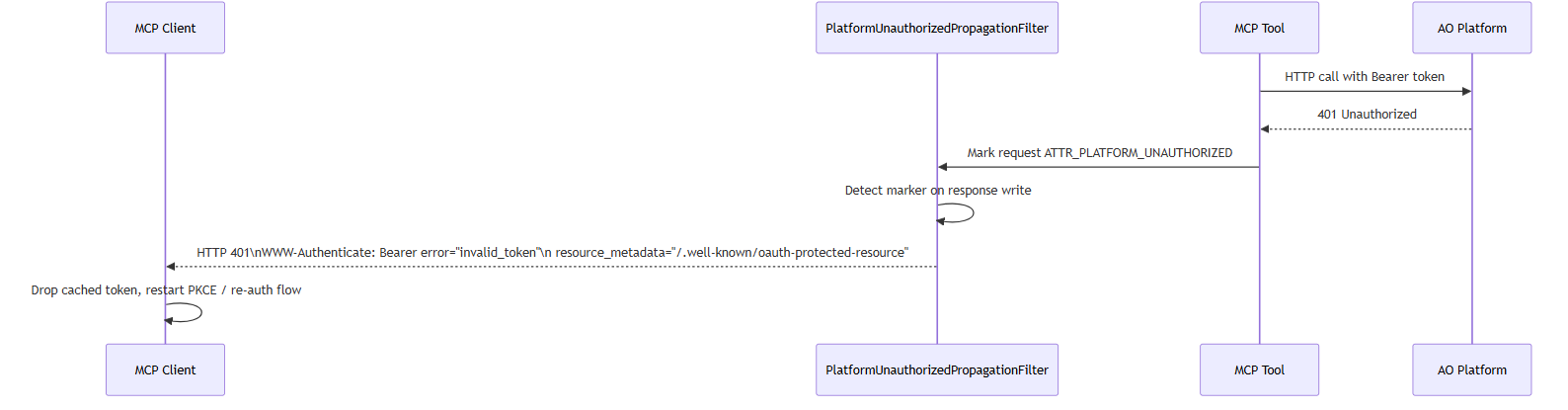
Configuration Reference
Environment Variables
|
Variable |
Required |
Default |
Description |
|---|---|---|---|
|
|
Yes |
|
Base URL of the AO Platform API. No trailing slash. |
|
|
Yes (deployed) |
|
Public HTTPS URL of this server. Appears in |
|
|
Yes (deployed) |
|
Public URL of ao-mcp-security-service. Appears in |
|
|
No |
|
Set to |
|
|
No |
(none) |
Static fallback Bearer token for outbound platform calls. Leave blank in production — use per-request credentials. |
|
|
No |
(none) |
Static fallback API key for outbound platform calls. Leave blank in production. |
|
|
No |
|
When |
application.yml Defaults
server:
  port: 8080

spring:
  application:
    name: ao-mcp-server
  ai:
    mcp:
      server:
        protocol: STREAMABLE   # STATELESS for stateless/cloud-native deployments

app:
  mcp:
    require-auth: ${MCP_REQUIRE_AUTH:true}
    resource-url: ${MCP_RESOURCE_URL:http://localhost:8080}
    auth-server-url: ${AUTH_SERVER_URL:http://localhost:9000}

  platform:
    semantic-sql-tool-timeout: 250s
    server:
      base-url: ${PLATFORM_SERVER_BASE_URL:http://localhost:8090}
      bearer-token: ${PLATFORM_BEARER_TOKEN:}
      api-key: ${PLATFORM_API_KEY:}
      connection-timeout-millis: 15000
      read-timeout-millis: 480000          # 8 minutes
      max-response-buffer-size-bytes: 10485760  # 10 MB
      trace-log-sensitive-headers: ${PLATFORM_TRACE_LOG_SENSITIVE_HEADERS:false}
      retry:
        max-attempts: 3
        first-backoff: 500                 # ms
        max-backoff: 2000                  # ms

  cors:
    allowed-origins: ["*"]
    allowed-methods: ["GET", "POST", "PUT", "PATCH", "DELETE", "OPTIONS", "HEAD"]
    allowed-headers: ["*"]
    max-age: 3600
    allow-credentials: false

management:
  endpoints.web.exposure.include: health,info
  endpoint.health.show-details: always
  tracing.sampling.probability: 1.0
Timeouts & Retry Tuning
|
Setting |
Default |
Notes |
|---|---|---|
|
|
|
TCP connect to AO Platform. Raise on slow networks. |
|
|
|
Platform response read. NLQ and Semantic SQL on large datasets can be slow — do not lower without testing. |
|
|
|
Per-MCP-tool timeout. Should be ≤ |
|
|
|
Total attempts including the first. Set to |
|
|
|
Backoff before the second attempt. |
|
|
|
Cap for exponential backoff. |
|
|
|
In-memory buffer for platform responses. Increase for |
Deployment
Docker
The Dockerfile uses a multi-stage build:
-
Build stage (Amazon Corretto 21 JDK + Amazon Linux 2023): Runs
gradle bootJar. No Gradle in the runtime image. -
Runtime stage (Amazon Corretto 21 headless JRE): Copies fat JAR, runs as non-root user
app. Exposes port8080.
Build the image:
docker build -t ao-mcp-server:latest .
Run the container:
docker run -p 8080:8080 \
  -e PLATFORM_SERVER_BASE_URL=https://platform.apporchid.com \
  -e MCP_RESOURCE_URL=https://your-mcp-host.apporchid.com \
  -e AUTH_SERVER_URL=https://your-auth-host.apporchid.com \
  ao-mcp-server:latest
Pass JAVA_OPTS for JVM tuning:
-e JAVA_OPTS="-Xms256m -Xmx512m -XX:+UseG1GC"
App arguments can be appended after the image name:
docker run ... ao-mcp-server:latest --server.port=9090
On Linux hosts, replace
host.docker.internalwith the host IP or an externally reachable platform URL.
Environment Checklist
-
PLATFORM_SERVER_BASE_URLpoints to the correct AO Platform environment -
MCP_RESOURCE_URLis the exact public HTTPS URL of this server — no trailing slash, no/mcpsuffix -
AUTH_SERVER_URLpoints to ao-mcp-security-service -
MCP_REQUIRE_AUTH=true(default) — never disable in production -
PLATFORM_BEARER_TOKENandPLATFORM_API_KEYare blank (rely on per-request credentials from MCP clients) -
PLATFORM_TRACE_LOG_SENSITIVE_HEADERS=false(default) -
Anthropic egress IP range
160.79.104.0/21is allowlisted if Claude connector is used -
GET /actuator/healthreturns{"status":"UP"}withplatform: UPbefore routing traffic
Local Development
Prerequisites
-
Java 21 — set
JAVA_HOMEto the JDK 21 home (e.g.C:\Program Files\Java\jdk-21.0.2on Windows) -
Gradle wrapper included — no separate Gradle install needed (
./gradlew/gradlew.bat)
Build & run
# Build
./gradlew build           # macOS / Linux
gradlew.bat build         # Windows

# Run
./gradlew bootRun
Minimal local config (no auth, local platform)
export MCP_REQUIRE_AUTH=false
export PLATFORM_SERVER_BASE_URL=http://localhost:8090
./gradlew bootRun
Or edit src/main/resources/application.yml:
app:
  mcp:
    require-auth: false
  platform:
    server:
      base-url: http://localhost:8090
Debug logging
export LOGGING_LEVEL_COM_APPORCHID_FILTER_MCPBEARERAUTH=DEBUG        # auth enforcement
export LOGGING_LEVEL_COM_APPORCHID_CLIENT_PLATFORMSERVERCLIENT=TRACE  # platform HTTP payloads
export LOGGING_LEVEL_COM_APPORCHID_CLIENT=DEBUG                       # outbound credential resolution
Connecting MCP Clients
The MCP endpoint is always at /mcp. Always use the full URL including the path.
Always pass
--timeout 600on the bridge — Semantic SQL and NLQ calls can take longer than the bridge's default POST timeout.
Claude Desktop — API Key (Via ao-mcp-bridge, Zero-Install)
%APPDATA%\Claude\claude_desktop_config.json (Windows) · ~/Library/Application Support/Claude/claude_desktop_config.json (macOS) · ~/.config/Claude/claude_desktop_config.json (Linux):
{
  "mcpServers": {
    "ao-mcp-server": {
      "command": "npx",
      "args": [
        "-y", "ao-mcp-bridge@latest",
        "https://your-mcp-host.apporchid.com/mcp",
        "--header", "X-Platform-Api-Key: ak_YOUR_KEY_HERE",
        "--timeout", "600"
      ]
    }
  }
}
Claude Desktop — OAuth / SSO (Via ao-mcp-bridge)
The bridge auto-discovers the auth server via /.well-known/oauth-protected-resource, runs PKCE, and forwards the resulting token:
{
  "mcpServers": {
    "ao-mcp-server": {
      "command": "npx",
      "args": [
        "-y", "ao-mcp-bridge@latest",
        "https://your-mcp-host.apporchid.com/mcp",
        "--oauth",
        "--timeout", "600"
      ]
    }
  }
}
For local repo checkout, replace npx -y ao-mcp-bridge@latest with node <bridge-path>/mcp-bridge.mjs. See scripts/README.md for full options.
Claude Custom Connector (Cloud-to-Cloud)
Set the connector URL to https://your-mcp-host.apporchid.com/mcp and configure OAuth credentials via the ao-mcp-security-service admin API.
-
See the ao-mcp-security-service connector setup guide.
-
See MCP Server - Connecting Claude via OAuth: Overview and Steps.
Claude MCP Server Skill
The ao-mcp-query skill is bundled with the AO MCP Server plugin for Claude. For Claude Code, the skill files are located under claude/skills/ao-mcp-query/ in the project repository. The skill is activated automatically when the ao-mcp-server tools are available and the user asks a data question.
Cursor (Native HTTP MCP)
Project-level (.cursor/mcp.json) or global (~/.cursor/mcp.json):
{
  "mcpServers": {
    "ao-mcp-server": {
      "url": "https://your-mcp-host.apporchid.com/mcp",
      "headers": {
        "X-Platform-Api-Key": "ak_YOUR_KEY_HERE"
      }
    }
  }
}
For local dev, use http://127.0.0.1:8080/mcp. Restart Cursor after changing config.
Observability
Health
GET /actuator/health
Includes a platform sub-indicator that probes AO Platform reachability. Full details shown by default (show-details: always).
Tracing
-
Micrometer Tracing enabled by default —
traceIdandspanIdin every log line. -
100% sampling (
management.tracing.sampling.probability: 1.0). -
No OTLP exporter configured out of the box. Add
management.otlp.tracing.endpointor a Zipkin exporter to ship traces externally.
Key Log Events
|
Event |
Level |
What To Look For |
|---|---|---|
|
Startup |
INFO |
|
|
Auth enforcement |
WARN |
|
|
Outbound credential |
DEBUG |
Which credential (Bearer / API key) is used for platform call |
|
Platform HTTP payloads |
TRACE |
|
|
Platform 401 |
WARN |
Token rejected by platform; client re-auth triggered |
|
Platform 5xx + retry |
WARN |
Retry attempt N/3 for platform endpoint |
|
Tool timeout |
WARN |
|
Testing & Code Quality
# Run all tests
./gradlew test

# Run tests + generate JaCoCo coverage report
./gradlew test jacocoTestReport
# Coverage report: build/reports/jacoco/test/jacocoTestReport.html
SonarQube (Jenkins CI)
|
Variable |
Required |
Description |
|---|---|---|
|
|
Yes |
SonarQube server URL |
|
|
Yes |
User token with Execute Analysis permission |
|
|
No |
Project key (default: |
|
|
No |
Organisation key (SonarCloud / org-scoped SonarQube) |
withCredentials([string(credentialsId: 'sonar-token', variable: 'SONAR_TOKEN')]) {
    env.SONAR_HOST_URL = 'https://sonarqube.mycompany.com'
    sh './gradlew test jacocoTestReport sonar'
}
Troubleshooting
|
Symptom |
Most Likely Cause |
Resolution |
|---|---|---|
|
Immediate |
No Bearer token or API key sent |
Add |
|
|
AO Platform rejected the token (expired / wrong audience) |
Re-authenticate via PKCE; confirm platform |
|
Tool call times out |
Platform slow or |
Increase |
|
|
|
Verify both env vars are public HTTPS URLs without trailing slashes |
|
|
|
Check URL, network connectivity, and platform status; verify no firewall is blocking |
|
Tools not discovered by client |
Wrong endpoint URL or missing |
Ensure client URL ends with |
|
|
Schema exceeds |
Increase |
|
Claude connector cannot reach server |
Anthropic egress IPs not allowlisted |
Allowlist |
|
|
Client config references old tool names |
Rename: |
Tool & Prompt Name Changes (Breaking)
If existing client configs or automation reference old names, update them:
|
Old Name |
New Name |
|---|---|
|
Tool: |
|
|
Param: |
|
|
Prompt: |
|
|
Prompt: |
|
|
Prompt: |
|
|
Config: |
|
References
Contact App Orchid | Disclaimer