
Intended audience: Developers administrators
AO Platform: 5.0
Overview — Two Connectivity Paths
|
Path |
Who Uses It |
How OAuth Is Handled |
|---|---|---|
|
ao-mcp-bridge (local stdio) |
Individual developers on their own machine |
Bridge runs locally, registers a loopback client via Dynamic Client Registration (DCR), proxies stdio → HTTPS |
|
Claude custom connector (cloud-to-cloud, this guide) |
Teams, enterprise, and individual Claude users who want the connector in their Claude account |
Claude's cloud calls the MCP server directly; admin pre-registers one confidential client; each user authenticates individually via Okta |
This guide covers the Claude custom connector path only.
The local token validation will have to be disabled in the AO Platform to use this feature, as we now have two applications (AO Platform server and Claude Desktop) responsible for requesting the OIDC tokens, whereas the token cache is specific to the platform.
Video
Architecture
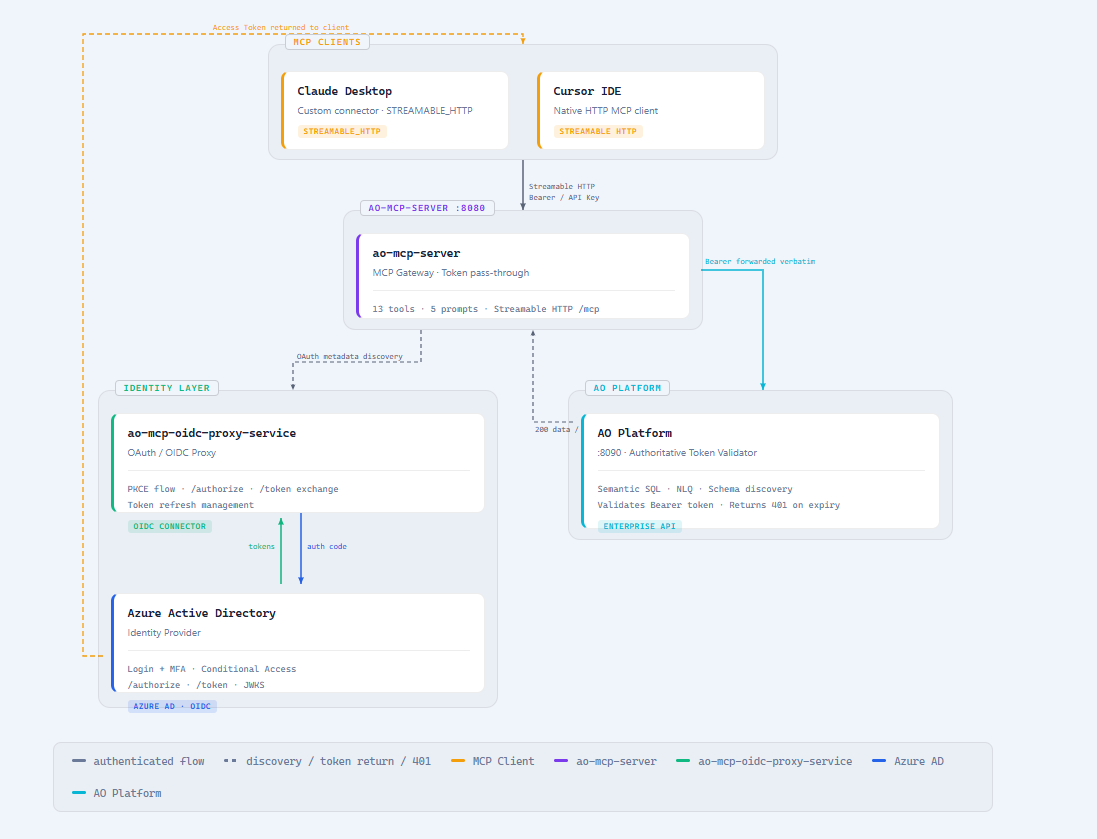
Claude Custom Connector OAuth Flow (cloud-to-cloud)
┌──────────────────────────────────────────────────────────────────────────────────────────────────┐
│  PHASE 1 — DISCOVERY (once per connector setup)                                  │
│                                                                                  │
│  Claude Cloud ──[1: GET /mcp (no token)]────────────────────────► ao-mcp-server      │
│               ◄──[2: HTTP 401                                │                   │
│                    WWW-Authenticate: Bearer                  │                   │
│                      resource_metadata="<MCP_RESOURCE_URL>/  │                   │
│                      .well-known/oauth-protected-            │                   │
│                      resource/mcp"]───────────────────────────────┘                   │
│                                                                                  │
│  Claude Cloud ──[3: GET /.well-known/oauth-protected-resource/mcp]─► ao-mcp-server
│               ◄──[4: { "resource": "<MCP_RESOURCE_URL>",     │                   │
│                         "authorization_servers": [           │                   │
│                           "<AUTH_SERVER_URL>" ] }]─────────────┘                   │
│                                                                                  │
│  Claude Cloud ──[5: GET /.well-known/oauth-authorization-server]─► ao-mcp-security-service
│               ◄──[6: { issuer, authorization_endpoint,       │                   │
│                         token_endpoint,                      │                   │
│                         code_challenge_methods: ["S256"],    │                   │
│                         (NO registration_endpoint) }]─────────┘                   │
└──────────────────────────────────────────────────────────────────────────────────────────────────┘

┌──────────────────────────────────────────────────────────────────────────────────────────────────┐
│  PHASE 2 — AUTHORIZATION (once per user; repeated when token expires)            │
│                                                                                  │
│  Claude Cloud ──[7: GET /oauth/authorize                                         │
│                    ?client_id=<pre-registered>                                   │
│                    &redirect_uri=https://claude.ai/api/mcp/auth_callback         │
│                    &code_challenge=<S256-PKCE>                                   │
│                    &state=<nonce>]──────────────────────► ao-mcp-security-service    │
│                                                                   │              │
│                        ──[8: redirect to Okta /authorize]───────────┘              │
│                                          ▼                                       │
│                              ┌──────────────────────────┐                            │
│                              │  Okta login page     │ ◄── User enters credentials│
│                              └───────────┬──────────────┘                            │
│                                        │ [9: callback with IdP authorization code]
│                                        ▼                                         │
│                              ao-mcp-security-service                             │
│                              · exchanges IdP code for IdP token (server-side)    │
│                              · issues an opaque proxy code                       │
│                              · redirects to claude.ai/api/mcp/auth_callback      │
│                                        │ [10: browser → auth_callback?code=...]  │
│                                        ▼                                         │
│                                   Claude Cloud                                   │
└──────────────────────────────────────────────────────────────────────────────────────────────────┘

┌──────────────────────────────────────────────────────────────────────────────────────────────────┐
│  PHASE 3 — TOKEN EXCHANGE                                                        │
│                                                                                  │
│  Claude Cloud ──[11: POST /oauth/token                                           │
│                     grant_type=authorization_code                                │
│                     code=<proxy code>                                            │
│                     code_verifier=<PKCE verifier>                                │
│                     client_id=<pre-registered>                                   │
│                     client_secret=<pre-registered>]──► ao-mcp-security-service   │
│               ◄──[12: { access_token, refresh_token, … }]─────────────────────────────┘
└──────────────────────────────────────────────────────────────────────────────────────────────────┘

┌──────────────────────────────────────────────────────────────────────────────────────────────────┐
│  PHASE 4 — TOOL CALLS (every MCP request thereafter)                             │
│                                                                                  │
│  Claude Cloud ──[13: POST /mcp                                                   │
│                     Authorization: Bearer <Okta access_token>]─► ao-mcp-server   │
│                                                                        │         │
│                     ──[14: forward Bearer token]────────────────────────────┘         │
│                                          ▼                                       │
│                                    AO Platform API                               │
│                                    · validates token (iss, aud, exp)             │
│                                    · executes tool / query                       │
│                                    · returns result                              │
│               ◄──[15: tool result]────────────── ao-mcp-server ◄─────────────────────── │
└──────────────────────────────────────────────────────────────────────────────────────────────────┘
Credential layers explained
|
Layer |
Credentials |
Owner |
Visible to user? |
|---|---|---|---|
|
Okta server-side app ( |
ao-mcp-security-service ↔ Okta (server-to-server) |
DevOps |
Never |
|
Claude connector client ( |
Claude ↔ ao-mcp-security-service |
Admin (created once via API, pasted into Claude UI) |
Visible during connector setup only |
|
User identity |
Okta username + password |
Each user |
Yes — they log in themselves |
Prerequisites
Before starting, ensure:
-
ao-mcp-security-service is deployed at a public HTTPS URL (e.g.
https://easyanswers-qa-agents-mcp-auth.apporchid.com). -
ao-mcp-server is deployed at a public HTTPS URL (e.g.
https://easyanswers-qa-agents-mcp.apporchid.com). -
Okta has a server-side web app registered:
-
Grant type: Authorization Code
-
Allowed redirect URI:
<AUTH_SERVER_URL>/oauth/idp-callback -
Obtain:
OIDC_ISSUER_URI,OIDC_CLIENT_ID,OIDC_CLIENT_SECRET
-
-
Anthropic egress IP
160.79.104.0/21is allowed through any firewall protecting either service.
Step 1 — Deploy ao-mcp-security-service
Environment variables
|
Variable |
Required |
Default |
Sample Value |
Description |
|---|---|---|---|---|
|
|
Yes |
|
|
Public HTTPS URL of this service. Appears as the |
|
|
Yes |
(none) |
|
Issuer URI of the upstream Okta authorization server. Found in Okta Admin Console → Security → API → Authorization Servers → [server] → Issuer. |
|
|
Yes |
(none) |
|
Client ID of the server-side Okta app. Used by ao-mcp-security-service to proxy authorization to Okta. Never share with end users. |
|
|
Yes |
(none) |
|
Client secret of the server-side Okta app. Treat like a password. Store in a secrets vault. |
|
|
No |
|
|
Controls whether |
|
|
Yes (for admin API) |
(empty) |
|
Shared secret for |
|
|
Yes |
|
|
JDBC URL for the PostgreSQL database that stores registered OAuth client records. |
|
|
Yes |
|
|
PostgreSQL username with read/write access to the |
|
|
Yes |
|
(from vault) |
Password for |
|
|
No |
|
|
When |
|
|
No |
|
|
HikariCP maximum connection pool size. |
Deployment checklist
-
Set
ADVERTISE_REGISTRATION_ENDPOINT=false -
Set a strong
ADMIN_KEY(store in vault) -
Confirm
AUTH_ISSUERmatches the public URL exactly (no trailing slash) -
Confirm
OIDC_ISSUER_URIpoints to the correct Okta authorization server -
Database migrations run automatically on startup (Liquibase)
Step 2 — Deploy ao-mcp-server
Environment variables
|
Variable |
Required |
Default |
Sample Value |
Description |
|---|---|---|---|---|
|
|
Yes |
|
|
Canonical public HTTPS URL of the MCP endpoint (no |
|
|
Yes |
|
|
Public HTTPS URL of ao-mcp-security-service. Appears in the |
|
|
No |
|
|
When |
|
|
Yes |
|
|
Base URL of the AO Platform API. The MCP server forwards all tool calls here, attaching the user's Bearer token. |
|
|
No |
(none) |
(leave blank) |
Optional static fallback JWT. Used when no per-request Bearer token is present (e.g., automated testing). Leave blank in production to require per-request credentials. |
|
|
No |
(none) |
(leave blank) |
Optional static fallback API key. Leave blank in production. |
Step 3 — Create the Claude Connector Client (Admin, Once)
This step registers a confidential client in ao-mcp-security-service's database. Run it once after both services are deployed.
# Generate a strong admin key (if not already done):
export ADMIN_KEY=$(openssl rand -hex 32)

# Register the Claude connector client:
curl -s -X POST https://easyanswers-qa-agents-mcp-auth.apporchid.com/admin/clients \
  -H "X-Admin-Key: $ADMIN_KEY" \
  -H "Content-Type: application/json" \
  -d '{
    "redirect_uris": ["https://claude.ai/api/mcp/auth_callback"],
    "token_endpoint_auth_method": "client_secret_basic"
  }' | python -m json.tool
Example response:
{
  "client_id": "proxy-a1b2c3d4-...",
  "client_secret": "e5f6g7h8-...",
  "client_id_issued_at": 1749984000,
  "redirect_uris": ["https://claude.ai/api/mcp/auth_callback"],
  "token_endpoint_auth_method": "client_secret_basic"
}
Important: Save
client_idandclient_secretsecurely. The secret is shown only once and cannot be retrieved later (stored as BCrypt hash). Store in your secrets manager.
Lost the secret? Create a new client by re-running
POST /admin/clients, then update the Claude connector Advanced settings with the new credentials.
Retrieve or audit registered clients
# Retrieve a specific client by ID (no secret returned)
curl -s https://easyanswers-qa-agents-mcp-auth.apporchid.com/admin/clients/<client_id> \
  -H "X-Admin-Key: $ADMIN_KEY" | python -m json.tool

# List all registered clients (no secrets returned)
curl -s https://easyanswers-qa-agents-mcp-auth.apporchid.com/admin/clients \
  -H "X-Admin-Key: $ADMIN_KEY" | python -m json.tool
Example list response:
[
  {
    "client_id": "proxy-a1b2c3d4-...",
    "client_id_issued_at": 1749984000,
    "redirect_uris": ["https://claude.ai/api/mcp/auth_callback"],
    "token_endpoint_auth_method": "client_secret_basic"
  }
]
The client_secret field is never included in GET responses.
Step 4 — Add the Connector in Claude
Individual account (http://Claude.ai personal)
-
Open Claude → Customize (bottom-left) → Connectors → +
-
Paste the MCP URL:
https://easyanswers-qa-agents-mcp.apporchid.com/mcp -
Expand Advanced settings
-
Paste
client_idandclient_secretfrom Step 3 -
Click Add
Team / Enterprise account
An Owner adds the connector once at the org level:
-
Org Settings → Connectors → Add → Custom → Web
-
Same URL and credentials as above
-
Members then connect individually (Step 5)
Step 5 — Each User Connects (Individual)
-
In Claude, find the connector (Connectors panel or sidebar)
-
Click Connect
-
A browser window opens showing the Okta login page
-
Sign in with your own Okta credentials
-
The connector status changes to connected
-
AO Tools (
nlq-get-data,list-ontologies, etc.) are now available in Claude chat
Verification Checklist
Run these commands to confirm all layers are working before adding the connector:
# 1. AS metadata — no registration_endpoint
curl -s https://easyanswers-qa-agents-mcp-auth.apporchid.com/.well-known/oauth-authorization-server \
  | python -m json.tool | grep registration_endpoint
# Expected: no output (field absent)

# 2. MCP endpoint — 401 with /mcp suffix in WWW-Authenticate
curl -i https://easyanswers-qa-agents-mcp.apporchid.com/mcp
# Expected headers:
#   HTTP/2 401
#   WWW-Authenticate: Bearer resource_metadata="https://easyanswers-qa-agents-mcp.apporchid.com/.well-known/oauth-protected-resource/mcp"

# 3. PRM at both paths (must return identical JSON)
curl -s https://easyanswers-qa-agents-mcp.apporchid.com/.well-known/oauth-protected-resource
curl -s https://easyanswers-qa-agents-mcp.apporchid.com/.well-known/oauth-protected-resource/mcp
# Expected both:
# {"resource":"https://easyanswers-qa-agents-mcp.apporchid.com","authorization_servers":["https://easyanswers-qa-agents-mcp-auth.apporchid.com"]}

# 4. Connector test (after adding in Claude UI)
# tools/list should return AO tools; a tool call should succeed without 401
Troubleshooting
|
Symptom |
Most Likely Cause |
Fix |
|---|---|---|
|
|
|
Set |
|
|
Wrong |
Re-run |
|
401 loop after successful Okta login |
Token audience ( |
Confirm AO Platform is configured to accept tokens from |
|
Connect bounces with loopback error |
Public DCR endpoint ( |
Always use |
|
Cannot reach auth server / MCP server |
Anthropic's cloud egress IPs are firewall-blocked |
Allowlist |
|
"Invalid admin key" on Step 3 |
|
Verify |
|
Tools available but every tool call returns 401 |
Platform rejects the access token (invalid/expired) |
Check |
ao-mcp-bridge Reference (Existing Local Path)
The bridge is a Node.js process that runs on the developer's machine:
-
Connects Claude Desktop via stdio (not HTTPS)
-
Registers a loopback client automatically via DCR (
POST /oauth/register, redirect URI =http://127.0.0.1:<random-port>) -
Requires
ADVERTISE_REGISTRATION_ENDPOINT=truein ao-mcp-security-service
Bridge and connector can coexist across different deployment environments (e.g., bridge for dev, connector for production/team). Do not set ADVERTISE_REGISTRATION_ENDPOINT=true in the same deployment used by the Claude connector.
Reference Values (QA environment)
|
Item |
Value |
|---|---|
|
MCP / resource URL |
|
|
MCP_RESOURCE_URL (no |
|
|
Authorization server (issuer) |
|
|
Claude hosted callback (redirect URI) |
|
|
Anthropic egress IP range |
|
|
PKCE method |
|
FAQ
-
Q: How can we disable local token validation?
-
A: There is a configuration script that will need to be run by the DevOps team.
-
Q: In the recorded video, the SSO Authentication is using Okta IdP. Can Azure AD be used?
-
A: Currently, the SSO Authentication is only validated with Okta, but it should work with Azure AD and other platform-certified OIDC providers.
-
Q: What is the default token expiry duration, and where can it be configured?
-
A: This is a configuration in IdP.
-
Q: Are refresh tokens supported in this flow? If yes, what is the refresh window?
-
A: Refresh tokens are not supported at this point. Users will be relogged in if the token expires.
-
Q: What is the expected behavior when the same user logs in from both the AO Platform and the Claude Desktop? Should the sessions be independent or shared?
-
A: Typically, sessions are independent.
-
Q: Is performance impacted when using MCP Server with SSO Authentication?
-
A: Token will be validated for every incoming request to the AO Platform server.
-
Can the existing skills and configurations in Claude (ao-mcp-query-2.0.3.skill and claude_desktop_config) be used?
-
A: Yes.
Contact App Orchid | Disclaimer