
Intended audience: Developers administrators
AO Platform: 5.0
Overview
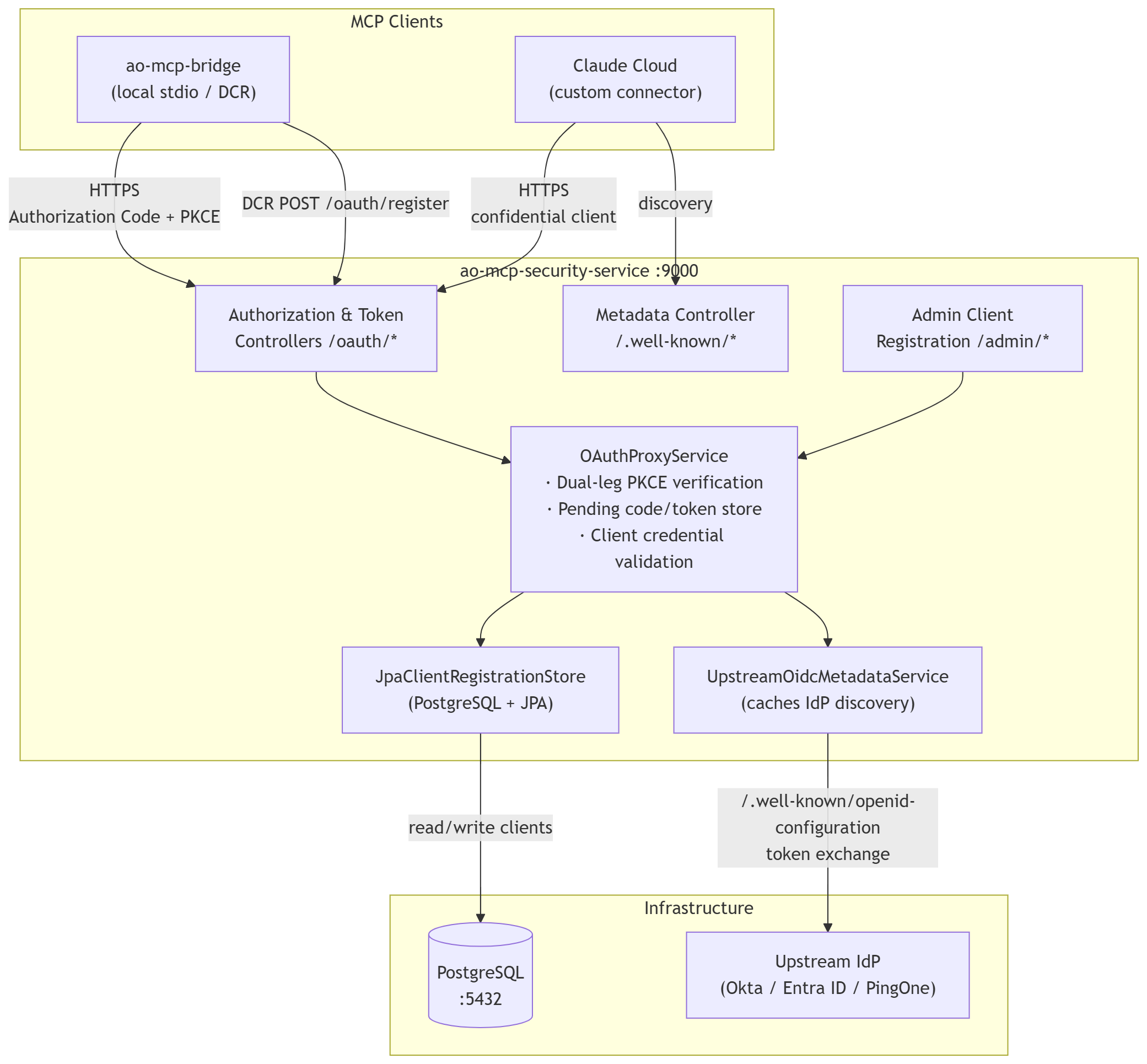
The ao-mcp-security-service is a Spring Boot 3.4 / Java 21 OAuth 2.0 proxy service. It sits between MCP clients (Claude Desktop, ao-mcp-bridge, or Claude's cloud connector) and an upstream Identity Provider (Okta, Azure Entra ID, PingOne, etc.).
Core function: Act as an OAuth authorization server that forwards authentication to the real IdP, then returns the IdP-issued tokens unchanged. The proxy never mints its own JWTs — AO Platform always validates tokens against the IdP's own issuer and JWKS endpoint.
Why it exists:
-
MCP clients need an OAuth authorization server they can discover via standard OIDC metadata.
-
The upstream IdP cannot be reconfigured to point directly at every MCP client's redirect URI.
-
The proxy bridges this gap while keeping security anchored at the IdP.
Runs on: port 9000 by default.
Architecture
What This Service Does
|
Capability |
Detail |
|---|---|
|
OAuth 2.0 discovery |
Serves |
|
Authorization Code + PKCE |
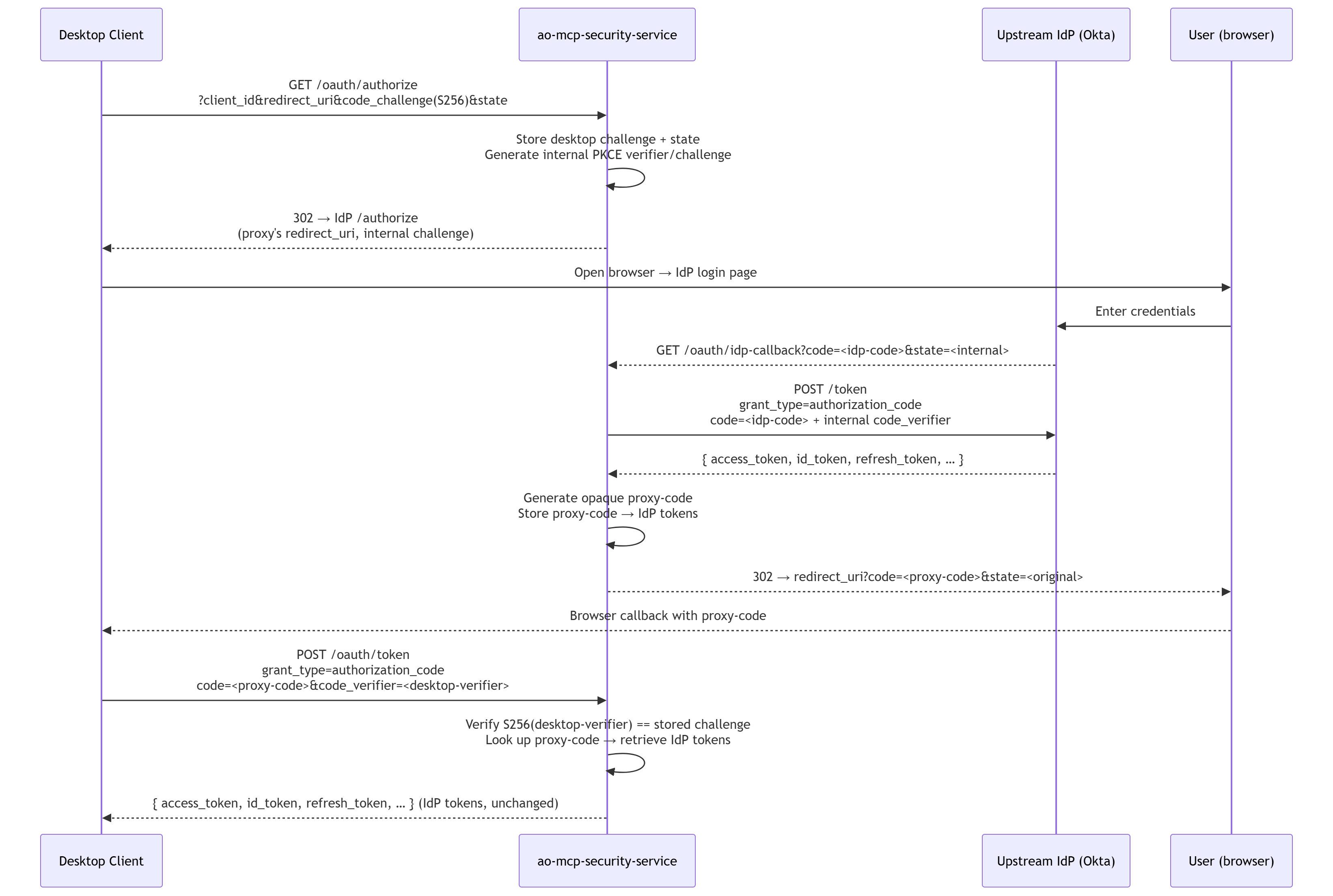
Implements dual-leg PKCE: one verifier for the desktop client, a separate internal one for the IdP |
|
Dynamic Client Registration |
|
|
Admin Client Registration |
|
|
Token passthrough |
Returns the IdP's token JSON verbatim to the MCP client |
|
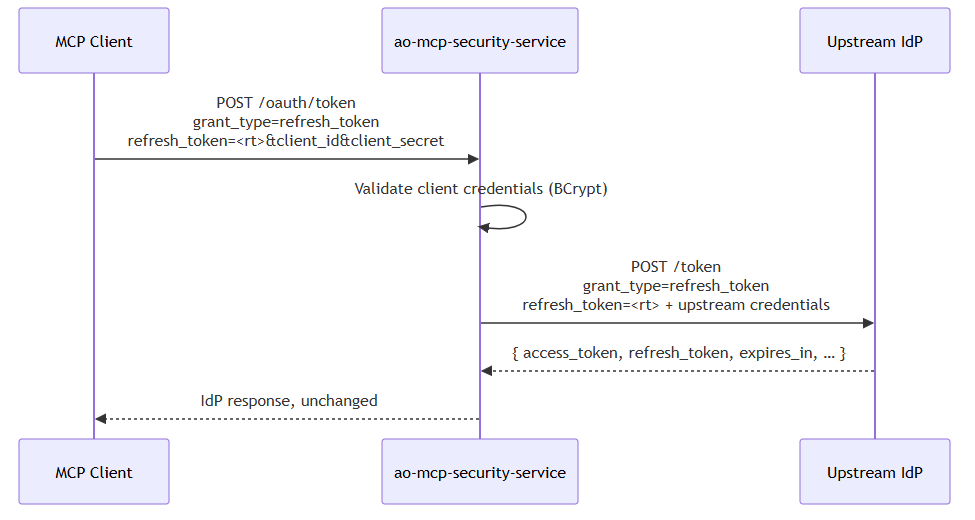
Refresh token forwarding |
Proxies |
|
Client persistence |
Stores registered clients in PostgreSQL with BCrypt-hashed secrets |
Component Diagram
OAuth Flows
Flow A — Desktop PKCE (ao-mcp-bridge / Claude Desktop)
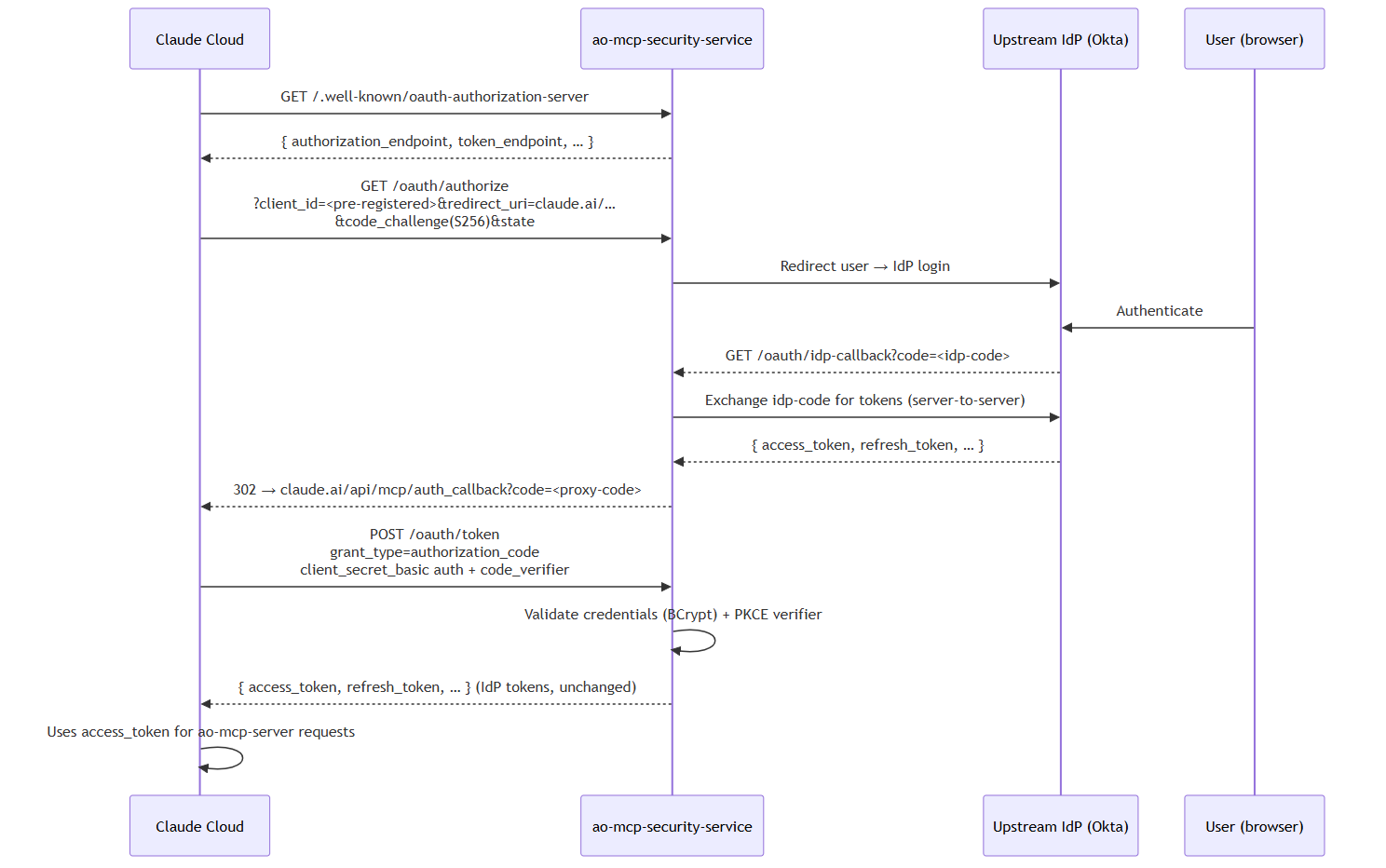
Flow B — Claude Connector (Cloud-to-Cloud, Confidential Client)
At the token endpoint, Claude sends client_secret_basic credentials plus the PKCE verifier; the proxy follows the same internal IdP exchange as Flow A.
Flow C — Refresh Token
API Reference
All endpoints are HTTP (no authentication required by default — access control is at the network or admin-key level).
OAuth Discovery
GET /.well-known/oauth-authorization-server
GET /.well-known/openid-configuration
Both paths return identical JSON.
Response 200 OK:
{
  "issuer": "https://your-auth-host.example.com",
  "authorization_endpoint": "https://your-auth-host.example.com/oauth/authorize",
  "token_endpoint": "https://your-auth-host.example.com/oauth/token",
  "response_types_supported": ["code"],
  "grant_types_supported": ["authorization_code", "refresh_token"],
  "code_challenge_methods_supported": ["S256"],
  "token_endpoint_auth_methods_supported": [
    "client_secret_post",
    "client_secret_basic",
    "none"
  ],
  "scopes_supported": ["openid", "profile", "email", "offline_access"],
  "registration_endpoint": "https://your-auth-host.example.com/oauth/register"
}
Note:
registration_endpointis only present whenADVERTISE_REGISTRATION_ENDPOINT=true. Set it tofalsefor the Claude connector deployment.
Authorization Endpoints
GET /oauth/authorize
Initiates an Authorization Code + PKCE flow. Redirects the user's browser to the upstream IdP.
Query parameters:
|
Parameter |
Required |
Description |
|---|---|---|
|
|
Yes |
Must be |
|
|
Yes |
Client ID from DCR or admin registration |
|
|
Yes |
Must exactly match the registered URI |
|
|
Yes |
Base64url-encoded S256 hash of the PKCE verifier |
|
|
Yes |
Must be |
|
|
Yes |
Opaque value returned on callback |
|
|
No |
Space-separated; merged with default scopes |
Response: 302 Found → upstream IdP's authorization URL (user sees the IdP login page).
GET /oauth/idp-callback
Internal callback. The upstream IdP redirects here after the user authenticates. Never call this endpoint directly.
Query parameters (from IdP):
|
Parameter |
Description |
|---|---|
|
|
IdP authorization code |
|
|
Internal state set by the proxy during authorization |
|
|
OAuth error code (if authorization failed) |
|
|
Human-readable error (optional) |
Response: 302 Found → client's registered redirect_uri with:
-
code= opaque proxy code (UUID, valid 300 s) -
state= original client state
Token Endpoint
POST /oauth/token
Content-Type: application/x-www-form-urlencoded
Authorization Code Exchange:
|
Parameter |
Required |
Description |
|---|---|---|
|
|
Yes |
|
|
|
Yes |
Proxy code received in the callback |
|
|
Yes |
Must match what was used in |
|
|
Yes |
Registered client ID |
|
|
Yes* |
Required unless |
|
|
Yes |
PKCE verifier whose S256 hash matches the original challenge |
*Can be sent as HTTP Basic Auth header instead when token_endpoint_auth_method=client_secret_basic.
Refresh Token:
|
Parameter |
Required |
Description |
|---|---|---|
|
|
Yes |
|
|
|
Yes |
Refresh token received from a prior exchange |
|
|
Yes |
Registered client ID |
|
|
Yes* |
Required unless |
Successful response 200 OK (passthrough of IdP token JSON):
{
  "access_token": "<IdP-issued JWT>",
  "token_type": "Bearer",
  "expires_in": 3600,
  "id_token": "<IdP-issued OIDC JWT>",
  "refresh_token": "<IdP-issued refresh token>",
  "scope": "openid profile email offline_access"
}
Error response 400 Bad Request:
{
  "error": "invalid_client",
  "error_description": "Unknown client_id"
}
Dynamic Client Registration (DCR)
POST /oauth/register
Registers a new OAuth client. Only loopback redirect URIs are accepted (http://127.0.0.1:* or http://localhost:*) unless ALLOW_LOOPBACK_REDIRECTS_ONLY=false.
Used by ao-mcp-bridge automatically. Do not use for Claude connector (use admin endpoint instead).
Requires ADVERTISE_REGISTRATION_ENDPOINT=true for DCR to be discoverable; the endpoint still functions regardless.
Request body (application/json):
{
  "redirect_uris": ["http://127.0.0.1:8400/callback"],
  "token_endpoint_auth_method": "client_secret_post"
}
|
Field |
Required |
Description |
|---|---|---|
|
|
Yes |
Array of redirect URIs; must be loopback in production |
|
|
No |
|
Response 201 Created:
{
  "client_id": "proxy-<uuid>",
  "client_secret": "<plaintext secret — shown once only>",
  "client_id_issued_at": 1749984000,
  "client_secret_expires_at": 0,
  "redirect_uris": ["http://127.0.0.1:8400/callback"],
  "token_endpoint_auth_method": "client_secret_post"
}
Important: The
client_secretis shown only on creation. It is stored as a BCrypt hash and cannot be retrieved later.
Admin Client Management
All admin endpoints require the X-Admin-Key header matching the ADMIN_KEY environment variable.
POST /admin/clients
Registers a confidential client. Accepts any redirect URI (not limited to loopback). Used to create the Claude connector client.
Request headers:
X-Admin-Key: <value of ADMIN_KEY env var>
Content-Type: application/json
Request body:
{
  "redirect_uris": ["https://claude.ai/api/mcp/auth_callback"],
  "token_endpoint_auth_method": "client_secret_basic"
}
Response 201 Created:
{
  "client_id": "proxy-<uuid>",
  "client_secret": "<plaintext secret — shown once only>",
  "client_id_issued_at": 1749984000,
  "redirect_uris": ["https://claude.ai/api/mcp/auth_callback"],
  "token_endpoint_auth_method": "client_secret_basic"
}
GET /admin/clients/{clientId}
Returns client metadata. Secret is never returned.
Response 200 OK:
{
  "client_id": "proxy-a1b2c3d4-...",
  "client_id_issued_at": 1749984000,
  "redirect_uris": ["https://claude.ai/api/mcp/auth_callback"],
  "token_endpoint_auth_method": "client_secret_basic"
}
GET /admin/clients
Lists all registered clients. Secrets are never returned.
Response 200 OK: Array of client objects (same shape as single GET above).
Configuration Reference
Environment Variables
|
Variable |
Required |
Default |
Description |
|---|---|---|---|
|
|
Yes |
|
Public HTTPS URL of this service. Appears as |
|
|
Yes |
— |
Upstream IdP issuer URI. Found in Okta Admin Console → Security → API → Authorization Servers → [server] → Issuer. |
|
|
Yes |
— |
Client ID of the server-side IdP app registered at the IdP. Never expose to end users. |
|
|
Yes |
— |
Client secret of the IdP app. Treat as a password. Store in a vault. |
|
|
Yes (for admin API) |
(empty) |
Shared secret for |
|
|
Yes |
|
JDBC URL for the PostgreSQL database. |
|
|
Yes |
|
PostgreSQL username with read/write on |
|
|
Yes |
|
Password for |
|
|
No |
|
|
|
|
No |
|
When |
|
|
No |
|
HikariCP maximum pool size. |
|
|
No |
|
HikariCP minimum idle connections. |
|
|
No |
|
Max wait for a connection from the pool (ms). |
|
|
No |
|
Max time for connection validation (ms). |
|
|
No |
|
Time before idle connections are removed (ms). |
|
|
No |
|
Maximum connection lifetime (ms). |
|
|
No |
|
Keepalive interval (ms). |
|
|
No |
|
Alert threshold for connection leak detection (ms). |
|
|
No |
|
When |
|
|
No |
(none) |
Add |
Application.yml Defaults
server:
  port: 9000

app:
  oauth-proxy:
    enabled: true
    pending-ttl-seconds: 300        # Proxy code lifetime (seconds)
    idp-callback-path: /oauth/idp-callback
    upstream-token-auth-method: client_secret_post  # or client_secret_basic
    default-scopes:
      - openid
      - profile
      - email
      - offline_access

  cors:
    allowed-origins: ["*"]
    allowed-methods: ["GET", "POST", "PUT", "PATCH", "DELETE", "OPTIONS", "HEAD"]
    allowed-headers: ["*"]
    max-age: 3600
    allow-credentials: false

management:
  endpoints.web.exposure.include: health,info
  tracing.sampling.probability: 1.0
Database Connection Pool Tuning
For production deployments, tune HikariCP to your expected concurrency. Key relationships:
-
DB_POOL_MAX_SIZEshould be ≤ PostgreSQL'smax_connectionsminus connections from other services. -
DB_POOL_KEEPALIVE_MSshould be less than PostgreSQL'sidle_in_transaction_session_timeout. -
Set
DB_POOL_LEAK_DETECTION_MSto around 2–3× the expected longest query time.
Database Schema
Schema is managed by Liquibase and applied automatically on startup. Migration files are in src/main/resources/db/changelog/.
Tables
registered_client
Stores OAuth client registrations.
|
Column |
Type |
Constraints |
Description |
|---|---|---|---|
|
|
|
PRIMARY KEY |
Generated UUID prefixed with |
|
|
|
NOT NULL |
BCrypt(10) hash of the client secret |
|
|
|
NOT NULL |
|
|
|
|
NOT NULL, DEFAULT now() |
Registration timestamp |
Index: idx_registered_client_created_at on created_at.
registered_client_redirect_uri
One-to-many child table for redirect URIs.
|
Column |
Type |
Constraints |
Description |
|---|---|---|---|
|
|
|
FK → |
Parent client |
|
|
|
NOT NULL |
Registered callback URI |
Primary key: (client_id, redirect_uri).
Entity Lifecycle
-
Registration:
JpaClientRegistrationStore.register()hashes the plaintext secret with BCrypt(10) and persists both tables in a transaction. Returns the plaintext secret once (to the registration response); it is not stored. -
Lookup:
findById()eagerly loads redirect URIs. The returnedRegisteredClienthasclientSecret = null— secret never leaves the store after initial registration. -
Verification:
verifySecret()callsBCryptPasswordEncoder.matches(provided, storedHash). The hash is never returned to callers. -
Cascade delete: Removing a
registered_clientrow also deletes all associatedredirect_urirows.
Security
Authentication & Authorization
|
Endpoint |
Protection |
|---|---|
|
|
Public (no auth) |
|
|
Validates registered |
|
|
Protected by internal state nonce (SSRF-safe) |
|
|
Validates client credentials (BCrypt) + PKCE verifier |
|
|
Public; loopback URI restriction enforced |
|
|
|
|
|
|
|
|
Public |
|
|
Public; details require authorization |
PKCE (Proof Key for Code Exchange)
The service implements dual-leg PKCE:
-
Desktop leg: Desktop generates its own
code_verifierand sendsS256(code_verifier)ascode_challenge. The proxy stores this challenge and validates it at token exchange. -
Internal IdP leg: The proxy independently generates a separate
code_verifier/code_challengepair for its own call to the upstream IdP. The IdP validates this; the desktop never sees these values.
This ensures neither leg can be replayed independently.
Client Secret Storage
-
Secrets are hashed with BCrypt(strength=10) immediately on receipt.
-
Plaintext secrets are never persisted.
-
Plaintext is returned only once in the registration response.
-
GET admin endpoints never include the secret field.
Sensitive Logging
When LOG_SENSITIVE_INFO=true, the OAuthProxySensitiveLoggingFilter logs:
-
AuthorizationandX-Admin-Keyrequest headers -
Full form body of
POST /oauth/tokenandPOST /oauth/register -
Full JSON body of
POST /admin/*
This will expose tokens and secrets in logs. Only enable temporarily for debugging in a non-production environment.
CORS
Default configuration allows all origins (*). Restrict allowed-origins via app.cors.allowed-origins in production if required.
Network Security
-
Anthropic's cloud egress for Claude connectors:
160.79.104.0/21. Allow this range through any firewall protecting this service and ao-mcp-server.
Deployment
Docker
The Dockerfile uses a multi-stage build:
-
Build stage (Amazon Corretto 21 + Gradle): Extracts Spring Boot layers for optimal Docker cache reuse.
-
Runtime stage (Amazon Linux 2023 + Corretto 21 JRE): Runs as non-root user
app:app. Exposes port9000.
Build the image:
docker build -t ao-mcp-security-service:latest .
Run the container:
docker run -p 9000:9000 \
  -e AUTH_ISSUER=https://your-auth-host.example.com \
  -e OIDC_ISSUER_URI=https://dev-12345.okta.com/oauth2/ausXXX \
  -e OIDC_CLIENT_ID=0oaXXX \
  -e OIDC_CLIENT_SECRET=<secret> \
  -e ADMIN_KEY=<32-hex-chars> \
  -e DB_URL=jdbc:postgresql://db-host:5432/ao_mcp_security \
  -e DB_USERNAME=ao_mcp_user \
  -e DB_PASSWORD=<password> \
  -e ADVERTISE_REGISTRATION_ENDPOINT=false \
  ao-mcp-security-service:latest
Pass JAVA_OPTS for JVM tuning:
-e JAVA_OPTS="-Xms256m -Xmx512m -XX:+UseG1GC"
Environment Checklist
Before going live, verify:
-
AUTH_ISSUERis the exact public HTTPS URL — no trailing slash, matches what clients use -
OIDC_ISSUER_URIpoints to the correct upstream authorization server -
OIDC_CLIENT_IDandOIDC_CLIENT_SECRETare from a server-side (confidential) IdP app, not a public SPA app -
The IdP app's allowed redirect URI includes
{AUTH_ISSUER}/oauth/idp-callback -
ADMIN_KEYis set to a cryptographically random value (openssl rand -hex 32) and stored in a vault -
ADVERTISE_REGISTRATION_ENDPOINT=falsefor Claude connector deployments -
LOG_SENSITIVE_INFO=false(or not set) in production -
Database migrations run cleanly (check startup logs for Liquibase output)
-
GET /.well-known/oauth-authorization-serverreturns a valid JSON response with yourAUTH_ISSUER -
Anthropic IP range
160.79.104.0/21is allowlisted (if Claude connector is used)
Local Development
Prerequisites
-
Java 21
-
Docker (for PostgreSQL)
-
Gradle 8.11.1 (wrapper included)
Start the Service
# Starts PostgreSQL via Docker Compose automatically, then boots the app
./gradlew bootRun
The service starts at http://localhost:9000. PostgreSQL is auto-started on localhost:5432 (see compose.yaml).
Required Env Vars for Local Dev
At minimum, set:
export OIDC_ISSUER_URI=https://dev-12345.okta.com/oauth2/ausXXX
export OIDC_CLIENT_ID=0oaXXX
export OIDC_CLIENT_SECRET=<secret>
AUTH_ISSUER defaults to http://localhost:9000 and all DB vars have working defaults for local Docker Compose.
Useful Local Verification Commands
# Discovery metadata
curl -s http://localhost:9000/.well-known/oauth-authorization-server | python -m json.tool

# Register a test client (loopback)
curl -s -X POST http://localhost:9000/oauth/register \
  -H "Content-Type: application/json" \
  -d '{"redirect_uris":["http://127.0.0.1:8400/callback"]}' | python -m json.tool

# Create a Claude connector client (admin)
curl -s -X POST http://localhost:9000/admin/clients \
  -H "X-Admin-Key: $ADMIN_KEY" \
  -H "Content-Type: application/json" \
  -d '{"redirect_uris":["https://claude.ai/api/mcp/auth_callback"],"token_endpoint_auth_method":"client_secret_basic"}' \
  | python -m json.tool
Observability
Health Check
GET /actuator/health
Returns {"status":"UP"} when the service and database are healthy.
Tracing
-
OpenTelemetry tracing is enabled by default (
management.tracing.sampling.probability: 1.0— 100% sampling). -
Each request carries a
traceIdandspanIdin MDC, visible in logs. -
Configure an OTLP exporter via standard Spring Boot / OTel environment variables (
OTEL_EXPORTER_OTLP_ENDPOINT, etc.) for sending traces to a collector.
Logging
Log output is structured (JSON in production recommended). Key log events:
|
Event |
Level |
What To Look For |
|---|---|---|
|
Startup |
INFO |
|
|
IdP discovery |
INFO |
Upstream metadata fetched successfully |
|
Authorization initiated |
INFO |
|
|
IdP callback received |
INFO |
|
|
Token exchange |
INFO |
|
|
Invalid client / bad verifier |
WARN |
Validation failures |
|
Upstream IdP error |
WARN |
Non-2xx from IdP token endpoint |
|
Sensitive data (opt-in) |
DEBUG |
Only when |
Unit Testing
# Run all tests
./gradlew test

# Run with coverage report
./gradlew test jacocoTestReport
# Coverage report: build/reports/jacoco/test/html/index.html

# Run a single test class
./gradlew test --tests "com.apporchid.oauthproxy.OAuthProxyFlowIntegrationTest"
Test Infrastructure
|
Tool |
Purpose |
|---|---|
|
Testcontainers |
Spins up a real PostgreSQL 16 container per test run |
|
WireMock |
Stubs the upstream IdP (port 29444 in tests) |
|
MockMvc |
HTTP-level integration tests against the Spring context |
|
JUnit 5 |
Test framework |
|
JaCoCo |
Code coverage; minimum 50% line coverage enforced in CI |
Connectivity Paths — Choosing the Right Mode
|
|
ao-mcp-bridge (Local) |
Claude Connector (Cloud) |
|---|---|---|
|
Who uses it |
Individual developers on their own machine |
Teams, enterprise, any http://Claude.ai user |
|
MCP transport |
stdio (local process) |
HTTPS (cloud-to-cloud) |
|
Client registration |
DCR — automatic, loopback URIs |
Admin API — manual, once per deployment |
|
|
|
|
|
Redirect URI |
|
|
Do not set
ADVERTISE_REGISTRATION_ENDPOINT=truein a deployment also used by the Claude connector. Use separate deployments (e.g., dev vs. prod) or configure it per environment.
Troubleshooting
|
Symptom |
Most Likely Cause |
Resolution |
|---|---|---|
|
|
|
Set |
|
|
Wrong |
Re-run |
|
401 loop after Okta login |
Token audience ( |
Verify AO Platform accepts tokens issued by |
|
|
Proxy code expired (> 300 s), replay attempt, or PKCE verifier mismatch |
Restart the authorization flow; check |
|
"Invalid admin key" |
|
Print |
|
Tools available but every call returns 401 |
AO Platform rejects the access token (wrong aud, expired, wrong issuer) |
Check |
|
|
|
|
|
Liquibase migration fails on startup |
DB not ready, wrong credentials, or schema out of sync |
Check |
|
High DB connection wait times |
Pool exhausted; |
Increase |
|
Cannot reach auth server from Claude Cloud |
Anthropic egress IPs blocked by firewall |
Allowlist |
|
CORS errors in browser during DCR flow |
|
Add the browser origin to |
Contact App Orchid | Disclaimer