
Intended audience: analysts developers administrators
AO Platform: 5.0
Overview
This section contains the configuration of LLM Content at the Ontology level, used by Easy Answers when configured for LLM Use.
A Prompt Instruction is a short instruction, written in plain English, that tells Easy Answers how to understand a question. Think of it as a business rule you hand to the AI — a definition, or a hint about what a word means in your business. The AI reads it while it turns the question into a query.
A prompt is guidance, not code. Easy Answers still finds the data and writes the SQL itself. Your prompt only shapes how it does that. Because of this, a good prompt works for many ways of asking the same thing — not just one exact question.
See also…
-
MSO - LLM Content - for LLM Content configurations at the individual MSO and MSO Property levels
-
Best Practice > Configuring Ontology Prompts - for a Best Practice Guide on Prompt Instructions.
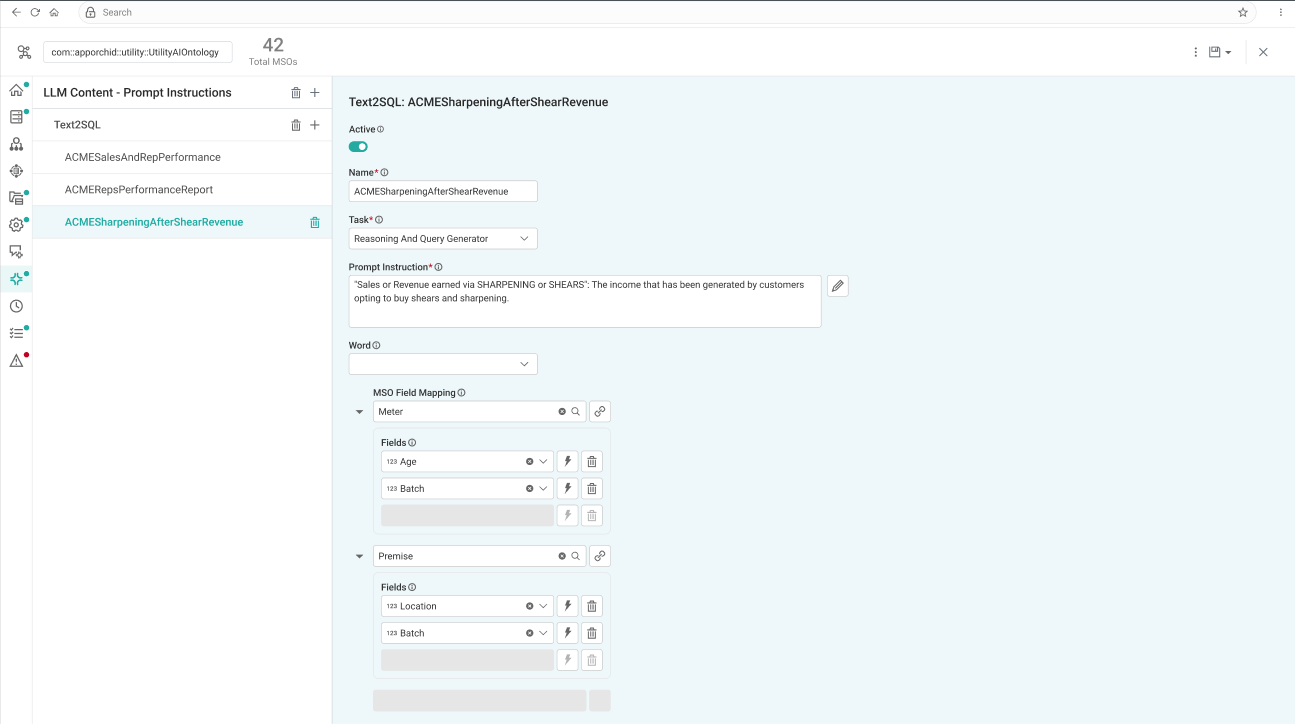
Prompt Instruction Configuration
User Actions
-
(+) - adds a new Prompt Instruction.
-
Delete - deletes the Prompt Instruction.
Properties
|
Label |
UI Widget |
Default |
Description |
|---|---|---|---|
|
Prompt Instruction Type |
Dropdown |
|
First, add a Prompt Instruction Type using the “+” icon, including:
Secondly, enter one or more Prompt Instructions for each type using the following configuration properties. |
|
ON/OFF Toggle |
Enable |
If enabled, the configured Prompt Instruction will be active in the system. Disable to make it inactive! |
|
Text Field |
|
Enter a meaningful Name for the Prompt Instruction. |
|
Dropdown |
|
Select from the following Tasks for the Prompt Instruction - this option is only available when the Prompt Instruction is for the Text2SQL category:
|
|
Multi-Line Text Field |
|
Provide the Prompt Instruction as relating to the Task Property. Use the pencil icon to open a pop-up dialog to see a larger text box. |
|
Dropdown |
|
Add one or more words that will trigger the use of the Prompt Instruction. Such words will be added to the Prompt BoW on the Linguistics page for the MSO. |
|
Dropdown |
|
The Repeater Section is used to select one or more MSO Field Properties from primary or connected MSOs for which the Prompt Instruction will be associated. |
Contact App Orchid | Disclaimer