
Intended audience: analysts developers administrators
AO Platform: 5.0
Generative AI Configurations
These configuration settings determine the default selection of which Large Language Model (LLM) and Embedding Model will be used if enabled for different sub-systems in the AO Platform as well as which Vector Store has been integrated as the default.
If a commercial LLM is enabled (compared to an Open Source LLM), then each transaction (API request) will incur a transaction fee.
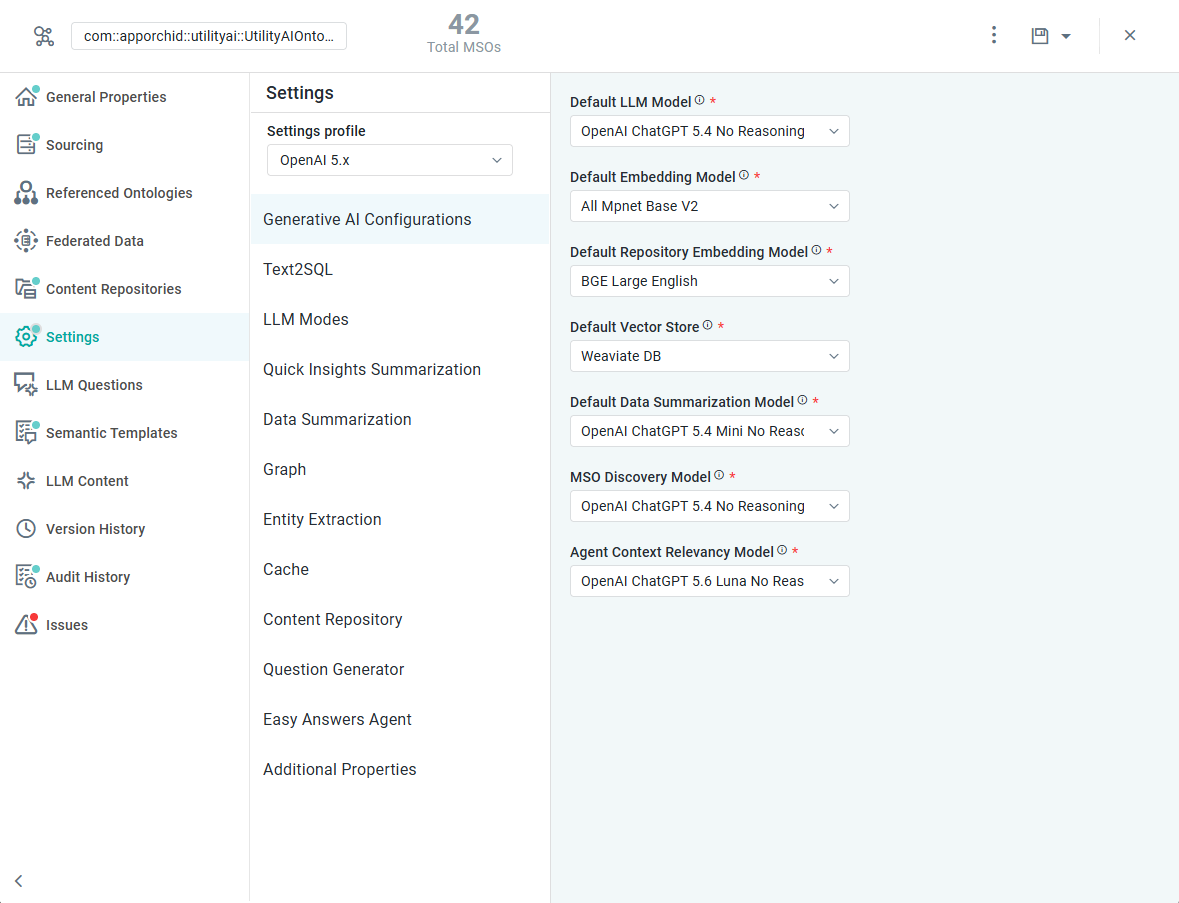
Properties
|
Label |
Defaults |
Description |
|---|---|---|
|
Default LLM Model |
OpenAI ChatGPT 6 Luna No Reasoning |
Use the dropdown to select from available Large Language Model (LLM) configurations. This selection will become the default for any LLM-enabled functionality, including Text2SQL transformations and Quick Insights Summarizations. |
|
Default Embedding Model |
All Mpnet Base V2 |
An LLM Embedding Model transforms words into numerical vectors, capturing the semantic meaning and relationships, enabling LLMs to understand and process information more effectively. Use the dropdown to select an Embedding Model from the available configurations. This selection will be used as the default for interpreting questions in Easy Answers and Chatbot if LLM is enabled on the Text2SQL page. |
|
Default Repository Embedding Model |
BGE Large English |
An LLM Embedding Model transforms words and sentences into numerical vectors, capturing the semantic meaning and relationships, enabling LLMs to understand and process information more effectively. Use the dropdown to select an Embedding Model from the available configurations. This selection will be used as the default for interpreting questions in Easy Answers against a Content Repository. |
|
Default Vector Store |
Weaviate DB |
Select a Vector Store to use. This selection will be considered the default Vector Store used to provide alternative question suggestions in Easy Answers if the question the user is asking isn’t fully understood. The use of a Vector Store will need to be enabled on the Text2SQL page in the Vector Store Settings section. Options include:
|
|
Default Data Summarization Model |
OpenAI ChatGPT 6 Luna No Reasoning |
Use the dropdown to select from available Large Language Model (LLM) configurations. This selection will become the default for any LLM-enabled functionality, including Text2SQL transformations, and Quick Insights Summarizations. |
|
MSO Discovery Model |
OpenAI ChatGPT 6 Sol No Reasoning |
Use the dropdown to select from available Large Language Model (LLM) configurations. This selection determines the model used for LLM-driven MSO and Property Name generation during Ontology Discovery. |
|
Agent Context Relevance Model |
OpenAI ChatGPT 6 Luna No Reasoning |
Use the dropdown to select from available Large Language Model (LLM) configurations. This selection determines the model used for the Agents flow to classify whether a question follows the existing context or is a new question. |
Contact App Orchid | Disclaimer