
Intended audience: end-users analysts developers administrators
AO Platform: 4.5
Overview
This topic provides an overview of a Calendar Heatmap Chart. A Calendar Heatmap Chart is a data visualization technique that helps users display data over time, especially when trying to highlight patterns, trends, or anomalies in a calendar-like structure. It is often used to represent the intensity of events, values, or frequencies across days, weeks, or months, tailored to the needs of the curation process. The Calendar Heatmap Chart allows drill-down between the different periods.
Example
Configuration of Calendar Heatmap Chart
DATA Properties
|
Label |
UI Widget |
Default |
Description |
|---|---|---|---|
|
Dropdown w/Expression option |
|
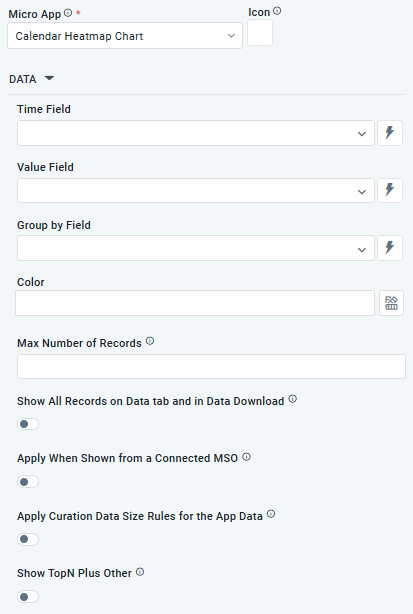
The Time Field allows the user to select an MSO Property that holds temporal information, such as dates or timestamps. This field is used to map and plot data in the calendar heatmap layouts. |
|
Dropdown w/Expression option |
|
The Value Field allows the user to select an aggregated value from an MSO Property (eg, Count)
|
|
Dropdown w/Expression option |
|
The Group By Field allows the user to select an MSO Property that defines categories for the data points. Grouping data enables the chart to display variations across categories within the most detailed calendar representation (typically an hourly view). |
|
Text Field w/Color Palette option |
|
The Color allows the user to select which color by Theme to use for the values in the chart. A gradient is automatically created within the Color selected. See Curation - Field Properties - Data Styles | Selection of Color. |
|
Number Field |
|
Option to set a Max number of records to be used by the chart. |
|
ON/OFF Toggle |
OFF |
If enabled, all records, otherwise excluded by the LIMIT clause when “Show TopN Plus Other” is enabled, and used by the App, will be shown on the App’s Data tab as well as in the Download Data option. |
|
ON/OFF Toggle |
OFF |
If enabled, the Apply When Shown from a Connected MSO ON/OFF Toggle determines whether the settings or actions are applied specifically when data is displayed through a connected MSO.
|
|
ON/OFF Toggle |
OFF |
If enabled, the Record Count rules are applied. If the criteria are not met, the series will not be displayed. |
|
ON/OFF Toggle |
OFF |
If Show TopN plus Other is enabled, the App will display only the Top N records and a single aggregated category representing all other records. An MSO Setting determines the number of records shown for the Top N in the Easy Answers section. If disabled, the App will display all records based on the user's query. |
STYLES Properties
|
Label |
UI Widget |
Default |
Description |
|---|---|---|---|
|
ON/OFF Toggle |
OFF |
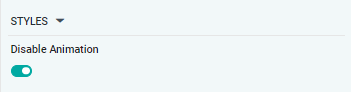
The Disable Animation toggle refers to turning off any animated transitions or effects that occur when the chart or visualization is rendered or updated. |
Contact App Orchid | Disclaimer