
Intended audience: analysts developers administrators
AO Platform: 4.5
Overview
Most Composers allow Versions to be created of the object being created/updated. All Versions are automatically recorded on the Version History page in the Composer’s Design area. This includes such objects as Ontologies, MSOs, Pipelines, Solutions, Insights, Pages, Applications, and Annotations. This page identifies where such Versions are created and where to find the Version History page in case an older Version of an object needs to be restored.
Save as Version
A user can explicitly save one or more designs/configurations as a Version using the Save as option in the Header of the Composer.
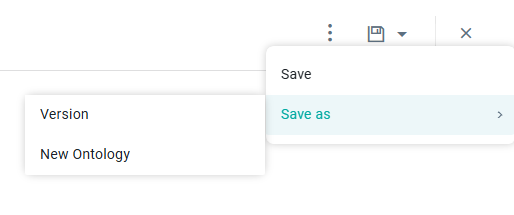
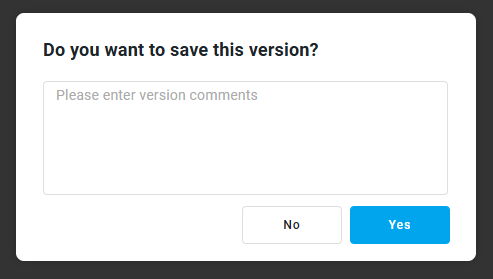
When creating an Ontology Version, users will be prompted to provide a Description only. The internal name of the Ontology Version will be generated as "Ontology Name + Version Number," but in the Version History panel, only the Version Number will be displayed as the Version's "Name."
Version History
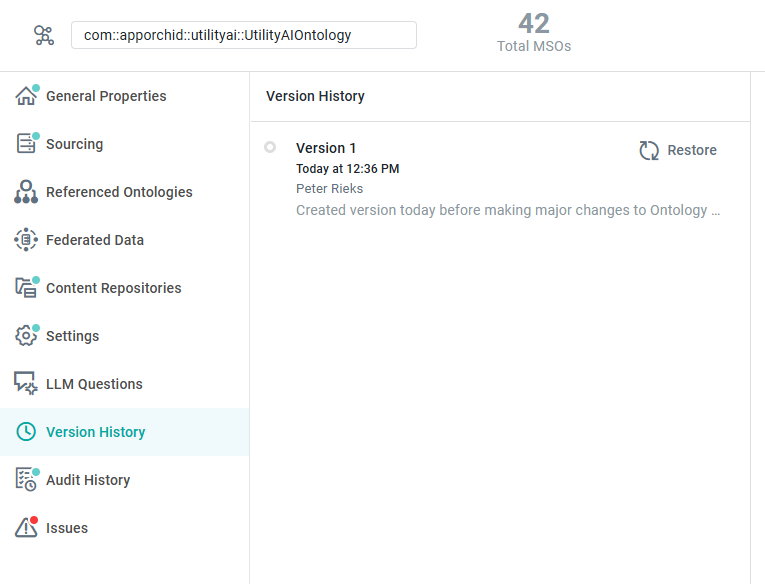
The Version History page will automatically be updated when a Composer object is saved as a Version, essentially creating multiple different versions (or snapshots) of objects over time.
-
Restore - this option only shows on hover of the item in the History list. Click Restore to replace the current design/configuration with the previously created version. If the current configuration has not been saved, a confirmation dialog will be shown.
-
Version Number - version number is automatically generated.
-
Timestamp - the date and time displayed when the version was generated.
-
Username - the name of the user who created the version.
-
Description - details of all modifications made in the version.
Please refer to Versions and Version History.
Contact App Orchid | Disclaimer