
Intended audience: end-users analysts developers administrators
AO Platform: 4.5
Properties for Easy Answers > Detail Views
Settings for Tables and Forms
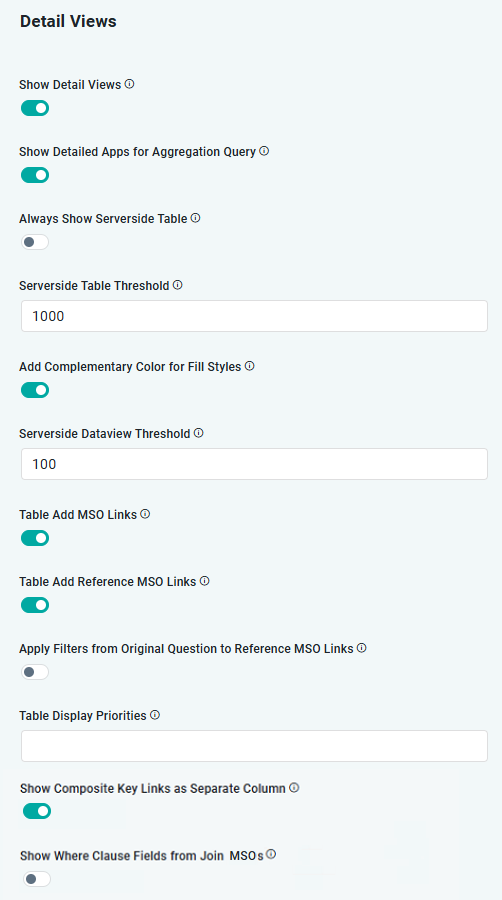
|
Label |
Type |
Default Value |
Description |
|---|---|---|---|
|
ON/OFF Toggle |
ON |
If enabled, Detail Views will be shown. |
|
ON/OFF Toggle |
ON |
If enabled, Detail Views will be shown for aggregation queries. |
|
ON/OFF Toggle |
ON |
If enabled, Table Apps will be forced to use a Server-Side table Micro App, including pagination. This may be required for some database data sources to ensure tables will render even on smaller data volumes. |
|
Number |
1,000 |
Switch to the Server-Side Table if the number of records in the App exceeds the number provided. |
|
ON/OFF Toggle |
ON |
If enabled, a complementary color will be added for text when background color styles are applied. |
|
Number |
100 |
Switch to the Server-Side Dataview if the number of records exceeds the number provided. |
|
ON/OFF Toggle |
ON |
If enabled, it will create links for values in the ID column that represent the MSO on which data is based. When clicked, the link opens the Single Entry dialog to display additional curated views specific to that ID. Eg, if the Easy Answers query is based on Meter Issues, the ID column MSO link will show specific information about the Meter Issues. |
|
ON/OFF Toggle |
ON |
If enabled, will create links for values in ID columns that represent one or more Referenced MSOs. When clicked, the link opens the Single Entry dialog to display additional curated views specific to the ID of the Referenced MSO. Eg, if the Easy Answers query is based on Meter Issues, but the query also includes data content from the Meter MSO and the Meter Installation MSO, then the ID columns representing Meter MSO and Meter Installation MSO will also have links that will open the Single Entry view for those referenced MSOs. |
|
ON/OFF Toggle |
OFF |
If enabled, any Filters from the original question will be applied to the records in the Detail View. |
|
Text |
|
This setting takes one or more Priority values as configured for individual MSO Field Properties. Eg, if the word High is specified, then only Field Properties with the Priority = High configured will be displayed in Table views. Applicable values include: High, Medium, Low, None. |
|
ON/OFF Toggle |
ON |
If enabled, an additional column with an eye icon will be added to the end of the table, and upon clicking, it will display data based on all composite keys. |
|
ON/OFF Toggle |
OFF |
If enabled, the Where Clause Fields will be shown alongside fields from the primary MSO in the Detail View. |
Contact App Orchid | Disclaimer