
Intended audience: end-users analysts developers
AO Platform: 4.5
Overview
The UI Composers are represented by this icon in the Solution menu:

The UI Composers is a collection of components that allow the user to create all the visual elements of an enterprise AI solution with the AO Platform. The composition of the solution elements is very flexible and provides for a great deal of customization in a solution, hence the many different components that are present in the overall UI Composer. Before using the UI Composer, it’s generally a prerequisite to have created Pipelines (with the Pipeline Composer) and MSOs (with the Ontology Composer), as the UI Composer elements will build on the foundation of data and ontologies.
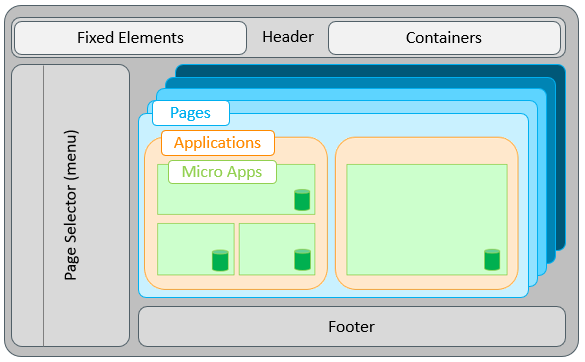
The following components make up the collection of UI Composers:
-
Solution Composer - The Solution Composer enables users to create and deploy Easy Answers solutions, which appear with their own solution icons and labels in the Solution menu.
-
Page Composer - the Page Composer allows the user to add Applications to a Page based on a configured Layout
-
Layout Composer - the Layout Composer allows the user to edit an existing (or create a new) Layout for use by
-
the Application Composer - Applications can contain one or more Micro Apps, so the Layout allows the user to more easily organize those Micro Apps within an Application
-
the Page Composer - Pages can contain one or more Applications, so the Layout allows the user to more easily organize those Applications with a Page
-
-
Template Composer - the Template Composer allows the user to create Templates for some types of Micro Apps, including Cue Cards and Data Views. Such Micro App Templates can be inserted into Applications
-
Application Composer - the Application Composer allows the user to assemble Applications that are made from one or more Micro Apps. A Micro App is the component that carries the data. A single Micro App can be a table, a chart, or some other UI element. Alternatively, users can group multiple Micro Apps into a single Application
-
Annotation Composer - the Annotation Composer allows the user to create a special kind of UI element, allowing a solution user to provide input at runtime about a specific piece of content on the screen. Such input could be a rating of the content, a sentiment, or even tags or descriptive words that create additional clarification or classification of the data element being annotated
Contact App Orchid | Disclaimer