
Intended audience: Data scientists developers administrators
AO Platform: 4.3
Overview
The Model Details page contains the most basic configuration properties for a model, including its Name, Model Type, Domain, Descriptions, and Tags.
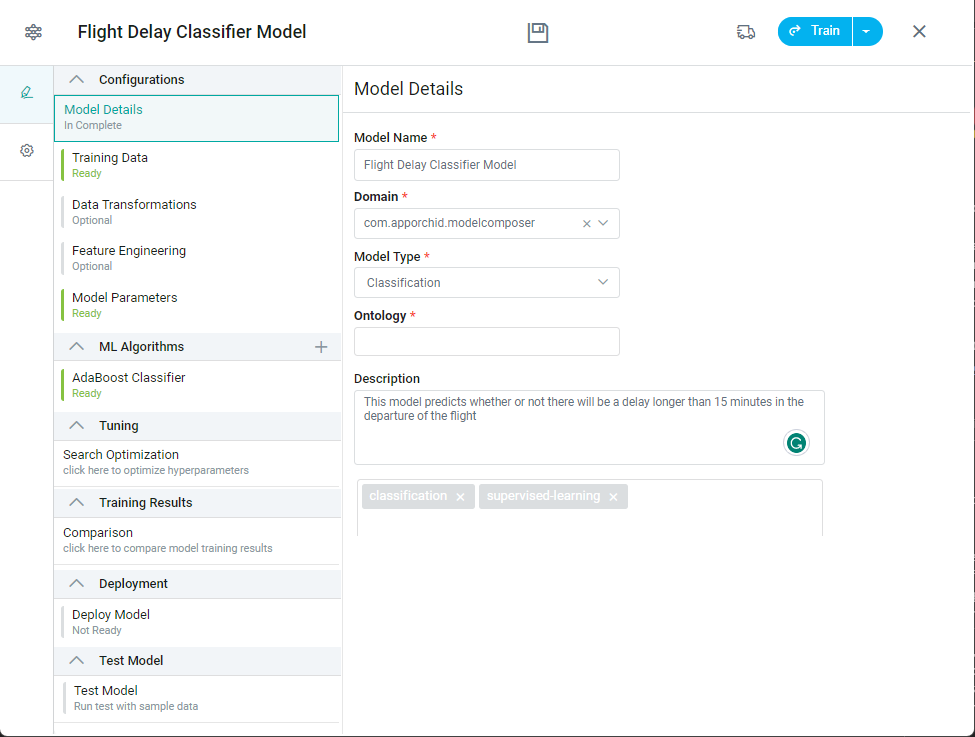
Properties
|
Label |
Description |
|---|---|
|
Model Name |
The Model Name is the named used to identify the configuration of a given model. All configured models will appear with their name on the Model Composer landing page as well as on the Download page if model is added to Transport. |
|
Domain |
Add the domain from dropdown to which the model relates. All objects in the AO Platform belongs to a domain. |
|
Model Type |
The Model Type allows user to select the type of model being configured to be trained. See Creating a Model | Model Types with Use Case Examples for details. Note: Others may be added in future releases. |
|
Ontology |
Select one or more Ontologies that this ML Model can be used with. |
|
Long Description |
Add Long Description to describe the purpose of the model being configured. |
|
Public |
Checkbox to enable/disable accessibility status for the ML Model, ie if disabled, the ML Model can only be seen/accessed by the current user, if Public, the ML Model is available for all users of the Model Composer. |
|
Tags |
Add any additional Tags to help when searching for models. |
Contact App Orchid | Disclaimer