
Intended audience: developers administrators
AO Platform: 4.4
Overview
The Search pages enable users to configure options specific to Elasticsearch and Solr integration.
Most of the pages in this section offer the following general actions:
-
Search/Filter - use a search term to find an entry from existing configurations.
-
Delete - batch deletion of any/all selected items.
-
Add New - create a new entry on the page.
-
Refresh - refreshes the page.
-
Import from Excel - allows the provision to import the configuration of one or more entries of the selected configuration page.
-
Download Data - exports the content of the page to a CSV or Excel file.
-
Settings - allows configuration of which columns can be seen on the page.
-
Go to (or select by page number) - allows moving to another page in case of too many entries for one page.
Additionally, these are the actions on individual entries:
-
View - views the properties of an entry in read-only mode.
-
Edit - allows the properties of an entry to be edited.
-
Delete - deletes an entry.
-
Add to Transport - adds the configuration record to Transport.
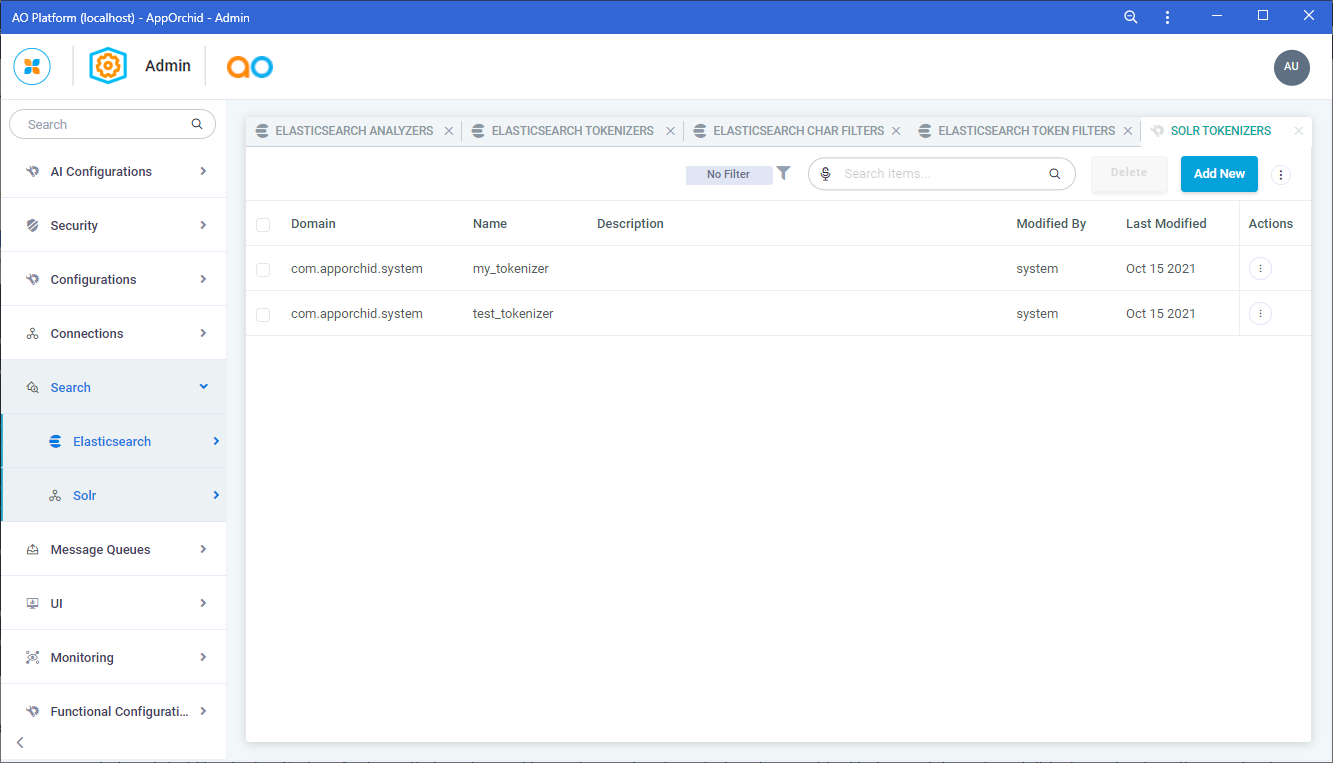
Elasticsearch > Analyzers
The Analyzers page includes a list of Standard or Custom Analyzers that can be used to create search indices. Text analysis enables Elasticsearch to perform full-text search, where the search returns all relevant results rather than just exact matches.
For a full Analyzer reference for Elasticsearch, see https://www.elastic.co/guide/en/elasticsearch/reference/current/analysis-analyzers.html.
Configuration details include Properties for these categories: General and Analyzer.
Elasticsearch > Tokenizers
The Tokenizers page includes a list of Standard or Custom Tokenizers.
A Tokenizer receives a stream of characters, breaks it up into individual tokens (usually individual words), and outputs a stream of tokens. For instance, a whitespace tokenizer breaks text into tokens whenever it sees any whitespace. It would convert the text "Quick brown fox!" into the terms [Quick, brown, fox!].
The Tokenizer is also responsible for recording the following:
-
Order or position of each term (used for phrase and word proximity queries)
-
Start and end character offsets of the original word which the term represents (used for highlighting search snippets).
-
Token type, a classification of each term produced, such as
<ALPHANUM>,<HANGUL>, or<NUM>. Simpler analyzers only produce thewordtoken type.
For a full Tokenizer reference for Elasticsearch, see https://www.elastic.co/guide/en/elasticsearch/reference/current/analysis-tokenizers.html.
Configuration details include Properties for these categories: General, Tokenizer, and Additional Properties.
Elasticsearch > Character Filters
The Character Filters page includes a list of Standard or Custom Character Filters.
Character Filters are used to preprocess the stream of characters before it is passed to the tokenizer.
A Character Filter receives the original text as a stream of characters and can transform the stream by adding, removing, or changing characters. For instance, a character filter could be used to convert Hindu-Arabic numerals (٠١٢٣٤٥٦٧٨٩) into their Arabic-Latin equivalents (0123456789), or to strip HTML elements like <b> from the stream.
For a full Character Filters reference for Elasticsearch, see https://www.elastic.co/guide/en/elasticsearch/reference/current/analysis-charfilters.html.
Configuration details include Properties for these categories: General, Char Filter, and Additional Properties.
Elasticsearch > Token Filters
The Token Filters page includes a list of Standard or Custom Token Filters.
Token Filters accept a stream of tokens from a tokenizer and can modify tokens (eg lowercasing), delete tokens (eg remove stopwords) or add tokens (eg synonyms).
For a full Token Filters reference for Elasticsearch, see https://www.elastic.co/guide/en/elasticsearch/reference/current/analysis-tokenfilters.html.
Configuration details include Properties for these categories: General, Token Filter, and Additional Properties.
Solr > Analyzers
The Analyzers page includes a list of Standard or Custom Analyzers that can be used to create search indices. An Analyzer examines the text of fields and generates a token stream.
For a full Analyzer reference for Solr, see https://solr.apache.org/guide/6_6/analyzers.html.
Configuration details include Properties for these categories: General and Analyzer.
Solr > Tokenizers
The Tokenizers page includes a list of Standard or Custom Tokenizers. Tokenizers are responsible for breaking field data into lexical units, or tokens.
For a full Tokenizer reference for Solr, see https://solr.apache.org/guide/6_6/tokenizers.html.
Configuration details include Properties for these categories: General, Tokenizer, and Additional Properties.
Solr > Character Filters
The Character Filters page includes a list of Standard or Custom Character Filters. Character Filters are components that pre-processes input characters.
For a full Character Filters reference for Solr, see https://solr.apache.org/guide/6_6/charfilterfactories.html.
Configuration details include Properties for these categories: General, Char Filter, and Additional Properties.
Solr > Token Filters
The Token Filters page includes a list of Standard or Custom Token Filters. Token Filters examine a stream of tokens and keep them, transform them or discard them, depending on the filter type being used.
For a full Token Filters reference for Solr, see https://solr.apache.org/guide/6_6/filter-descriptions.html.
Configuration details include Properties for these categories: General, Token Filter, and Additional Properties.
Contact App Orchid | Disclaimer