
Intended audience: developers administrators
AO Platform: 4.4
Overview
Value-Based Synonyms are part of the MSO Linguistics enrichment options, adding values from fields in a database table to the vocabulary that makes the natural language questions by users in Easy Answers understood and supports the interpretation by LLM to ensure optimized responses.
This topic explains the importance of this enrichment, the various options available, as well as guidance on the naming conventions.
Why Is This Important
Storing database values with low cardinality for applicable MSO Properties, as well as having the flexibility to add both Synonyms for those values and even Word Rules as part of the Ontology’s Linguistics enrichment, makes it many times faster to retrieve the values and provide such values as part of the context and prompt instructions to the LLM in order for the LLM to interpret and convert the natural english language question asked by the user into a Semantic SQL response that is used to retieve the actual database content for the response(s) provided.
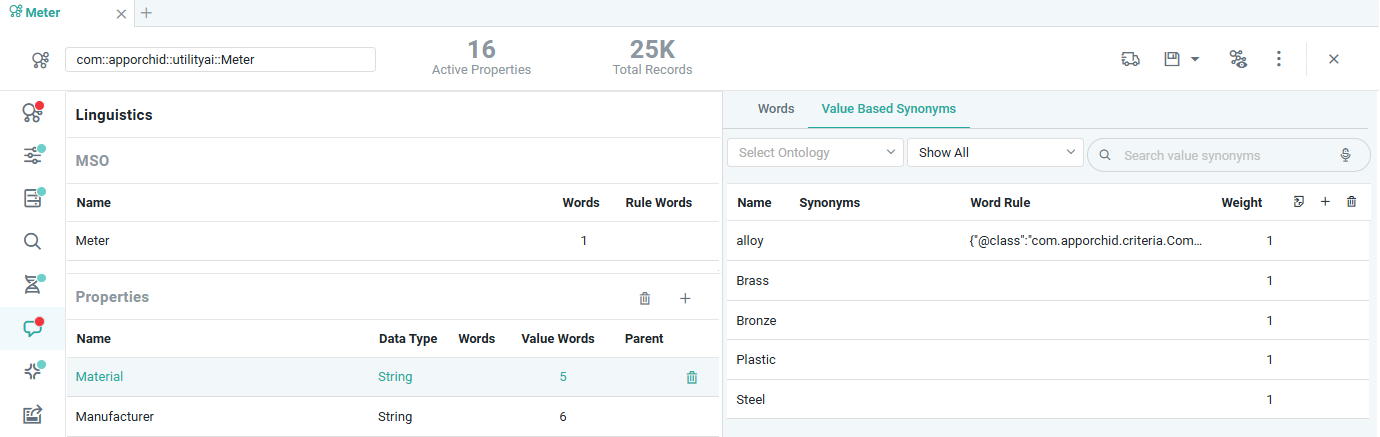
Using the example from the Material configuration in the screenshot in the Overview section above, it means that a user can now ask the simple question: “show all plastic meters”, and the LLM would understand that “plastic” is a Value-Based Synonym for the “material” MSO Property in the “meter” MSO.
Creating Value-Based Synonyms is very easy, but please consider the General Guidelines in the What To Do section below to create the best possible Linguistics enrichment configuration for the MSOs in an Ontology.
What To Do
There are two methods by which Value-Based Synonyms can be created:
-
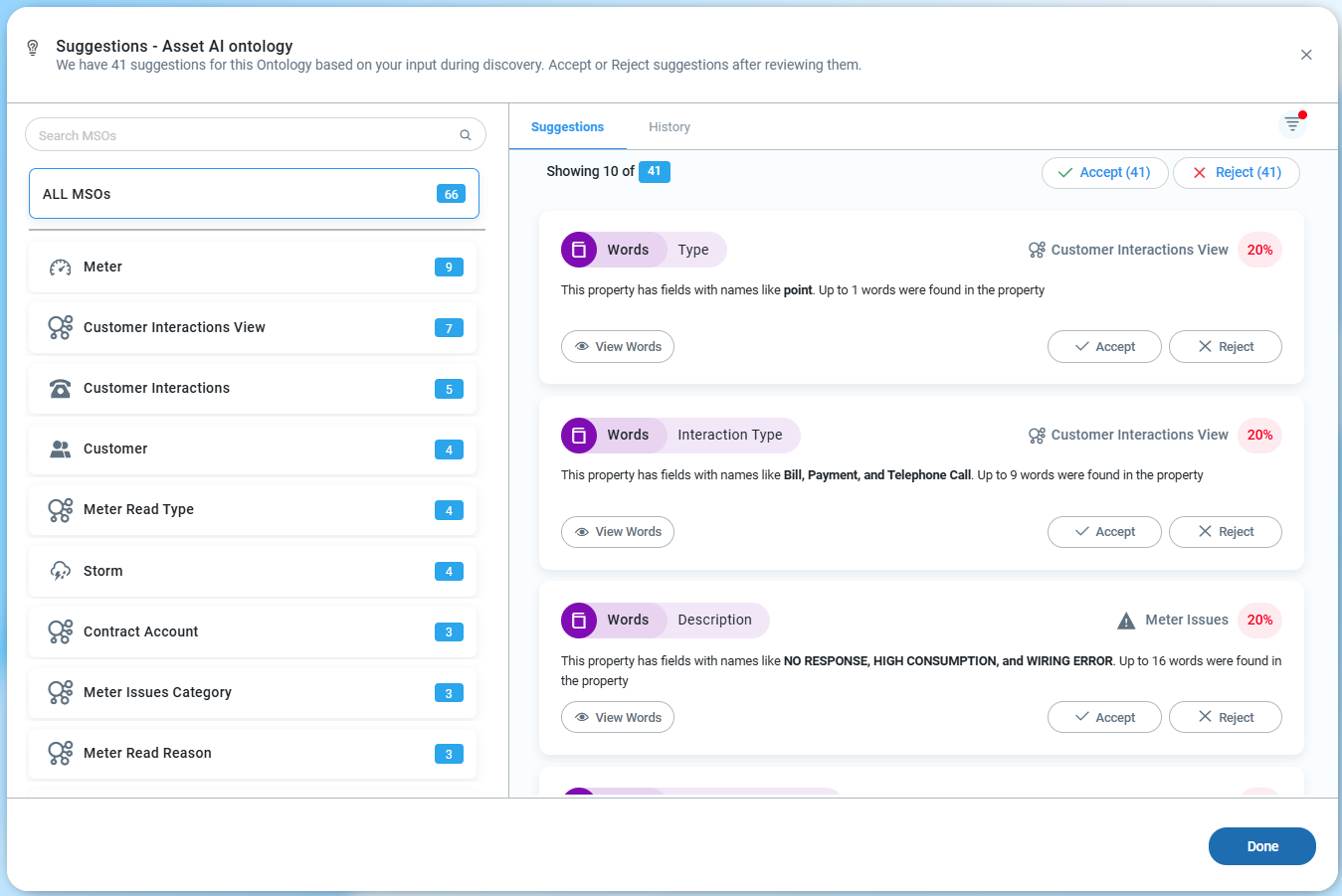
Using the Discover Words option in the Ontology Options menu, in the Discover section. Once the Discover Words process has run, the found Value-Based Synonyms will be shown in the View Suggestions dialog - also available from the Ontology Options menu.
-
Using the MSO Composer’s Linguistics page. Add and select any MSO Property on this page to reach the Value-Based Synonyms tab in the right-side panel.
View Suggestions dialog for Words across all MSOs - allowing users to easily Accept or Reject possible Value-Based Synonyms.
Linguistics page in MSO Composer showing Value-Based Synonyms for an MSO Property
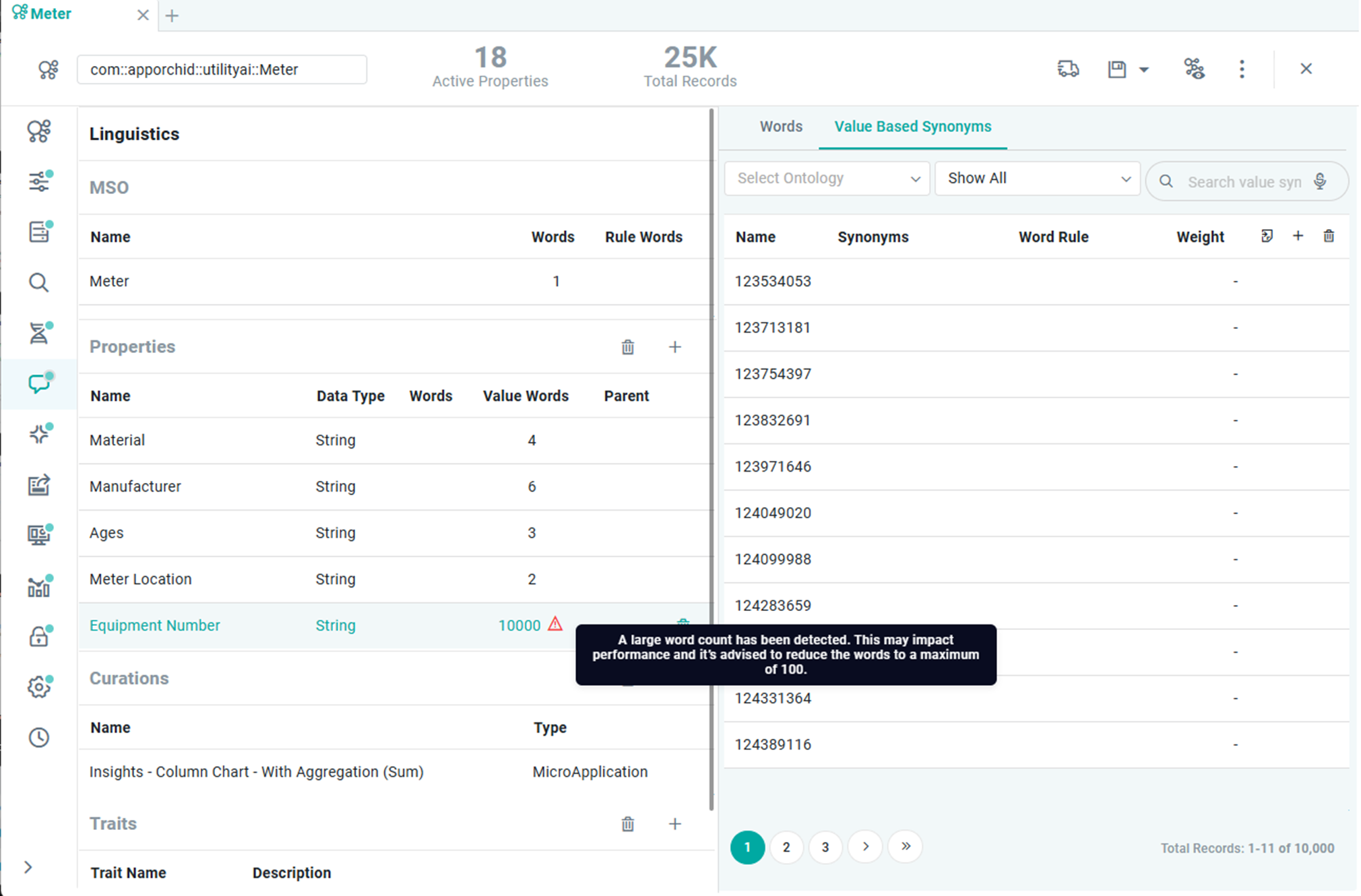
The Value-Based Synonyms tab allows users to add individual Synonyms or import values from the data source property as Synonyms (Sourcing of the MSO is required). The latter will quickly enable the “dictionary” used by Easy Answers, allowing for a better understanding of user questions. Additional Synonyms can be added for each entry found in the data source, as well as Word Rules that are more complex configurations based on criteria.
Example: A property "Premise Type", which has values "Residential", "Commercial", "Industrial" in the data source, can be configured with the following additional synonyms:
-
Residential: "Home” and “House”.
-
Commercial:“ Store” and “Office”.
-
Industrial: “Factory" and “Plant”.
Once Value-Based Synonyms have been added, the user can search for specific Synonyms or filter the list of Synonyms based on the following options:
-
Show All - view all Value-Based Synonyms created manually or imported from values in the Data Source (default).
-
Show only entries with Synonyms - view entries with additional Synonyms added.
-
Show only entries with Word Rules - view entries with additional Word Rule(s) added.
General Guidelines
When adding value-based synonyms, follow these guidelines.
-
Low Cardinality: Only add value-based synonyms for fields with a limited number of unique values (eg, less than 100).
-
Avoid Long Phrases: Do not use value-based synonyms for text fields with long phrases (eg, product names or company names).
-
Single Characters: Avoid using value-based synonyms for single character-based fields (eg, `C`, `A`). Use rule-based synonyms instead.
-
No Numeric Fields: Avoid value-based synonyms for numeric fields.
-
Handle Duplicates: Review synonyms and delete duplicates. If cases vary (eg, `CA`, `California`, `california`), define one synonym (e.g., `CA`) and list alternates.
-
Unique Synonyms: Avoid using the same synonym across multiple values unless necessary with an OR condition. Ensure synonyms are unique across different fields.
-
High Cardinality - Don’t configure value synonyms for properties with high cardinality. Any MSO Property with Value-Based Synonyms imported with a record count higher than 100 will be “flagged” with an alert triangle icon in the UI.
-
Collision - Don’t configure the same value synonym for more than one MSO Property from the same or different MSO.
-
Alternate Word & Synonym – An alternate word should be used in a criterion; a synonym should not.
-
Value Synonyms for Categorical – Value synonyms should only be configured for MSO properties that are categorical in nature or have a Categorical trait.
-
Avoid Single-Character Value Synonyms – As that may lead to a lot of false positive matches with common English words like “a”, “i”, and some other determinants as well.
-
6 Gram Value Synonyms – Value synonyms spanning up to 6 words are supported as of now.
-
Configure Appropriate Way – Ideally, we should configure things to where they belong, eg, “meters” should be configured as the plural for Meter MSO, not as synonyms, even though functionally it won’t make a difference. The same is true for abbreviations.
-
Use Double Quotes For Text Matching – It’s a good practice to always wrap the text phrase with which matching needs to be done within “”.
-
Don’t Add Reserved Words - Avoid reserved words for the naming of objects, especially Common MSO names and logical operators. See the full list on the Reserved Key Words page in the Generative AI section of the Admin solution. Some examples:
-
AO Reserve Words: Operators, eg, greater_than)
-
Temporal Reserve Words: Q1, Q2 … FY.
-
Spatial Reserve Words: miles, kilometers.
-
Stopwords: “Or”, “And”, “The”.
-
-
Display Names - never have 2 MSOs with the same Display Name.
-
Non-meaningful names, typos, or short forms - LLMs get confused and tend to auto-correct them. (For example, “Customer Information” instead of “Custmer Infomation”, “Cust Info”).
-
Ignore Case - use if data values are mixed case.
References
Contact App Orchid | Disclaimer