
Intended audience: end-users developers
AO Platform: 4.3
Overview
This page will show the History for all scheduled Insights configured. This page focuses on allowing the Solution Developer to validate the generation of the Quick Insights over time.
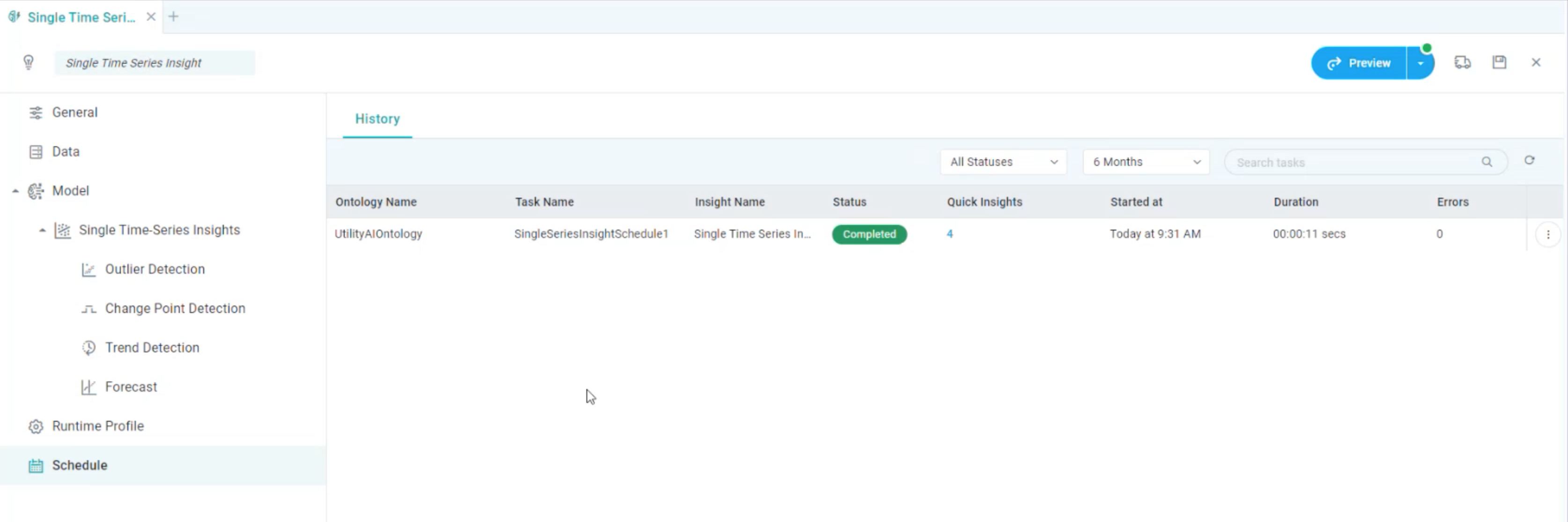
Properties
|
Label |
UI |
Default |
Description |
|---|---|---|---|
|
Status |
Dropdown |
All Statuses |
Show a list of possible Status indicators for the executed tasks, including:
|
|
Time Period |
Dropdown |
6 Months |
Show a list of possible predefined Time Periods, including:
|
|
Search Tasks |
|
|
Search for any item on the History list. |
|
Refresh |
|
|
Click to Refresh the History list. |
|
Table of all Scheduled and Executed Tasks |
|
|
|
Options menu
-
View Insight Result - click to open a dialog showing the Preview of all generated Quick Insights for the selected item.
Contact App Orchid | Disclaimer