
Intended audience: end-users analysts developers administrators
AO Platform: 4.3
Overview
On the Ontologies home page, click the Discover Ontology button to open a wizard-driven workflow to fast-track populating an Ontology with MSOs created from a schema-based data source and additional enrichments using an automated discovery process. Once an Ontology has been created, users can also access the wizard-driven workflow again for the existing Ontology via the Discover Data Sources icon on the Ontology card.
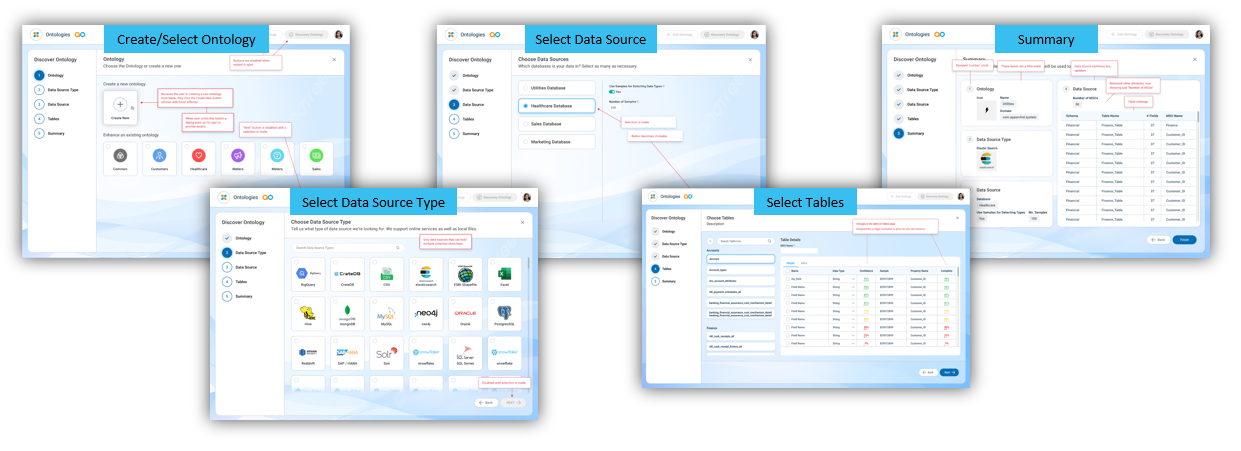
Discover Ontology Wizard
The wizard has the following 5 key steps:
-
Step 1 - Ontology - create (or select) an Ontology
-
Step 2 - Data Source Type - select a Data Source Type
-
Step 3 - Data Source - select a Data Source
-
Step 4 - Tables (or Sheets) - select Tables (and Fields in Tables)
-
Step 5 - Summary - validate and start the Ontology creation
Contact App Orchid | Disclaimer