
Intended audience: analysts developers administrators
AO Platform: 4.3
Overview
This topic contains the Parameters configuration section of the Linguistic Entity Extractor Strategy. For text data where it is hard to capture entities using a simple RegEx, the Linguistic expression/Linguistic regex can help. Different types of regex, such as Tregex, Token RegEx, Semi RegEx and simple Java RegEx can be combined into a single “Linguistic Group ID”.
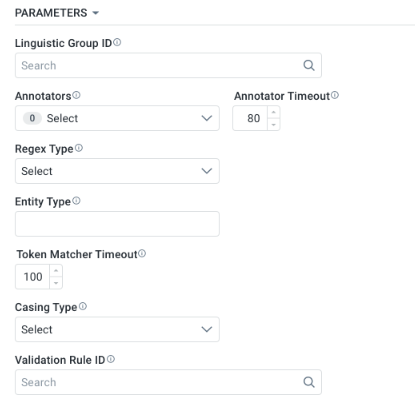
Properties
|
Label |
Description |
|---|---|
|
Linguistic Group ID |
Search dialog - the Linguistic Group ID will reference a Linguistic Group containing Filter, Entity and Value regex configurations available from the Admin solution page: Linguistic Group Expressions in the AI Configurations > NLP section.
|
|
Annotators |
Multi-select Dropdown. Example value: parse |
|
Annotator Timeout |
Text Field - number value - default 100 - increment of 5 |
|
Regex Type |
Dropdown. Example value: Tregex |
|
Entity Type |
Default is capitalized value of Property Name, eg. BUYER_LIABILITY_CAP_DESCRIPTIVE_AMOUNT |
|
Token Matcher Timeout |
Text Field - number value - default 100 - increment of 5 |
|
Casing Type |
Dropdown. Example value: LowerCase |
|
Validation Rule ID |
Search dialog - the Validation Rule ID will reference one or more Validation regex configurations available from the Admin Solution page: Linguistic Rule in the AI Configurations > NLP section.
|
Also see Testing Strategies.
Contact App Orchid | Disclaimer