
Intended audience: analysts developers administrators
AO Platform: 4.3
Overview
This section contains basic properties for the MSO, including Name/Plural Name, Icon, Description, Domain, Ontology, and if MSO is inherited from another MSO. An MSO is an object that contains the structure of fields that can be enriched by adding functions and behaviors. An MSO becomes a node in the Ontology it belongs to, and together with other MSOs, it simulates real-world objects, their relationships, and interactions.
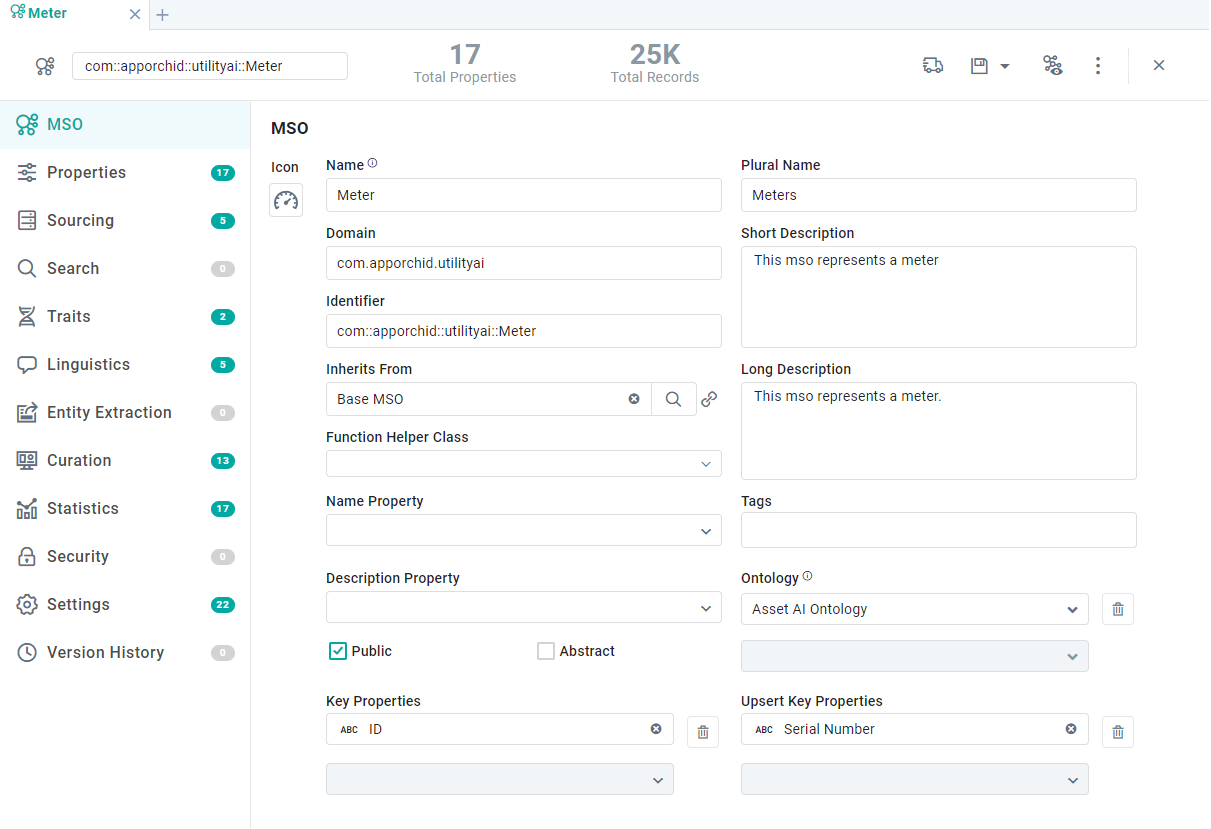
Properties
|
Label |
UI Widget |
Default |
Description |
|---|---|---|---|
|
Icon |
Icon |
|
A unique icon can be associated with the MSO; otherwise, use the default icon. |
|
Name |
Text Field |
|
The Name field displays the given name of the MSO. |
|
Plural Name |
Text Field |
|
The Plural spelling of the MSO’s Name property. |
|
Domain |
Text Field |
|
The Domain identifies which domain this object, the MSO, belongs to. The Domain is an organizing principle for all types of objects in the system. The format is typically: com.organization.component.subcomponent |
|
Identifier |
Text Field |
|
The identifier is a combination of the Domain and Name of the MSO. |
|
Inherits From |
Text Field w/Search |
|
Inherits properties from a parent MSO identified by searching the list of existing MSOs. The link icon displays the parent MSO properties on a new tab in the Browser. The MSO being configured will include the inherited Parent MSO properties along with its own properties. |
|
Function Helper Class |
Dropdown |
|
This is a custom Java class that can be associated with one or more MSOs. A class contains methods which can be used by other MSO configuration properties where a special function/calculation is needed. For example, the method could be calculating the age of an asset by subtracting today’s date from the “installation date” data property. |
|
Name Property |
Dropdown |
|
The Name Property dropdown displays a list of the MSO field properties. Select the property that will best and uniquely describe the names of the objects that the MSO represents. This field is optional. If no property is selected, typically an ID field is used by default. |
|
Description Property |
Dropdown |
|
The Description Property dropdown displays a list of the MSO field properties. Select the field (if available) that contains a description of the objects that the MSO represents. |
|
Public |
Checkbox |
Checked |
When checked, the Public checkbox determines that all users can view and access the MSO. Leave unchecked, and the MSO is considered Private to the user creating it. |
|
Abstract |
Checkbox |
Unchecked |
Check the Abstract checkbox if the MSO is a base MSO, i.e., used as a “parent” for other MSOs inheriting its properties. |
|
Key Properties |
Dropdown - Repeater |
|
Select one or more properties from the dropdown to identify which properties are used as a single or composite key. When selected, a “key” icon is shown in the Attributes column for the field property/ies on the Properties page. |
|
Short Description |
Multi-Line Text Field |
|
The Short Description field displays a brief description of the MSO. This description is used in Search dialogs in other areas of the product, where there’s a need to search for an MSO. |
|
Long Description |
Multi-Line Text Field |
|
The Long Description field displays a longer, more explanatory description of the MSO, providing additional clarification on the use of the MSO. |
|
Tags |
Tags |
|
The Tags are additional search terms to search the MSOs easily. |
|
Ontology |
Dropdown |
|
The Ontology dropdown field includes predefined Ontologies to which the MSO can belong. Select one or more Ontologies for the MSO being edited. |
|
Upsert Key Properties |
Dropdown - Repeater |
|
Select one or more field properties to create a distinct Upsert Key to identify unique data during insert/update of records when adding data to a Data Sink. |
Contact App Orchid | Disclaimer