
Intended audience: end-users developers
AO Platform: 4.4
Causal Inference
The Model tab generally includes one or more of the following sections:
-
Data Fields - these are the data field configuration properties mandatory for the model to execute.
-
Model Specific Configurations - configuration properties in this section will vary depending on the selected model. If the model does not require additional configuration, the section(s) will not be shown.
Configuration
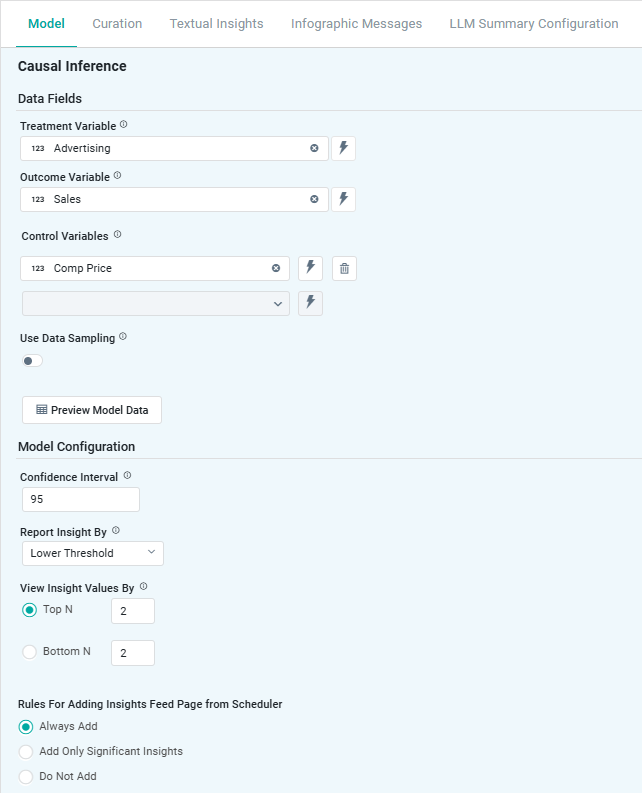
Properties
|
Label |
UI |
Default |
Description |
|---|---|---|---|
|
Data Fields |
|
|
|
|
Dropdown w/Expression |
|
Select a Topic field of Boolean data type that resolves to True. The Treatment Variable (This) will be considered for causing an impact on the Outcome Variable (That), ie, “This” causes “That”. Note: If no Boolean data type properties are available, the solution developer can create derived properties as Boolean data type with criteria defining true/false values. This is done in the MSO Composer on the Properties page. The records selected for True values will be used to assess how they impact the Topic field selected for the Outcome Variable. Note: To ensure that display names are suitable for the output of the Quick Insight, the solution developer can use MSO Composer > Properties > Data Styles to create suitable display names. |
|
Dropdown w/Expression |
|
Select a Topic field (That) which will be considered to be impacted by the Treatment Variable (This), ie, “That” caused by “This”. A Topic field can be selected that will be considered for impact by the Treatment Variable. Users can select either a Boolean property or a property with continuous values. |
|
Dropdown w/Expression |
|
Repeater section allowing the selection of multiple Control Variables. |
|
ON/OFF Toggle |
OFF |
|
|
Number Field |
100 |
The Data Sampling (%) only shows if Use Data Sampling is ON. |
|
Dropdown w/Expression |
|
The Sampling Partition Fields only show if Use Data Sampling is ON. |
|
Dropdown w/Expression |
|
The Sampling Order By Fields only shows if Use Data Sampling is ON. |
|
Button |
|
Opens a dialog to view the data that will be used by the model. See Model > Model tab | Preview Model Data Dialog. |
|
Model Configuration |
|
|
|
|
Number field |
95 |
Range from 90 to 100. |
|
Dropdown |
Lower Threshold |
Options are:
|
|
Radio-buttons |
Top N - 2 |
Select either Top N or Bottom N. In either case, the default value is 2. |
|
Rules for Adding Insight to Insights Feed Page from Scheduler |
Radio-buttons |
Always Add |
This section allows the user to select if the Quick Insight will be added to the Insights Feed page when generated from a Scheduled Task. See Model > Model tab | Rules for Adding Insights Feed Page from Scheduler. |
Contact App Orchid | Disclaimer