
Intended audience: end-users analysts developers
AO Platform: 4.3
Overview
This section contains an overview of the General Properties on the Curation page of the MSO configuration.
General Properties
The General Properties section is used to configure a few properties, such as icon and icon color, based on field properties added in the Field Properties section of MSO Curation. These properties will represent the MSO when used in different visualizations, such as placemarks on a Map.
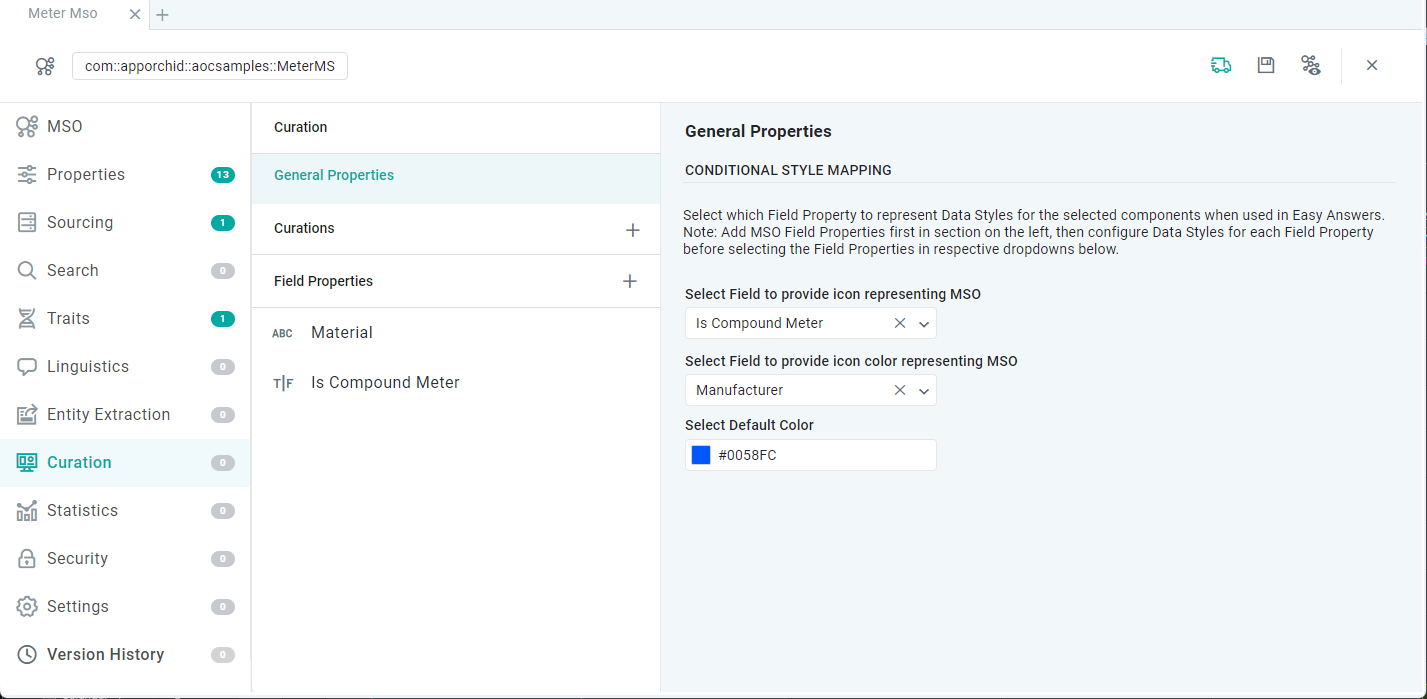
Properties
|
Label |
Description |
|---|---|
|
Select Field to provide icon representing MSO |
The field property selected for icon can be configured on the Data Styles tab after selecting the relevant property in the Field Properties section. If no Field is selected in the dropdown, the Default Color will be used. |
|
Select Field to provide icon color representing MSO |
The field property selected for icon color can be configured on the Data Styles tab after selecting the relevant property in the Field Properties section. If no Field is selected in the dropdown, the Default Color will be used. |
|
Select Default Color |
If no other color has been configured to represent the MSO, the Default Color will be used. |
Contact App Orchid | Disclaimer