
Intended audience: end-users analysts developers administrators
AO Platform: 4.3
Properties for Insights > General
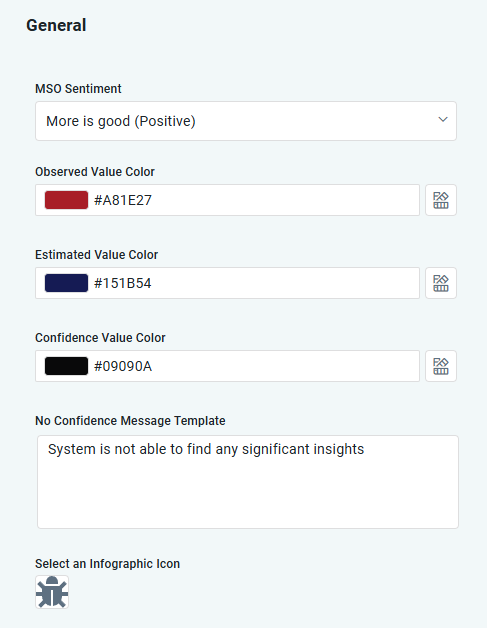
Properties
|
Label |
Type |
Default Value |
Description |
|---|---|---|---|
|
MSO Sentiment |
Dropdown |
More is good (Positive) |
Options to describe what a bigger number describes in Quick Insight, including:
|
|
Observed Value Color |
Color |
#A81E27 |
Select the Color option for the Observed data values in a Quick Insight Chart relative to the “All Themes” choice in the Themes selection dialog. |
|
Estimated Value Color |
Color |
#151B54 |
Select the Color option for the Estimated data values in a Quick Insight Chart relative to the “All Themes” choice in the Themes selection dialog. |
|
Confidence Value Color |
Color |
#09090A |
Select the Color option for the Confidence data values in a Quick Insight Chart relative to the “All Themes” choice in the Themes selection dialog. |
|
No Confidence Message Template |
Multiline Text Field |
System is not able to find any significant insights |
The message shown for Quick Insights where no specific conclusion can be made for an Insight. |
|
Infographic Icon |
Icon |
|
Some Infographic cards make use of an icon to represent the outcome/target value from the Quick Insight. Select an icon to best represent the outcome/target value. |
Contact App Orchid | Disclaimer