
Intended audience: end-users analysts developers administrators
AO Platform: 4.4
Cached MSOs
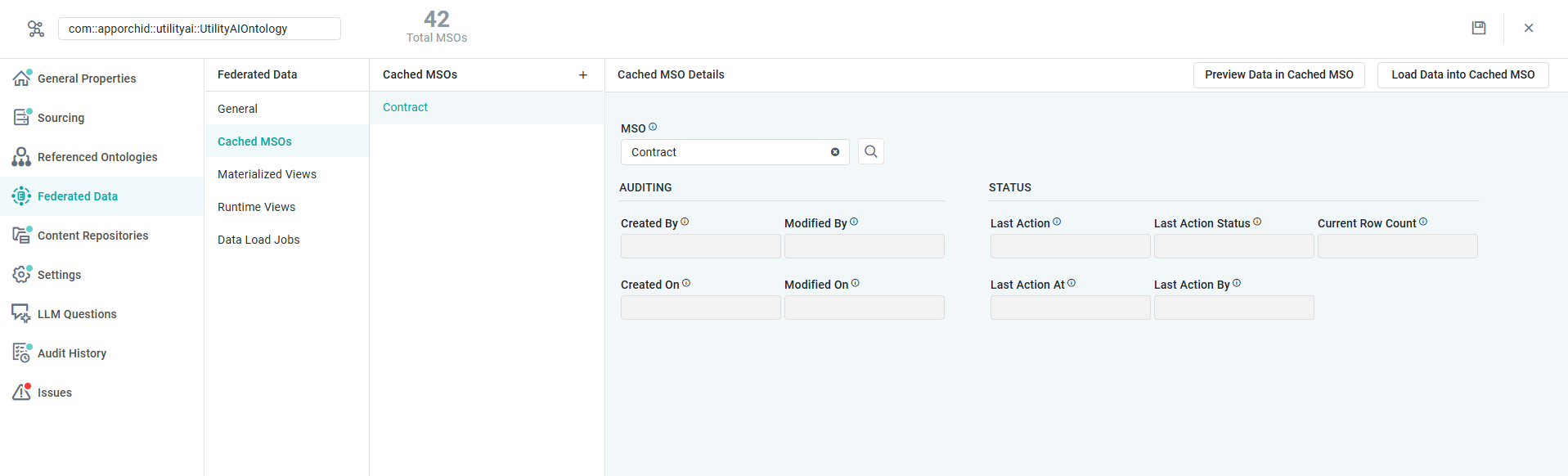
This page includes the configuration for one or more Cached MSOs that can be created to persist data retrieved from the federated environment using either Build the Query or Advanced mode. In other words, it’s a way to eliminate long-running processes retrieving data in a federated environment in a live production environment, but instead loading data from one or more MSOs into Cached MSOs that can then be accessed “locally” to the AO Platform. Such Cached MSOs can be refreshed both manually and on schedule.
Properties
|
Label |
UI Widget |
Default |
Description |
|---|---|---|---|
|
Cached MSOs |
|
|
Repeater section |
|
Icon |
|
Click to create a new Cached MSO. |
|
Read-Only Text Field |
|
Displays the name for the configuration of a Cached MSO. |
|
Icon |
|
Click to delete a configured Cached MSO. |
|
Cached MSO Details |
|
|
|
|
Button |
|
Click to display the data from the Cached MSO. |
|
Button |
|
Click to run the process that loads data from the original MSO into the Cached MSO. |
|
Text Field w/Search |
|
Enter the Name of the Cached MSO that will be created. |
|
AUDITING |
|
|
|
|
Read-Only Text Field |
<empty> |
Displays the user name of the user who created the Cached MSO. |
|
Read-Only Timestamp Field |
<empty> |
Displays the timestamp for when the Cached MSO was created. |
|
Read-Only Text Field |
<empty> |
Displays the user name of the user who modified the Cached MSO. |
|
Read-Only Timestamp Field |
<empty> |
Displays the timestamp for when the Cached MSO was modified. |
|
STATUS |
|
|
|
|
Read-Only Text Field |
<empty> |
Displays the most recent Action performed. Options include: Cached MSO Refreshed, Cached MSO Dropped. The Field will be empty if the Last Action Status is Not Started. |
|
Read-Only Text Field |
Not Started |
Displays the status from the Cached MSO process. Options include: Not Started (black), In Progress, Completed, Failed. |
|
Read-Only Timestamp Field |
<empty> |
Displays the timestamp for when the Cached MSO was most recently refreshed. The field will be empty if the Last Action Status is Not Started. |
|
Read-Only Text Field |
<empty> |
Displays the user name of the user who started the most recent process. The field will be empty if the Last Action Status is Not Started. |
|
Read-Only Number Field |
<empty> |
Displays the number of records loaded into the Cached MSO. If Last Action Status resulted in Failed or Not Started, the field will be empty. |
Contact App Orchid | Disclaimer