
Intended audience: end-users analysts developers administrators
AO Platform: 4.3
Overview
This section provides an overview of a Simple Treetable for a Curation Micro Application. A Simple TreeTable combines the flexibility of a table with the structure of a tree, making it an excellent choice for displaying hierarchical data.
Example
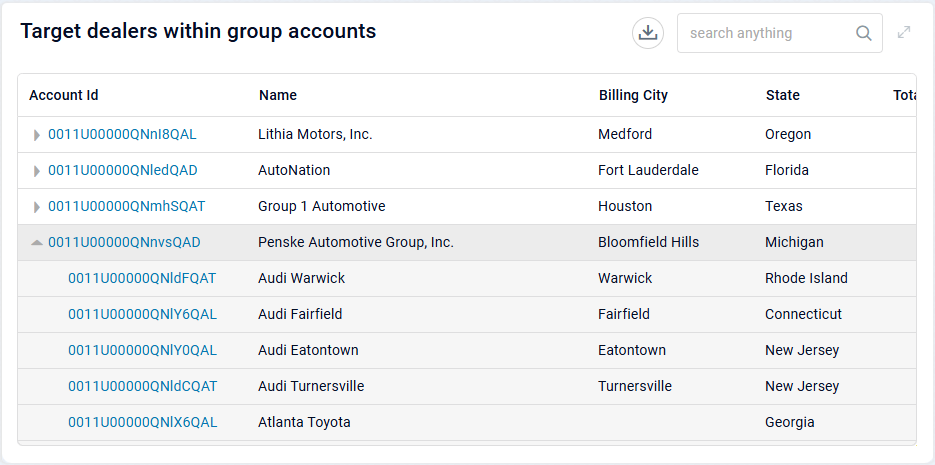
Configuration of Simple Treetable
DATA Properties
|
Label |
Description |
|
|
|---|---|---|---|
|
Dropdown w/Expression option |
|
|
|
Dropdown w/Expression option |
|
|
|
Dropdown w/Expression and Additional Properties option |
|
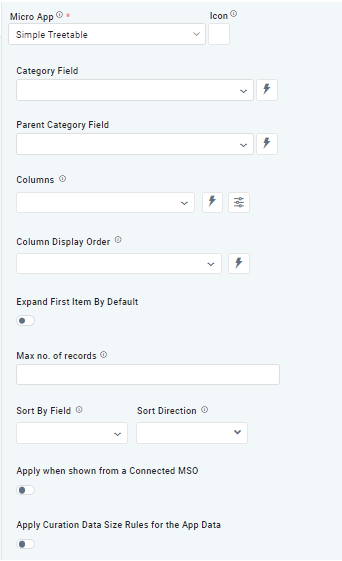
The Column dropdown allows users to select one or more MSO field properties to be included in the Table App. |
|
Dropdown w/Expression option |
|
The Column Display Order allows users to select the display order for one or more selected MSO Field Properties. |
|
ON/OFF Toggle |
OFF |
If enabled, allows users to expand the first item by default. |
|
ON/OFF Toggle |
ON |
If enabled, allows users to display data by parent category. |
|
Number Field |
|
Option to set a Max number of records to be used by the Chart. |
|
ON/OFF Toggle |
ON |
If enabled, the App will show the App Header with an Icon and Title. If disabled, only the visual component from the Template will be shown. |
|
Dropdown w/Expression option |
|
The Sort By Field option allows users to select a field to sort the data and also provides the flexibility to define a custom expression for more advanced sorting criteria. |
|
Dropdown |
|
Option to set the Sort order for data in the Chart to either Ascending or Descending. |
|
ON/OFF Toggle |
OFF |
The Apply When Shown from a Connected MSO ON/OFF Toggle determines whether the settings or actions are applied specifically when data is displayed through a connected MSO.
|
|
ON/OFF Toggle |
OFF |
If enabled, the Record Count rules will be applied. The series will not be shown if the Record Count rules are not met. |
Contact App Orchid | Disclaimer