
Intended audience: developers administrators
AO Platform: 4.4
Overview
This topic is not strictly required for most “starter Ontologies”; however, there are good reasons why it may be useful to follow the Best Practice guidance in this topic to improve and optimize the Ontology/Semantic Layer for the more complex or advanced configurations and use cases, which will go towards better design, performance, and LLM accuracy - all improving existing database data models through the Semantic Layer without touching the underlying database data sources.
When creating an Ontology and adding Tables and Fields from a database Schema, the initial configuration often starts as a one-to-one relationship between the original database data Tables and Fields and the Ontology representation’s MSOs and MSO Properties. Even existing keys are created “as is” from the source tables. This initial configuration can often be improved by implementing the guidance provided below.
Why Is This Important
Here are some reasons why “redesigning” or “restructuring” the Ontology may be beneficial relative to its representation of associated database data sources:
Federation for Access to Multiple Different Data Source Types
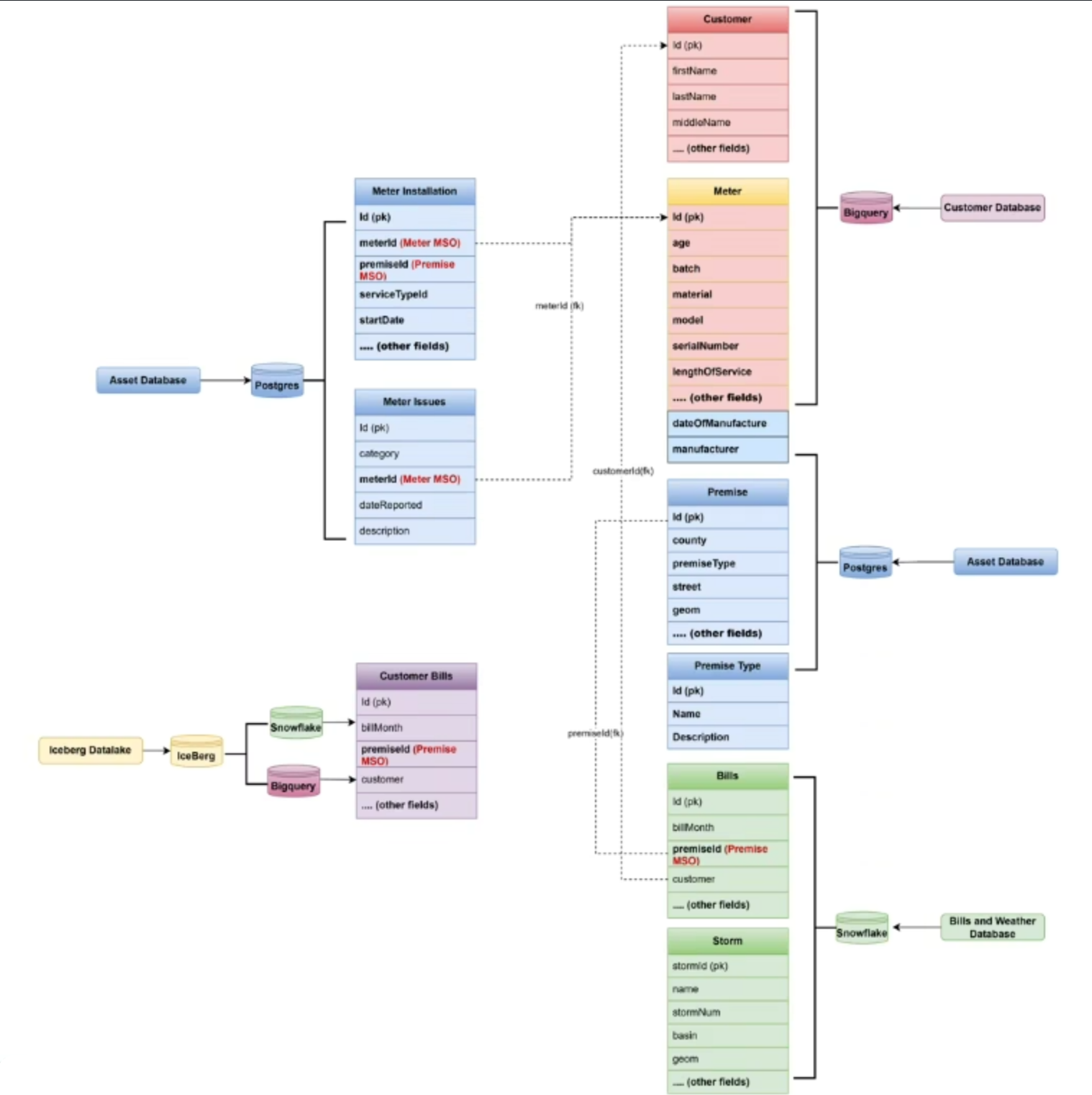
The Ontology is connected to multiple database data source types - this case likely requires the use of the Federated Data configuration. Related to Federated Data configuration, configure one MSO with MSO Properties from more than one data source!
Reduce Duplication of Data - Apply Normal Forms
The Ontology is connected to a database schema that doesn’t follow the Normal Forms recommendations, as relating to the normalization and structure of Tables and Keys - create MSOs that have been optimized to support Normal Forms, thereby minimizing duplication of data, which is key to reducing ambiguities when user questions in Easy Answers are interpreted by LLM.
Referenced Ontologies and Inheritance
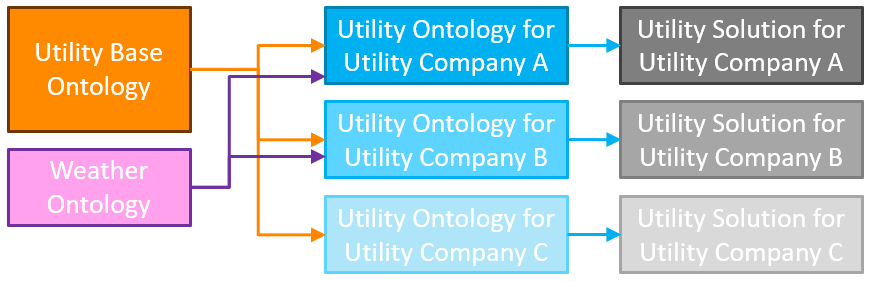
For Solution Developers who create multiple Ontologies for different solutions for a common domain, a “base” or “parent” Ontology can be created with all common MSOs and MSO Properties that become referenced by a customer-specific Ontology, only containing any unique MSOs for the customer. This ensures consistency in the data model for a given domain and is less error-prone due to all common MSOs and MSO Properties being created in a single, centralized Ontology.
Using Common MSOs
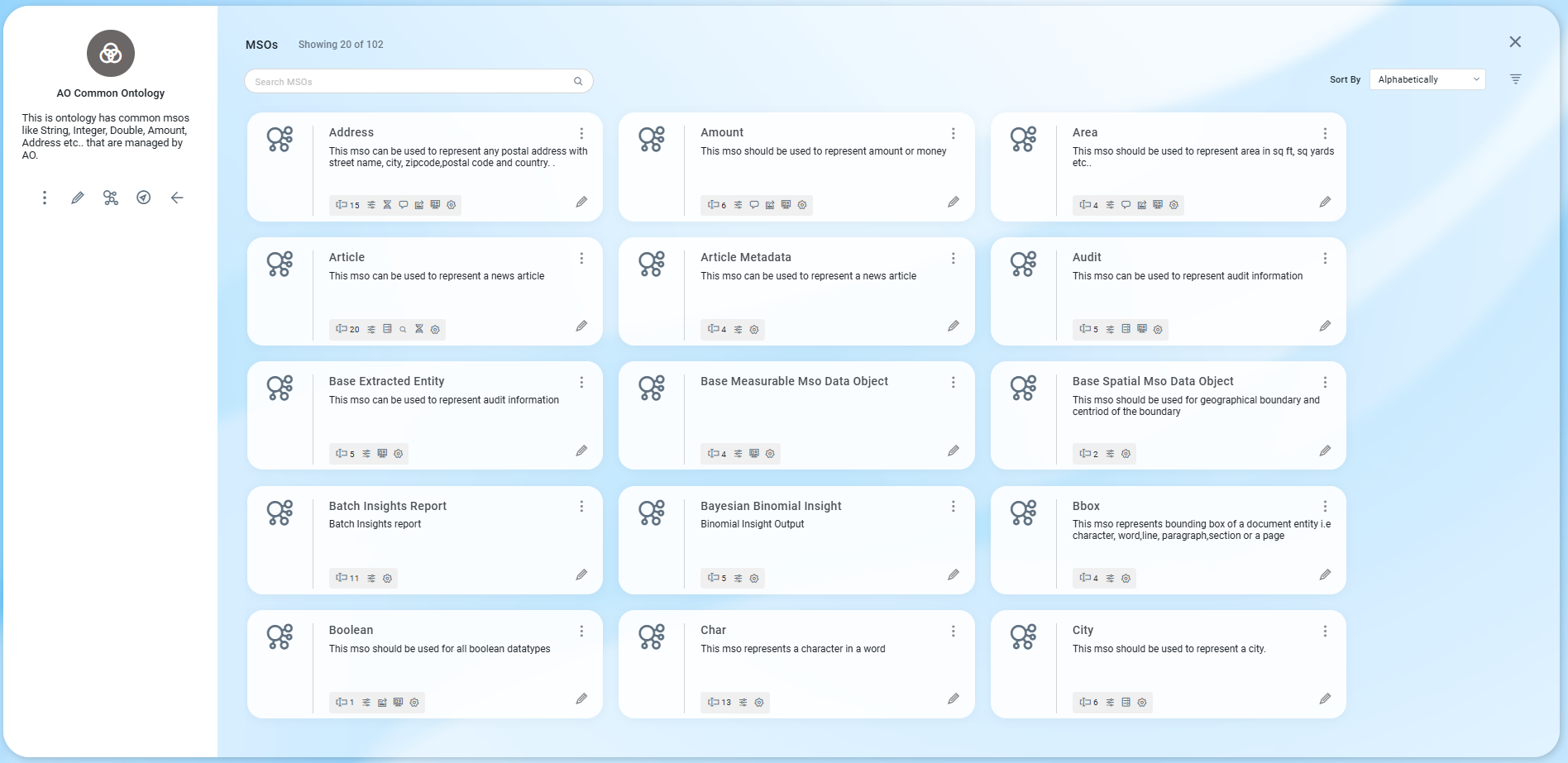
Replace individual MSO Properties with centralized Common MSOs and MSO Properties for things like “Address”, “Amount”, “Document”, “Person” - this will ensure a consistent representation of such “objects”, eg, same address format for all addresses, whether for customers, vendors, premises, employees, contractors, assets, etc…
What To Do
Federation for Access to Multiple Data Source Types
-
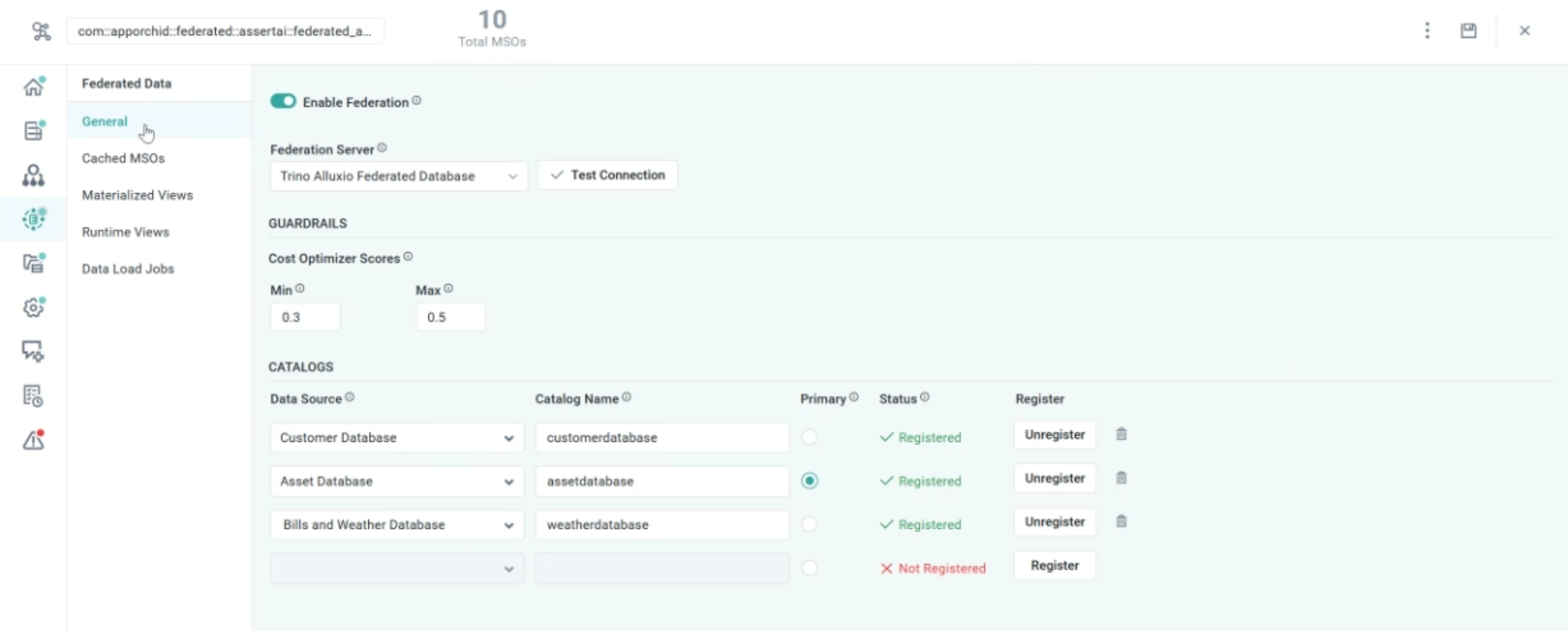
If an Ontology requires data from multiple different Data Source Types, eg, Google BigQuery, SAP, Snowflake, SQL Server, PostgreSQL, etc, to answer questions from users, it’s time to consider a Federated Data configuration in the Ontology Composer. A Federated Data configuration uses a Federated Data Server, Trino (a Distributed SQL Engine), in the AO Platform.
-
Once the Federated Data Server has been configured, options are available for creating…
-
Cached MSOs - individual MSOs with a high data volume can be cached in the Federated Data Server for faster retrieval in environments with high latency.
-
Materialized Views - materialized views are pre-populated data views typically created from data joined from multiple data tables or even data sources to provide faster responses to complex questions that would otherwise take a long time to produce.
-
-
Once created, both Cached MSOs and Materialized Views can be updated on a schedule to ensure data queried by users is kept up-to-date from original data sources.
-
Cached MSOs will automatically be used instead of the original data source.
-
Materialized Views have to have MSOs created, representing the data in the Materialized Views. Use the Discover Ontology wizard to create such MSOs.
-
-
Use the Federated Data page in the Ontology Composer to set up the Federated Server and to create Cached MSOs and Materialized Views, as well as configure a refresh schedule. See Ontology - Federated Data.
Reduce Duplication of Data - Apply Normal Forms
-
Identify reusable MSOs and consolidate them for consistency. The Normal Forms, as relating to the structure of tables in a relational database schema, is also relevant when creating an optimized Ontology. See https://www.geeksforgeeks.org/dbms/normal-forms-in-dbms/.
-
Example: If multiple tables have a
product categorycolumn with the same values and no master data table, create a singleProduct CategoryMSO and use it across related MSOs.
-
-
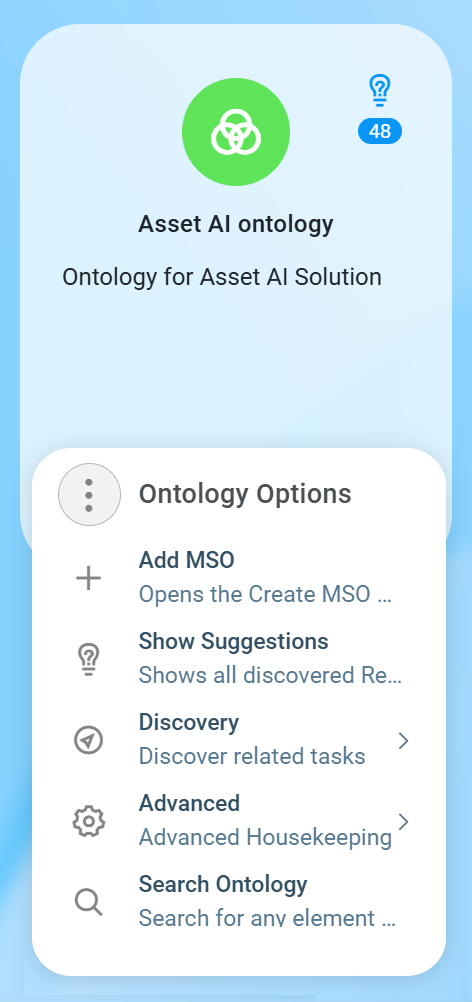
Use the “+ Add MSO” option in the Ontology Composer’s Options menu. See Creating an MSO.
Referenced Ontologies and Inheritance
-
Use Referenced Ontologies if the need arises, creating multiple customer Ontologies that have a lot in common. In such use cases, all common MSOs can be created in a “base” or “parent” Ontology, and only those MSOs that may be unique to a given customer shall be created in the Customer Ontology.
-
The Customer Ontology is then configured to reference the parent Ontology. This ensures consistency, is less error-prone, and enables higher productivity for implementation teams as only one parent Ontology has to be maintained, benefiting multiple customer solutions.
Using Common MSOs
-
The AO Platform comes with many Common MSOs configured out of the box. Common MSOs provide property structures for common objects, such as an “Address”.
-
Consider an Ontology that has MSOs for “Customer”, “Vendor”, “Asset”, “Premise”, “Partner”, and the likelihood that all these tables include address fields, such as Street Address, City, County, Country, Zip/Postal Code. Instead of each of the aforementioned MSOs include all these address fields, make use of the common MSO, “Address” for a single MSO Property “Address” to ensure consistency across all MSOs.
-
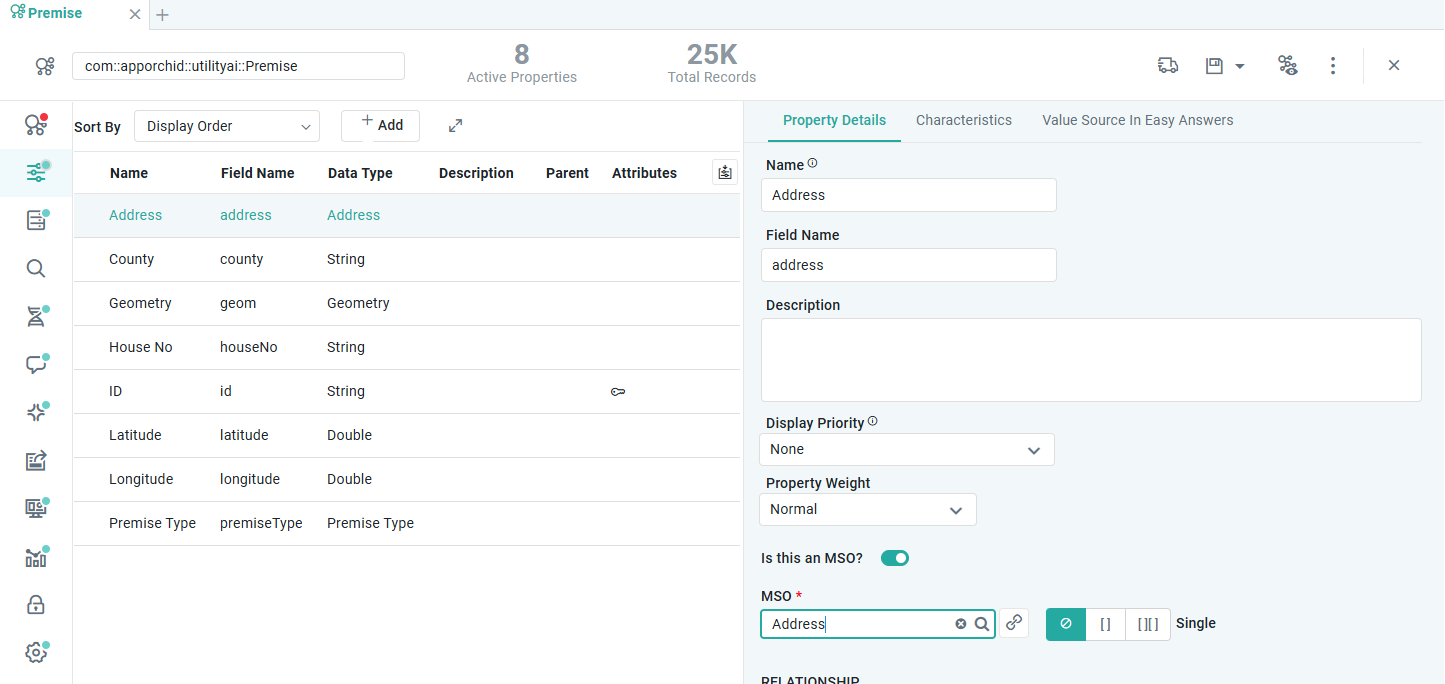
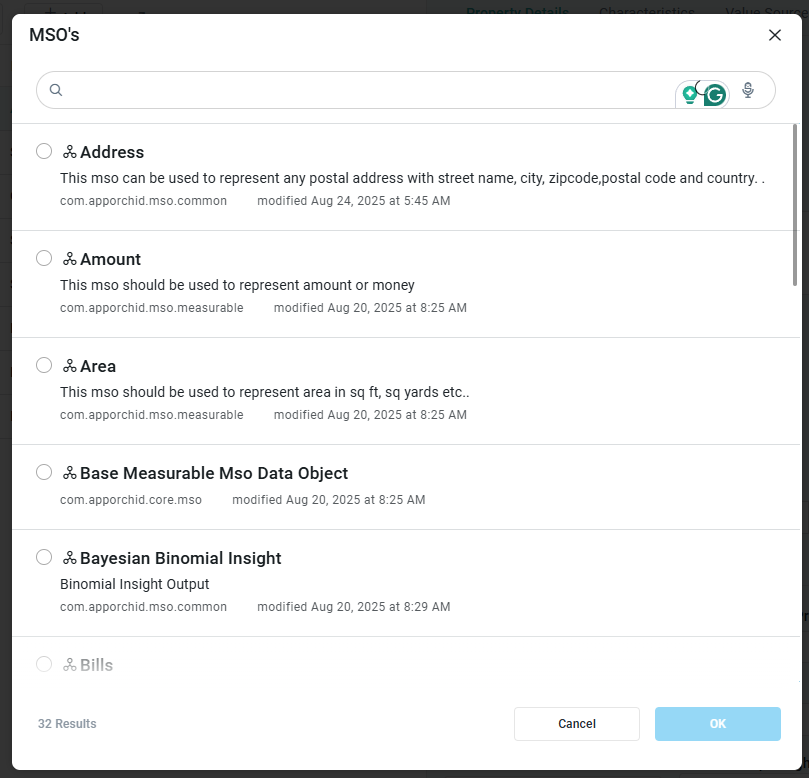
In the MSO Composer, select the Premise MSO (example), and in the Premise MSO, the Properties page. Create a new Address Property, then enable “Is this an MSO?” and in the MSO property, use the search icon to open a dialog and select the Address MSO (Common MSO).
-
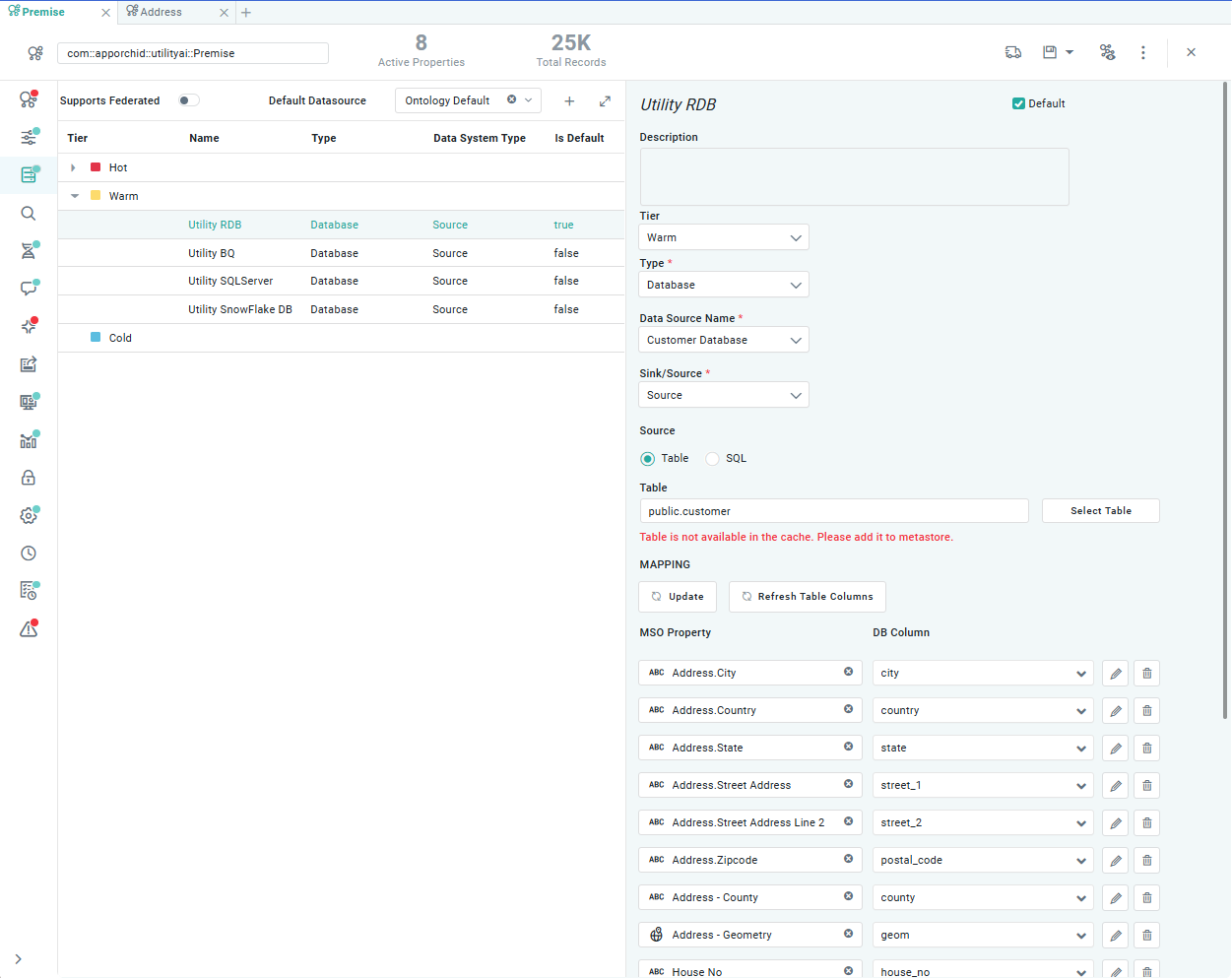
Next, go to the Sourcing tab, locate the data source for the Premise MSO, and in the right-side panel, use the MAPPING section to map the MSO Properties in the Address MSO to the fields in the data source table.
-
Finally, with the mapping done, go back to the Properties page and remove the MSO Properties from the Premise MSO that are no longer used, eg. Street Address, City, County, Latitude, Longitude, etc…
-
See MSO - Properties.
|
|
|
|
References
Contact App Orchid | Disclaimer