
Intended audience: all users
AO Platform: 3.3
Release Date
-
October 2022
Overview
-
Release 3.3 builds on previous 3.x releases of the AO Platform. The underlying infrastructure of 3.x is very similar to 2.3.2. Most apps developed in 2.3.x work in 3.x with very few modifications. We continue to introduce many new features that will make the development and management of solutions much more effortless and will be done mainly from the browser as a low-code environment.
-
This topic includes a highlevel introduction to the new release features, major issues fixed, known issues list, deprecations, updated system requirements/dependencies/pre-requisites, and update/upgrade requirements.
New in release
Model Composer
-
The Model Composer has received the following enhancements:
-
Updated the Landing page and made some other minor UI updates.
-
New Create dialog.
-
Add to Transport - Model configurations only.
-
Easy Answers (formerly Q&A)
-
Preview: Insights - see Insights Details.
-
Preview: Recommendations - see Recommendations.
-
NLP Query Annotations for Synonyms - see Viewing MSO Query and Adding Synonyms.
Ontology Composer
-
Enhanced Spatial Trait - with clustering - see Trait - Spatial.
-
Curation - see MSO - Curation.
-
New Display Priority field.
-
New section grouping Curation Filter fields.
-
Additional Group Fields within the Filter Fields section.
-
-
Incremental update of the Ontology graph for updated synonyms.
-
New Normalizers section supporting Entity Extraction - see Adding Named Entity Extraction Properties.
UI Composers
Application Composer
-
New Menu UI Control task - see Editing an Application.
-
Overhaul of many properties for increased usability and productivity - see Editing an Application.
-
Child-level properties moved to Parent-level if Parent-level is empty.
-
Visual Cue for individual properties that have changed from the default value.
-
Page Composer
-
New Save as > Resolution - see Editing a Page.
-
New Save as > Version - see Editing a Page.
-
New Publish Draft - see Editing a Page.
Template Composer
-
A new Infographics category when creating a new Template. See - Creating a Template.
Layout Composer
-
Updated indicator for Responsive Layout status in Header.
Transport Tool
-
New Checksum validation during Upload of Transport objects - see Transport Tool > Uploading.
Other Platform Features and Issue Fixes
Cloud
-
Containerization of Python infrastructure.
Security
-
Fingerprinting of distribution artifacts (jar/war files).
Performance and scalability
-
AO Platform Calcite framework enhancements/refactoring.
Usability
-
Ability to open Solution from Solution menu on a new browser tab.
Documentation
-
The AO Platform documentation can be accessed from https://docs.apporchid.com - or from a link in the User menu in the AO Platform UI. This documentation is not publicly available; a token is required to access it, unless accessed from within the AO Platform UI.
-
Key areas of new or updated documentation in this release include:
-
Introduction to AO Platform section.
-
General Concepts, Behaviors and Workflows - separate topics for each area, including new Annotation approval workflow, and additional details added.
-
Model Composer - Landing page and Creating a Model.
-
MSO Traits - separate topics for each Trait with additional details.
-
Updated MSO Curation with new topics for Application and Micro Application Properties.
-
UI Composers - various updates due to UI updates, including Page Composer (Save as Version, Save as Resolution, Publish Draft), Layout Composer (responsive icon), Application Composer (property reorganization, visibility of user-configured properties), Template Composer (new Infographics category).
-
Transport Tool - updated checksum validation.
-
Additional “how-to” videos.
-
These Release Notes.
-
Known issues
-
It’s currently not possible to create the assembly of a final Solution directly from the existing Composers. A new Solution Composer will be introduced in a future release.
-
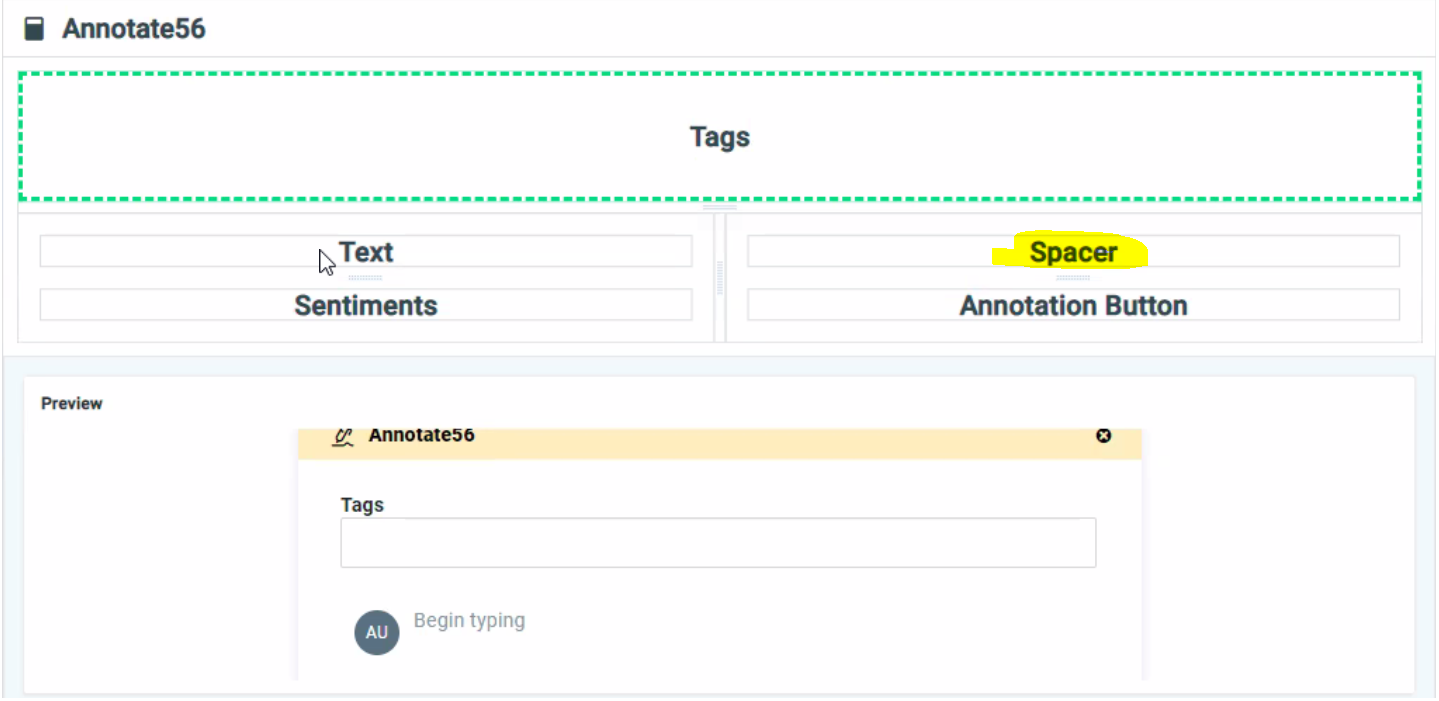
When creating an Annotation in Annotation Composer, it’s possible to divide a Layout cell into multiple rows. However, if such a cell in a row has an adjacent cell that isn’t divided, then the multiple rows in the first cell won’t be rendered correctly at runtime. The workaround is to create the same number of divisions in all cells in the row and, for instance, use the Spacer control to ensure the Layout renders correctly, eg:
Deprecations/removals
-
None in this release.
Updated System Requirements
-
For workstation system requirements, see System Requirements.