
Intended audience: end-users analysts developers administrators
AO Platform: 4.4
Overview
This section provides an overview of a Serverside Pivot for a Curation Micro Application. A Server-Side Pivot is a data visualization and analysis tool that processes and aggregates data on the server before delivering it to the client application.
Example
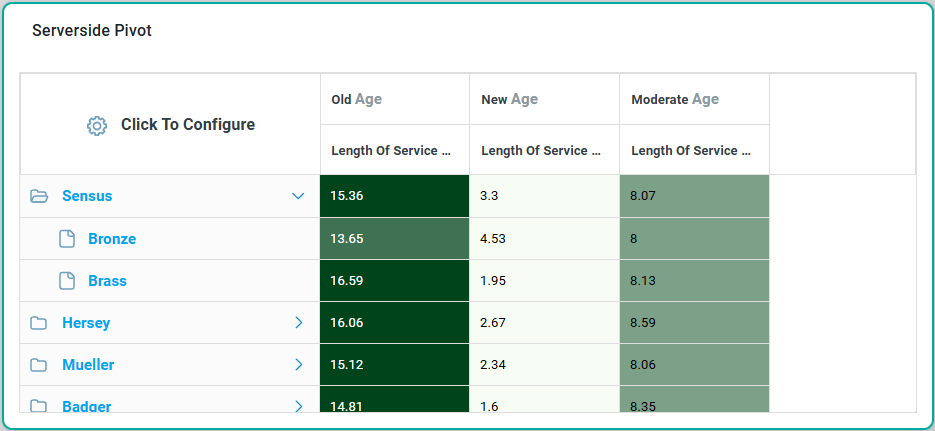
Configuration of Serverside Pivot
DATA Properties
|
Label |
UI Widget |
Default |
Description |
|---|---|---|---|
|
Dropdown |
|
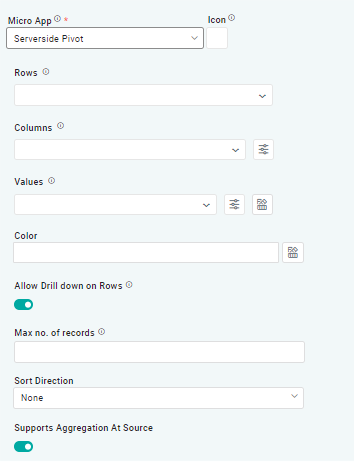
The Rows dropdown allows users to select one or more field properties to represent the hierarchical structure of the rows in the pivot table. |
|
Dropdown |
|
The Column dropdown allows users to select one or more field properties to represent the hierarchical structure of the columns in the pivot table. |
|
Dropdown |
|
The Value dropdown allows users to select one or more aggregated field properties (count, sum, avg, min, max, etc.), which will be shown for each row/column value. |
|
Text Field w/Color Palette option |
|
The Colors allows user to select which color to use for the Column of the series. See Curation - Field Properties - Data Styles | Selection of Color. |
|
ON/OFF Toggle |
ON |
If enabled, allows users to drill down on rows. |
|
Number Field |
|
Option to set a Max number of records to be used by the Chart. |
|
Dropdown |
|
Option to set the Sort order for data in the Chart to either Ascending or Descending. |
|
ON/OFF Toggle |
ON |
If enabled, the system is configured to perform aggregation operations (such as sum, average, count, min, max, etc.) directly at the data source, such as a database or API, before sending the results to the micro-app. |
Contact App Orchid | Disclaimer