
Intended audience: all users
AO Platform: 3.4
Release Date
-
May 2023
Overview
-
Release 3.4 builds on previous 3.x releases of the AO Platform. The underlying infrastructure of 3.x is very similar to 2.3.2. Most apps developed in 2.3.x work in 3.x with very few modifications. We continue to introduce many new features that will make the development and management of solutions much more effortless, and will be done mainly from the browser as a low-code environment.
-
This release has a strong focus on UI and functional enhancements to the Easy Answers solution as well as the composers supporting Easy Answers directly, including Ontology/MSO Composer, Model Composer, and Pipeline Composer.
-
This topic includes a high-level introduction to the new release features, major issues fixed, and a list of known issues.
New in Release
Easy Answers
-
Updated styling and functionality of the generated dashboard and Insights
-
New Theme selection - selectable from new User Settings. See Easy Answers Themes as an example of applying to Easy Answers:
-
Light
-
Dark
-
High-Contrast (Dark)
-
-
New options to Save/Open/Manage NLP Query as Favorites. See Easy Answers Favorites.
-
New option to Share Query with other users via Link or Email, including attaching a PDF version of the current dashboard to Email. See Sharing a Query.
-
New Download Results option to save the Easy Answers dashboard result to PDF format. See Downloading Results.
-
Preview: New Easy Answers ChatBot. See Easy Answers ChatBot.
-
Updated Download to CSV file dialog in the Action menu of relevant cards on the Easy Answers Dashboard. See Easy Answers Apps.
-
New virtual pagination for Easy Answers dashboards. See MSO - Settings for an overview of almost 50 new properties to control the Easy Answers' results page and app components configuration and rendering.
-
Enhanced NLP Queries supporting a number of new Commands, Aggregations, Operators, and Sorting/Grouping. See Understanding Natural Language Queries.
-
Enhanced Edit NLP Query options (Feature Detection) to make it easier to select alternative MSO, MSO Properties, and Values.
-
Preview: New optional Generative AI integration allowing the use of Large Language Models technology for additional articulated Insights for Easy Answers App results. See Easy Answers Apps.
Pipeline Composer
-
Added Python-based Pipeline Runner with Python-based data Sources, Transforms, and Sinks. See Creating a Pipeline and Editing a Pipeline.
-
Added the following Database data sources:
-
Amazon Redshift, with support for Server Side Spatial Clustering.
-
Apache Cassandra.
-
Salesforce.
-
Snowflake.
-
Neo4j.
-
-
Added MongoDB NoSQL data source.
Ontology Composer
-
Ontology Composer page. See Ontology Composer.
-
Has been moved to the first position in the left-side navigational panel.
-
The landing page has been updated to a card-based design, but users can switch between the card view and list view using a new toggle located in the top-right corner.
-
-
MSO page.
-
The Add New MSO wizard has been enhanced to include over 25 data sources as the basis for creating a new MSO. Strong focus on supporting Cloud-based Data Sources and accessing files in Cloud storage systems, such as Amazon S3 and Google Drive. See Creating an MSO.
-
MSO Properties page. See MSO - Properties.
-
UI Properties and Curation tabs have been moved from the MSO Properties page to the MSO Curation page. See MSO - Curation.
-
New MSO property Relationship fields, and Join Types for relationships have been added.
-
-
MSO Curation page. See MSO - Curation.
-
Infographics Templates were added as Micro Applications.
-
New Charts/Calendar Micro Applications:
-
Calendar Heatmap Chart (Client and Server Side).
-
Server-Side Temporal Aggregation Chart.
-
Server-Side Timeseries Chart.
-
-
Enhancements to the Data Styles tab (formerly Curation tab) when selecting an MSO Field Property:
-
Display Name added for the conditional color/icon configurations in the Infographics section.
-
Ability to define conditional colors/icons for different types of data configurations:
-
From Linguistics (value-based Synonyms).
-
Manual.
-
Rules (using Query Builder).
-
-
New default colors for Micro Applications based on a selection of Color Palettes.
-
-
New General Properties page allowing default selection of Icon and Color representing the selected MSO.
-
-
New MSO Security page with the ability to set rules for… See MSO - Security.
-
MSOs.
-
MSO Properties.
-
MSO Data.
-
-
MSO Traits page. See Trait - Periodic Event.
-
Enhanced Temporal Trait supporting grouping of time-series data and different types of aggregations.
-
-
MSO Linguistics page. See MSO - Linguistics.
-
New Filter option for MSO Linguistics > Value-Based Synonyms tab.
-
New Rule-Based Synonyms can be added for MSOs.
-
New section for Curations allowing Words, Word Providers, and/or Rules to be added.
-
-
MSO Statistics page. See MSO - Statistics.
-
New option to update statistics for either All field properties or individual field properties via selection in a pop-up dialog.
-
-
MSO Settings page. See MSO - Settings > Easy Answers.
-
New Easy Answers entry with many new properties relating to how Easy Answers results will be generated/presented.
-
-
A new checkbox on the MSO Add to Transport dialog to allow “property value synonyms” to be added. See Adding an MSO to Transport.
-
-
Model Input Configurations page. See Insight Model Configurations Page.
-
New page allowing users to create the Model configurations used by Insights in Easy Answers.
-
-
Insight Composer page. See Insight Composer Page.
-
New page allowing users to configure different types of Insight representations relevant to the Ontology from the Model Input Configurations.
-
-
The following four pages from Ontology Composer have been removed and instead added to the Admin solution:
-
MSO Traits - available in Admin > Functional Configurations section.
-
Entity Extraction Preprocessors - available in Admin > AI Configurations > NLP section.
-
Entity Extraction Postprocessors - available in Admin > AI Configurations > NLP section.
-
Normalizers - added to Admin > AI Configurations > NLP section.
-
-
New Reviewer Workflow for Easy Answers Annotations: User Feedback, NLP Query Errors, and User-added Synonyms. See Reviewing Feedback and Annotations.
UI Composers
Application Composer
-
New Calendar Heatmap Charts (Client- and Server-side) Micro Applications.
-
New Temporal Aggregation Chart and Server-side XY Timeseries Chart Micro Applications.
-
An Infographics section has been added to the Micro Application selection panel.
-
Search support was added for JS Function Template selection to make it easy to look up existing JS Function Templates. Users can still add manually using the namespace.function syntax.
-
JS and CSS Files properties have been added to the Settings panel.
Page Composer
-
JS and CSS Files properties have been added to the Settings panel.
Template Composer
-
Template Composer has had an update to the general Layout when configuring Templates. The variables panel has been broken into two new panels: Configuration and Data properties. See Editing a Template.
Model Composer
-
The landing page has been updated to a card-based design, but users can switch between the card view and list view using a new toggle located in the top-right corner. See Model Composer.
-
New Ontology property on models - allowing a model to be associated with one or more Ontologies. See Creating a Model and Configuration > Model Details.
-
New MSO data source and MSO Query options on the Training Data page. See Configuration > Training Data.
User Menu
-
New User Settings dialog adding and consolidating User-specific configurations available. Included under User Settings are: General, Profile, Privacy, and Easy Answers. See User Settings.
-
Previous menu options for Debug and Change Password have been included in the new User Settings dialog.
-
-
Enhanced Share Page option (previously called Copy Page URL). This option now allows users to share a Page via email or by copying the link to the clipboard to be shared via any other messaging service. Also allows the link to be set with an expiration date. Only users with access to the AO Platform and with permission to access the shared Page will be able to access it. See Share Page. Requires SMTP Email integration with the AO Platform for Share Page via email.
Admin Solution
-
Added JDBC database type providers for Amazon Redshift, Salesforce, MongoDB, Apache Cassandra, and Snowflake in Admin > Configurations > Database Types.
-
Statistics are only generated for active database connections in Admin > Monitoring > Databases.
-
Added Theme configurations to support users selecting a different Theme for a given Solution. See Admin > UI > Themes.
-
Added new configuration options for setting access security for Ontologies and MSOs. See Assigning Permissions.
-
Added a Page for 3rd-party Single Sign-On configurations. See Admin > Security > Single Sign-On and Using 3rd Party Identity Providers.
-
New SSO/OpenID Authentication options:
-
Added Ping Identity.
-
Added Auth0.
-
Multi-Tenancy support for OpenID.
-
See Using 3rd Party Identity Providers, and Admin > Security >Single Sign-On.
-
-
Added Page for Schema on Read. See Admin > Schema on Read.
-
Added Pages for Easy Answers. See Admin > Easy Answers.
-
Added Page for Reports. See Admin > Reports.
-
Ability to change database connection settings without restarting the App server.
-
A new page in AI Configurations > NLP for Normalizers - moved from Ontology Composer. See Admin > AI Configurations.
REST API
-
Multiple name/path updates in Swagger documentation.
-
New NLP Query endpoints:
/easyAnswers/getDataand/easyAnswers/getMsoQuery -
See API Documentation.
Documentation
-
The AO Platform documentation can be accessed from https://docs.apporchid.com - or from the https://docs.apporchid.com/getting-started/?contextKey=documentation&version=latest section in the User menu in the AO Platform UI. The main user documentation is not publicly available; a token is required to access it, unless accessed from within the AO Platform UI in the User menu.
-
A great many updates to existing topics - see above.
-
50+ new topics, including Using Query Builder, Using Expressions, Share Page, User Settings, Documentation, Using 3rd Party Identity Providers, Easy Answers Apps, Reviewing Feedback and Annotations, Easy Answers Themes, Easy Answers ChatBot, Admin > Schema on Read, Admin > Easy Answers, and Admin > Reports.
Known Issues
-
It’s currently not possible to create the assembly of a final Solution directly from the existing Composers. A new Solution Composer will be introduced in a future release.
-
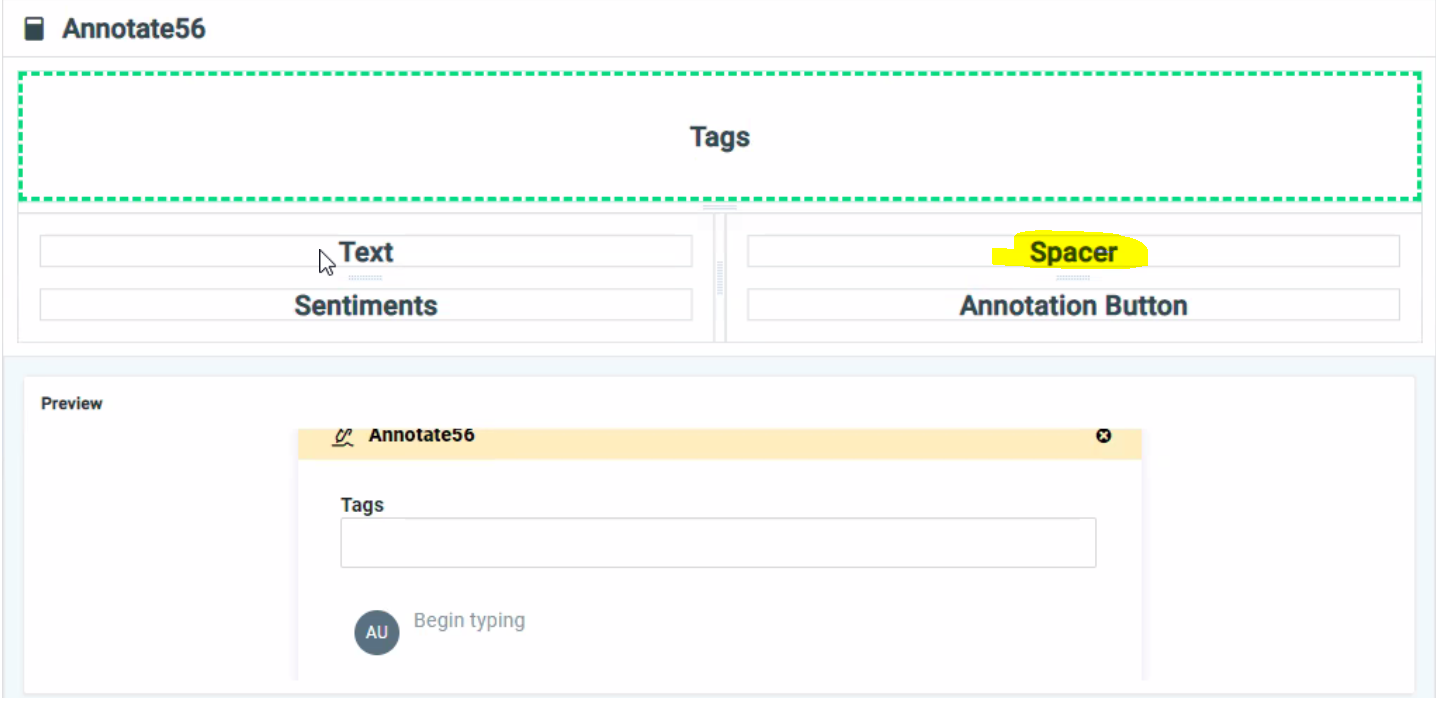
When creating an Annotation in Annotation Composer, it’s possible to divide a Layout cell into multiple rows. However, if such a cell in a row has an adjacent cell that isn’t divided, then the multiple rows in the first cell won’t be rendered correctly at runtime. The workaround is to create the same number of divisions in all cells in the row and, for instance, use the Spacer control to ensure the Layout renders correctly, eg:
Deprecations/Removals
-
None
Updated System Requirements
-
For workstation system requirements, see System Requirements.