
Intended audience: developers administrators
AO Platform: 4.4
Overview
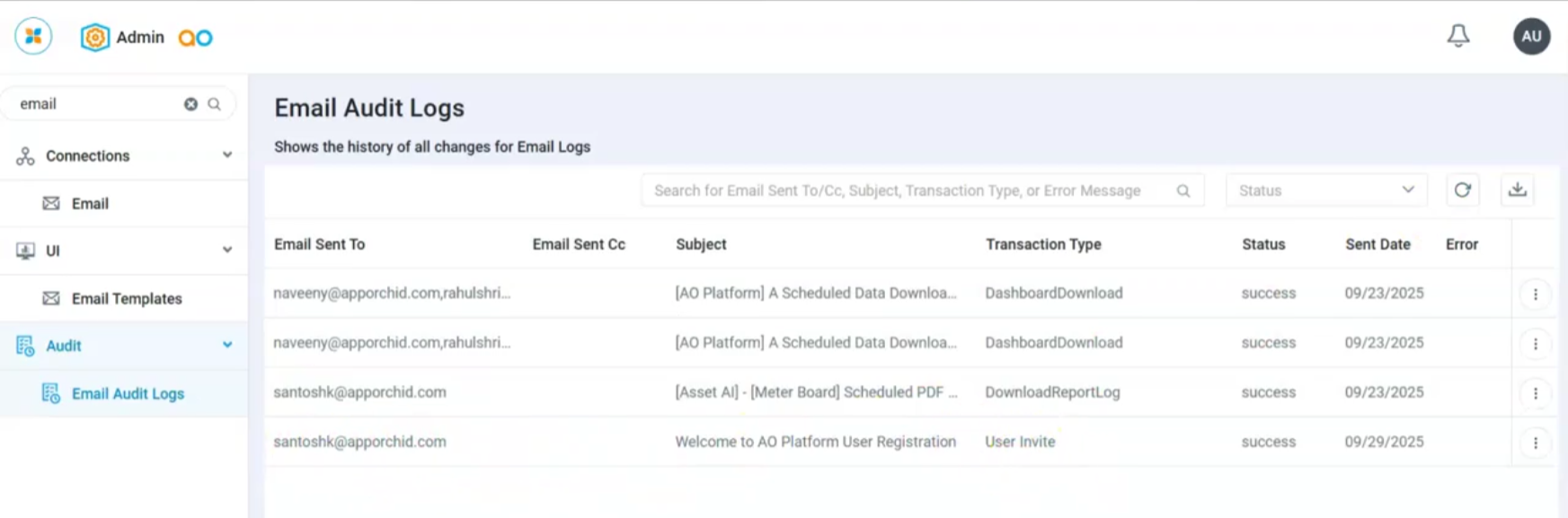
The Email Audit Logs page displays a table that shows a history of audit records for all emails sent from the AO Platform. The following content is included:
-
Email Sent To - shows one or more email addresses from To: recipients.
-
Email Sent Cc - shows one or more email addresses from Cc: recipients.
-
Subject - shows the subject line from the email.
-
Transaction Type - shows which process generated the email.
-
Status - shows whether the email was sent successfully or resulted in an error.
-
Sent Date - shows the timestamp of the email task.
-
Error - shows the error message if the email execution has failed.
User Actions
The following options are available:
-
Search - enter a search term to find matching email audit records.
-
Status - filter dropdown - select from available options (Success or Error) to show matching email audit records.
-
Refresh - click to refresh the table of email audit records.
-
Download - click to open the Download Data dialog to download email audit records into a CSV or Excel file.
-
Options menu
-
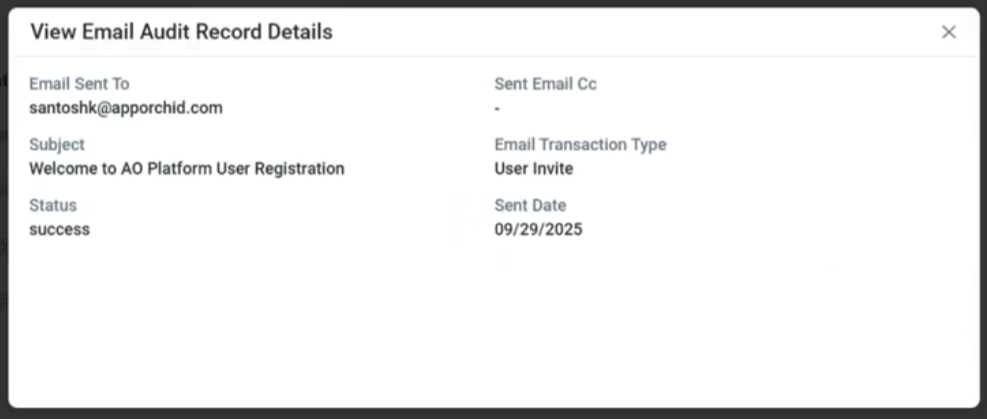
View Details - opens the View Email Audit Record Details dialog.
-
View Details Dialog
Contact App Orchid | Disclaimer