
Intended audience: end-users analysts developers administrators
AO Platform: 4.3
Properties for Insights > Change Points
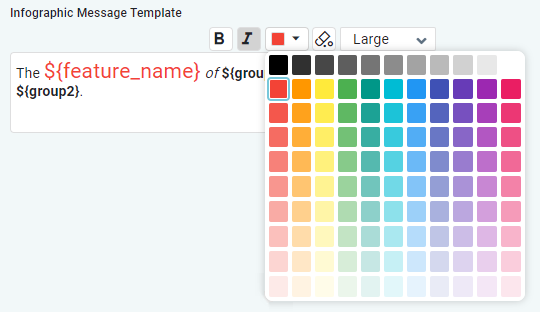
Formatting of Infographic Message Template
Some multi-line text field properties have additional formatting options. These properties are related to the Infographic card templates. Options include:
-
B - select some text, then click B to turn selected text Bold
-
I - select some text, then click I to turn selected text Italics
-
Color - select some text, then click dropdown to select a color
-
Clear - click to clear all existing formatting of the text
-
Font - select some text, then click dropdown to select font-size (small, medium, large)
|
Label |
Type |
Default Value |
Description |
|---|---|---|---|
|
Day |
|
|
|
|
Text Field |
$INSIGHT_TYPE - $MSO_NAME/$MSO_PROPERTY_NAME for $RUNTIME_LABEL |
Available variables
|
|
Search Dialog |
QInsight Change Point Cuecard 001 |
Use Search dialog to select a Quick Insight Template. |
|
Search Dialog |
Get Multi Time Series Insight Infographic Data Pipeline |
Use Search dialog to select a Pipeline that will transform input data into a suitable format for the Quick Insight model (optional). |
|
Multiline Text Field with formatting options |
No significant insight found. |
Single Series Template for the Infographic card - no significance. |
|
Multiline Text Field with formatting options |
${total_change_points} Strong Change Points ${feature_name} - ${min_date} to ${max_date}. |
Single Series Template for the Infographic card. |
|
Multiline Text Field with formatting options |
No significant insight found. |
Multi Series Template for the Infographic card - no significance. |
|
Multiline Text Field with formatting options |
${total_change_points} Strong Change Points ${feature_name} - ${min_date} to ${max_date}. |
Multi Series Template for the Infographic card. |
|
Week |
|
|
|
|
Text Field |
$INSIGHT_TYPE - $MSO_NAME/$MSO_PROPERTY_NAME for $RUNTIME_LABEL |
Available variables
|
|
Search Dialog |
QInsight Change Point Cuecard 001 |
Use Search dialog to select a Quick Insight Template. |
|
Search Dialog |
Get Multi Time Series Insight Infographic Data Pipeline |
Use Search dialog to select a Pipeline that will transform input data into a suitable format for the Quick Insight model (optional). |
|
Multiline Text Field with formatting options |
No significant insight found. |
Single Series Template for the Infographic card - no significance. |
|
Multiline Text Field with formatting options |
${total_change_points} Strong Change Points ${feature_name} - ${min_date} to ${max_date}. |
Single Series Template for the Infographic card. |
|
Multiline Text Field with formatting options |
No significant insight found. |
Multi Series Template for the Infographic card - no significance. |
|
Multiline Text Field with formatting options |
${total_change_points} Strong Change Points ${feature_name} - ${min_date} to ${max_date}. |
Multi Series Template for the Infographic card. |
|
Month |
|
|
|
|
Text Field |
$INSIGHT_TYPE - $MSO_NAME/$MSO_PROPERTY_NAME for $RUNTIME_LABEL |
Available variables
|
|
Search Dialog |
QInsight Change Point Cuecard 001 |
Use Search dialog to select a Quick Insight Template. |
|
Search Dialog |
Get Multi Time Series Insight Infographic Data Pipeline |
Use Search dialog to select a Pipeline that will transform input data into a suitable format for the Quick Insight model (optional). |
|
Multiline Text Field with formatting options |
No significant insight found. |
Single Series Template for the Infographic card - no significance. |
|
Multiline Text Field with formatting options |
${total_change_points} Strong Change Points ${feature_name} - ${min_date} to ${max_date}. |
Single Series Template for the Infographic card. |
|
Multiline Text Field with formatting options |
No significant insight found. |
Multi Series Template for the Infographic card - no significance. |
|
Multiline Text Field with formatting options |
${total_change_points} Strong Change Points ${feature_name} - ${min_date} to ${max_date}. |
Multi Series Template for the Infographic card. |
|
Quarter |
|
|
|
|
Text Field |
$INSIGHT_TYPE - $MSO_NAME/$MSO_PROPERTY_NAME for $RUNTIME_LABEL |
Available variables
|
|
Search Dialog |
QInsight Change Point Cuecard 001 |
Use Search dialog to select a Quick Insight Template. |
|
Search Dialog |
Get Multi Time Series Insight Infographic Data Pipeline |
Use Search dialog to select a Pipeline that will transform input data into a suitable format for the Quick Insight model (optional). |
|
Multiline Text Field with formatting options |
No significant insight found. |
Single Series Template for the Infographic card - no significance. |
|
Multiline Text Field with formatting options |
${total_change_points} Strong Change Points ${feature_name} - ${min_date} to ${max_date}. |
Single Series Template for the Infographic card. |
|
Multiline Text Field with formatting options |
No significant insight found. |
Multi Series Template for the Infographic card - no significance. |
|
Multiline Text Field with formatting options |
${total_change_points} Strong Change Points ${feature_name} - ${min_date} to ${max_date}. |
Multi Series Template for the Infographic card. |
|
Year |
|
|
|
|
Text Field |
$INSIGHT_TYPE - $MSO_NAME/$MSO_PROPERTY_NAME for $RUNTIME_LABEL |
Available variables
|
|
Search Dialog |
QInsight Change Point Cuecard 001 |
Use Search dialog to select a Quick Insight Template. |
|
Search Dialog |
Get Multi Time Series Insight Infographic Data Pipeline |
Use Search dialog to select a Pipeline that will transform input data into a suitable format for the Quick Insight model (optional). |
|
Multiline Text Field with formatting options |
No significant insight found. |
Single Series Template for the Infographic card - no significance. |
|
Multiline Text Field with formatting options |
${total_change_points} Strong Change Points ${feature_name} - ${min_date} to ${max_date}. |
Single Series Template for the Infographic card. |
|
Multiline Text Field with formatting options |
No significant insight found. |
Multi Series Template for the Infographic card - no significance. |
|
Multiline Text Field with formatting options |
${total_change_points} Strong Change Points ${feature_name} - ${min_date} to ${max_date}. |
Multi Series Template for the Infographic card. |
|
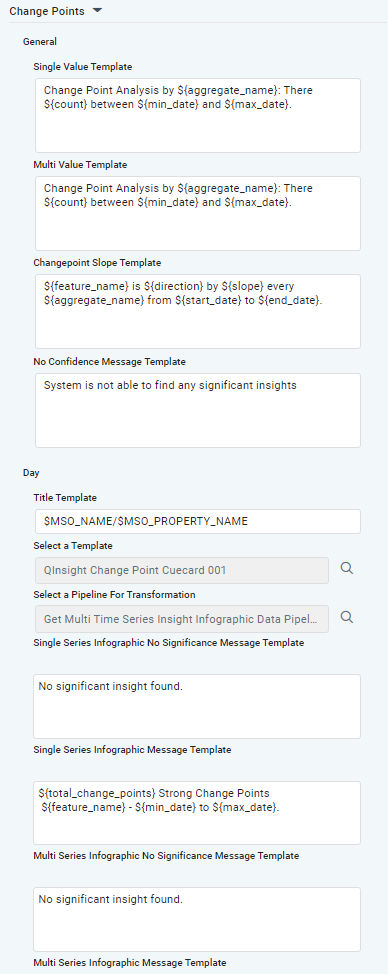
Single Value Template |
Multiline Text Field |
Change Point Analysis by ${aggregate_name}: There ${count} between ${min_date} and ${max_date}. |
Template for Textual Insight, including the data variables that will be added into template at runtime. Variables available
|
|
Multi Value Template |
Multiline Text Field |
Change Point Analysis by ${aggregate_name}: There ${count} between ${min_date} and ${max_date}. |
Template for Textual Insight, including the data variables that will be added into template at runtime. Variables available
|
|
ChangePoint Slope Template |
Multiline Text Field |
${feature_name} is ${direction} by ${slope} every ${aggregate_name} from ${start_date} to ${end_date}. |
Template for Textual Insight, including the data variables that will be added into template at runtime. Variables available
|
Contact App Orchid | Disclaimer