
Intended audience: end-users analysts developers administrators
AO Platform: 4.3
Properties for Easy Answers > Cue Card Views
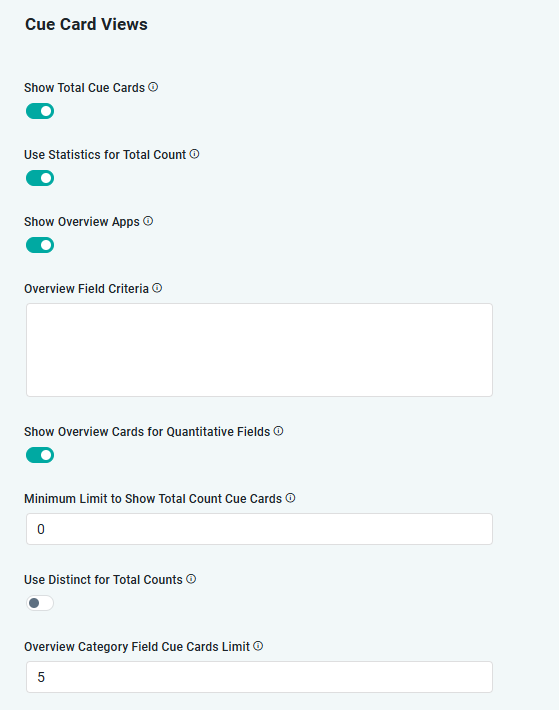
Settings for KPI and Cue Card Views
|
Label |
Type |
Default Value |
Description |
|---|---|---|---|
|
ON/OFF Toggle |
ON |
If enabled, will show Cue Cards with Total for all records in data source at top of the Results Dashboard. |
|
ON/OFF Toggle |
ON |
If enabled, will use generated Statistics for the Total Count on Cue Cards. This saves processing time in case values do not change much in the data source. |
|
ON/OFF Toggle |
ON |
If enabled, Overview Apps will be shown. |
|
String |
|
A Query Builder criteria entered in JSON format. This is often required if the KPI that will be shown is based on an aggregated value where one or more values are 0 or negative, so to avoid using such values to skew the actual KPI, they can be excluded using one or more criteria. Example: {"@class":"com.apporchid.mso.query.MSOQueryAnyCriteria","name":"commissionPercent","operator":"NotEquals","value":0,"msoName":"com::apporchid::arbonneai::OrderHeader","valueAsString":"0","expression":false,"additionalProperties":{}} |
|
ON/OFF Toggle |
ON |
If enabled, Overview Cards will be shown for Quantitative fields. |
|
Number |
0 |
To show total count Cue Cards if the number of values is greater than the specified limit. |
|
ON/OFF Toggle |
ON |
If enabled, will only show distinct values for the Cue Cards being produced. |
|
Number |
5 |
Sets the maximum limit of Cue Cards being shown. This is particularly useful if the Category Field selected for the Cue Cards have many values. |
Contact App Orchid | Disclaimer