
Intended audience: end-users developers administrators
AO Platform: 4.4
Overview
This topic includes workstation requirements and any other software prerequisites relevant to End-users, Developers, and Admins of the AO Platform.
Prerequisites
Prior to using the AO Platform, the AO Platform must be installed, licensed and operational.
Most likely, the AO Platform is hosted by App Orchid or a hosting/service partner, and provided as a Platform-as-a-Service offering. In this scenario, the majority of users will only ever be using a web browser to access the various components of the AO Platform, and you will likely have received a website address and your personal credentials in order to access and log in to the AO Platform. - see Browser-based workstation requirements.
If, however, you will be working as a Developer, creating advanced enterprise AI solutions using the AO Platform, or an Administrator doing advanced system integration and troubleshooting, then you will benefit from having additional software available to you - see Developer and Admin workstation requirements.
The system requirements and deployment instructions for a scalable AO Platform in the cloud is covered in the Deployment Guides associated with the operating environments and cloud platforms supported.
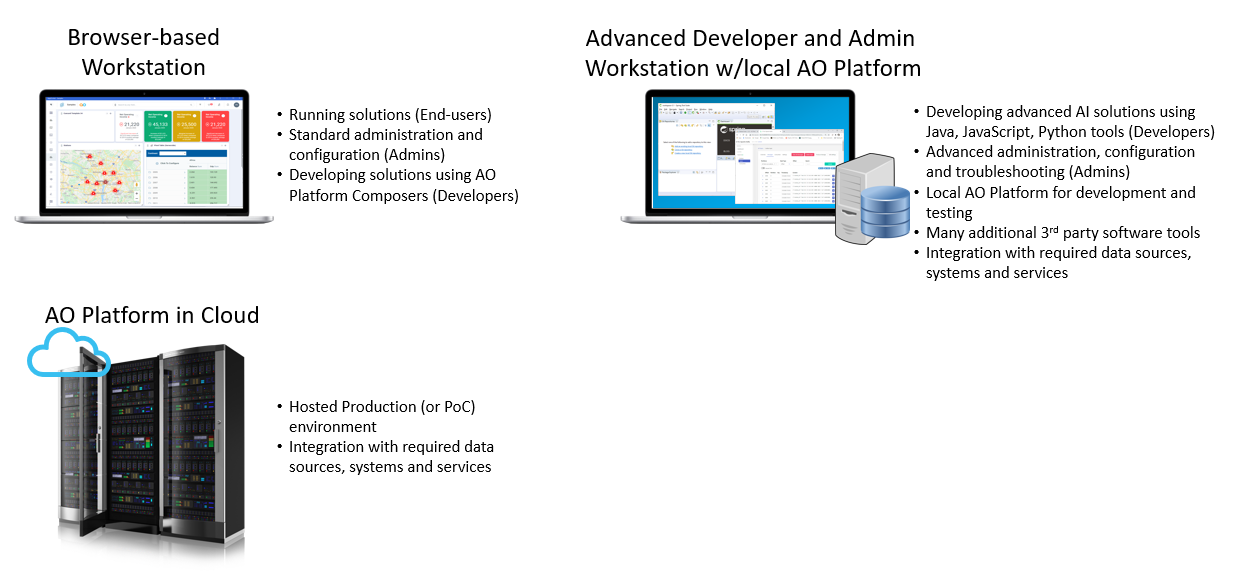
Browser-based workstation requirements
General access to the AO Platform for End-users, Developers, and Administrators is done via a web browser from almost any operating environment:
-
OS - it’s recommended to use a 64-bit operating system and software in general, including Windows 10/11, macOS, or one of the many Linux desktop distributions
-
RAM - minimum 8Gb, although 16Gb or more is recommended.
The following browser versions are recommended and supported by App Orchid for use with the AO Platform:
|
Browser software |
Minimum Version |
Version Recommended |
Operating Systems (tested with) |
|---|---|---|---|
|
Google Chrome |
v142.0.x+ |
latest |
|
|
Microsoft Edge |
v142.0.x+ |
latest |
|
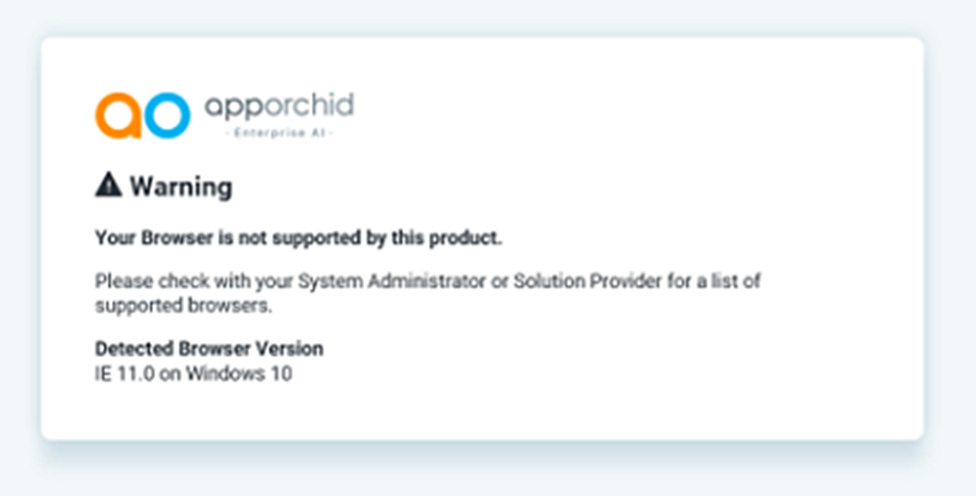
If a non-supported web browser is used, a dialog will appear after sign-in informing the user that the browser is not supported and that a supported browser is required. The user will not be able to continue with a non-supported browser. Please get in touch with your System Administrator and/or Solution Provider in case this issue is encountered.
WebGL
Some UI components may be used in an AO Platform solution that require the use of WebGL. This is often the case with 3D Map components. If a WebGL-based Map component is used, please check the following WebGL-specific guidelines:
-
A recent graphics card is required - please ensure to update to the most recent driver for the graphics card.
-
Check http://webglreport.com/ for compatibility with your browser and video card, and http://caniuse.com/#feat=webgl for cross-platform browser support for WebGL.
Screen Resolution
App Orchid has used the following screen resolutions during the development and testing of the AO Platform user interfaces.
-
1366 x 768
-
1920 x 1080 (recommended)
If a 4k resolution display is used, we recommend using the zoom-in function of the browser (Ctrl-+ in Google Chrome) in order to increase the size of visual components and all text elements in the application.
Developer and Admin workstation requirements
Most standard solution development can be accomplished using the AO Platform's user interfaces, which are made available in a web browser. For advanced development, troubleshooting, system administration, and additional system integration with other software products using the AO Platform APIs, the following requirements should be met:
-
OS - Windows 11 (64-bit) is required
-
RAM - minimum 16Gb RAM, although 32Gb or more is recommended if running multiple optional services on the same workstation. Please note, this does not include running a local AO Platform instance with dependent services on the developer’s workstation!
System Dependencies
The following is a list of major 3rd-party software and tools dependencies for the AO Platform stack.
App Orchid is not directly responsible for, nor supports 3rd third-party software and tools, except for the functions they perform within the AO Platform. App Orchid acknowledges any 3rd-party company/software trademarks.
|
Software |
Current Version |
Official 3rd Party EOL |
Description |
|---|---|---|---|
|
Core development/runtime Java engine for AO Platform and some tools to run. |
|||
|
For developing advanced solutions using Java, JavaScript, and/or Python. |
||
|
Apache Ignite is a leading distributed database management system for high-performance computing with in-memory speed. |
||
|
GridGain uniquely combines a fast, distributed, ACID-compliant multi-model database with the execution of AI, analytical, and transactional workloads in real time, with unlimited horizontal scalability and high availability. |
|||
|
Hibernate ORM is an object–relational mapping tool for the Java programming language. It provides a framework for mapping an object-oriented domain model to a relational database. |
|||
|
The Atmosphere Framework contains client and server side components for building Asynchronous Web Applications. Atmosphere transparently supports WebSockets, Server Sent Events (SSE), Long-Polling, HTTP Streaming, and JSONP |
|||
|
The JavaMail API provides a platform-independent and protocol-independent framework to build mail and messaging applications. |
|||
|
LangChain4j is an open-source Java library that simplifies the integration of LLMs into Java applications through a unified API, providing access to popular LLMs and vector databases. |
|||
|
|
|||
|
AO Platform configuration database. Also, install pgAdmin4 (for PostgreSQL) for easy administration of the database environment. |
|||
|
For access to the graph database environment used by AO Platform for its Easy Answers (Q&A) Solution. |
||
|
Used in the 4.3.1 release of the AO Platform. |
||
|
Used in the 4.4 release of the AO Platform. OpenSearch implementation and website content ingestion with native web crawler - compatible with Elasticsearch 7.10.x APIs. |
|||
|
Development language and service supporting AI/Machine Learning models used by the AO Platform. |
||
|
1.32.2 (database) 5.4.0 (java client library) |
A vector database used by Suggestions in Easy Answers when unknown words are found in Natural Language Questions. |
||
|
Redis is an in-memory data structure store, used as a database, cache, and message broker. |
||
|
Flexible & Powerful Open Source Multi-Protocol Messaging used for Notifications in the AO Platform. |
||
|
Trino is a fast, distributed SQL query engine for big data analytics. Used by AO Platform for Federated Data queries. |
Contact App Orchid | Disclaimer